Putting It All Together
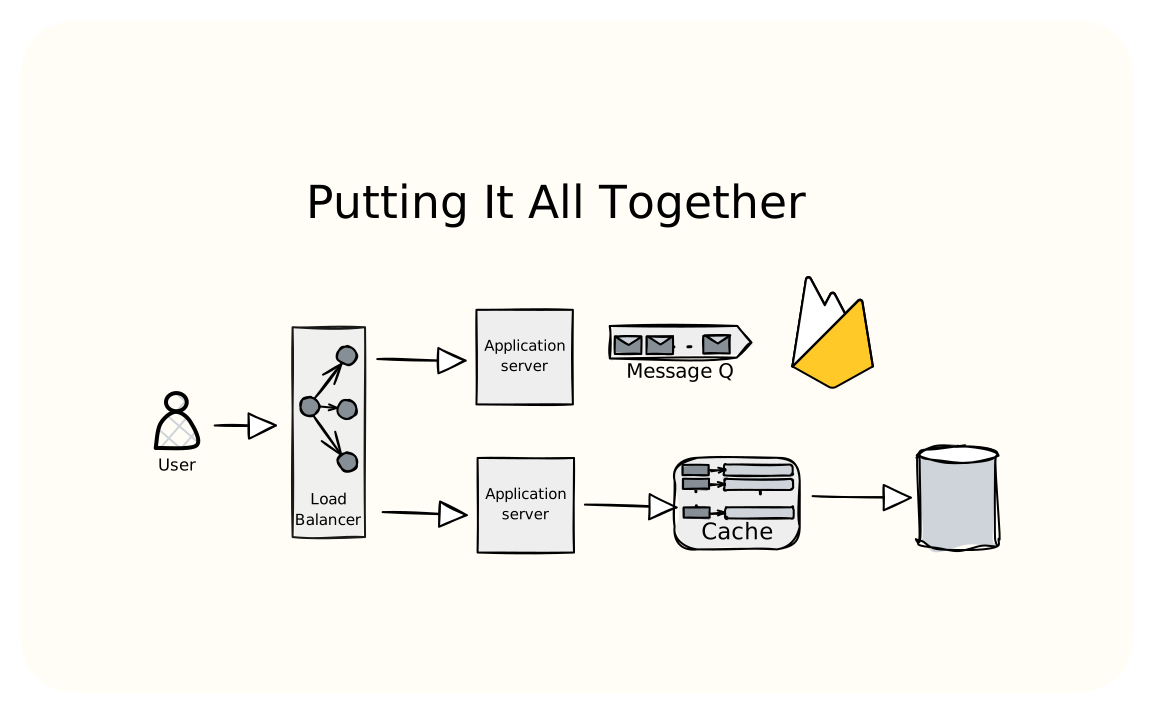
You've learned the pieces. Now let's assemble them.
We're going to design a system from scratch not as a theoretical exercise, but the way you'd actually do it in an interview or on the job. I'll show my thinking at each step, including the wrong turns and corrections.
Let's design a URL shortener like bit.ly
Simple enough to cover in one lesson. Complex enough to touch everything we've learned.
One important note before we begin is that this is just one of the ways to solve this problem. In real interviews or production scenarios, the right answer depends heavily on constraints you uncover through questions, expected scale, team expertise, existing infrastructure, budget. Two engineers can arrive at completely different architectures for the same problem and both be correct. The goal isn't to memorize this solution. It's to see how the pieces fit together and develop your own reasoning process.
Step 1: Understanding Requirements
Before drawing any boxes, we need to understand what we're building. A common mistake is jumping straight to hash the URL, store it, done. That works for a weekend project, but production systems need more thought.
Functional Requirements
Core functionality:
- Shorten: User submits a long URL, gets back something like
short.ly/x7Kp2 - Redirect: User visits
short.ly/x7Kp2, gets 302 to the original URL - Custom aliases: Let users pick their own short codes (e.g.,
short.ly/my-launch) - Expiration: URLs can have TTLs
We're exclude analytics for this walkthrough. Click tracking would need async event streaming (like Kafka) and a separate analytics store. Worth mentioning but not designing in detail.
Non-Functional Requirements
These numbers shape everything about the design, so it's important to clarify them upfront.
Scale assumptions:
- 100M new URLs per month (writes)
- 10B redirects per month (reads)
- Read:write ratio of 100:1
This is a read-heavy system.
Latency:
- Redirects under 100ms p99. Users clicking shortened links expect instant response.
- URL creation can be slower. 500ms is fine. Nobody's creating URLs in a tight loop.
Availability:
- Redirects need high availability.
- Writes can tolerate brief outages. Try again in a minute is acceptable.
Durability:
- Once a URL is shortened, it should stay shortened. Losing mappings breaks the internet's trust in your service.
Back-of-Envelope Math
Let's sanity-check these numbers:
plaintextWrites: 100M/month ÷ 30 days ÷ 24 hours ÷ 3600 seconds ≈ 40 writes/second Reads: 10B/month ≈ 4,000 reads/second Peak traffic (assume 3x average): ~12,000 reads/second
Storage over 5 years:
plaintextTotal URLs: 100M × 12 × 5 = 6 billion URLs Per-URL storage: - short_code: 7 bytes - long_url: ~200 bytes average (some URLs are massive, most aren't) - metadata (timestamps, user_id, click_count): ~50 bytes - Total: ~260 bytes, round to 500 bytes with indexes and overhead Total storage: 6B × 500 bytes = 3TB
3TB fits comfortably in a single Postgres instance. 4,000 reads/second is well within what a properly indexed database can handle, and with caching we won't hit the database for most requests.
This scale doesn't require sharding from day one. We can start simple and scale when needed.
Step 2: API Design
The API design is simple. We just need two endpoints.
plaintextPOST /api/v1/shorten Request: { "long_url": "https://example.com/very/long/path?with=params&and=more", "custom_alias": "my-launch", // optional "expires_at": "2025-01-01" // optional } Response (201 Created): { "short_url": "https://short.ly/x7Kp2", "short_code": "x7Kp2", "expires_at": "2025-01-01T00:00:00Z" }
plaintextGET /{short_code} Response: 302 Found Location: https://example.com/very/long/path?with=params&and=more
Why 302 instead of 301?
A 301 (Moved Permanently) tells browsers to cache the redirect. Next time the user clicks that link, the browser goes directly to the destination without hitting your server. Sounds efficient, but then you can't:
- Track clicks
- Update the destination URL
- Expire the link
- Detect abuse
302 (Found) means temporarily here. Browsers won't cache it, every click hits your server. More load, but more control. For a URL shortener, control is usually more important.
Step 3: High-Level Architecture
Let's build up the architecture by thinking through what each component needs to do and why we need it.
Starting Simple
The simplest possible URL shortener is one server with a database:
plaintextUser -> Server -> Database
This works for a hobby project, but our requirements (4,000 reads/second, high availability) tell us we need more.
Adding Components Based on Requirements
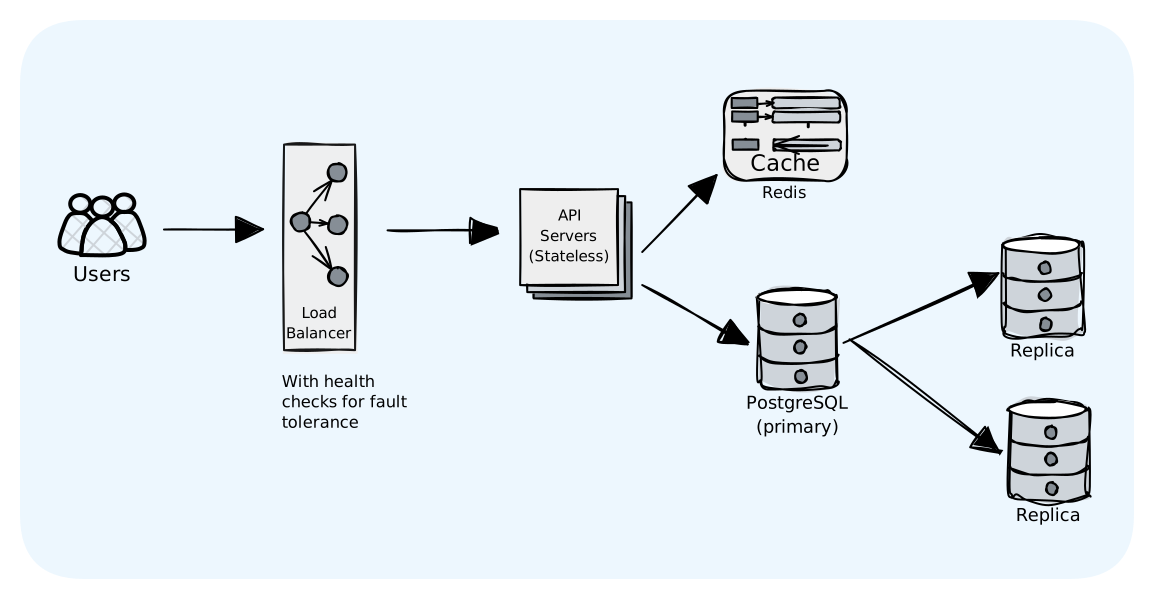
We need several components to build a production system. The components we need are:
- Load Balancer
- API Servers
- Database
- Cache
Let's review each component and why we need it.
Why a Load Balancer?
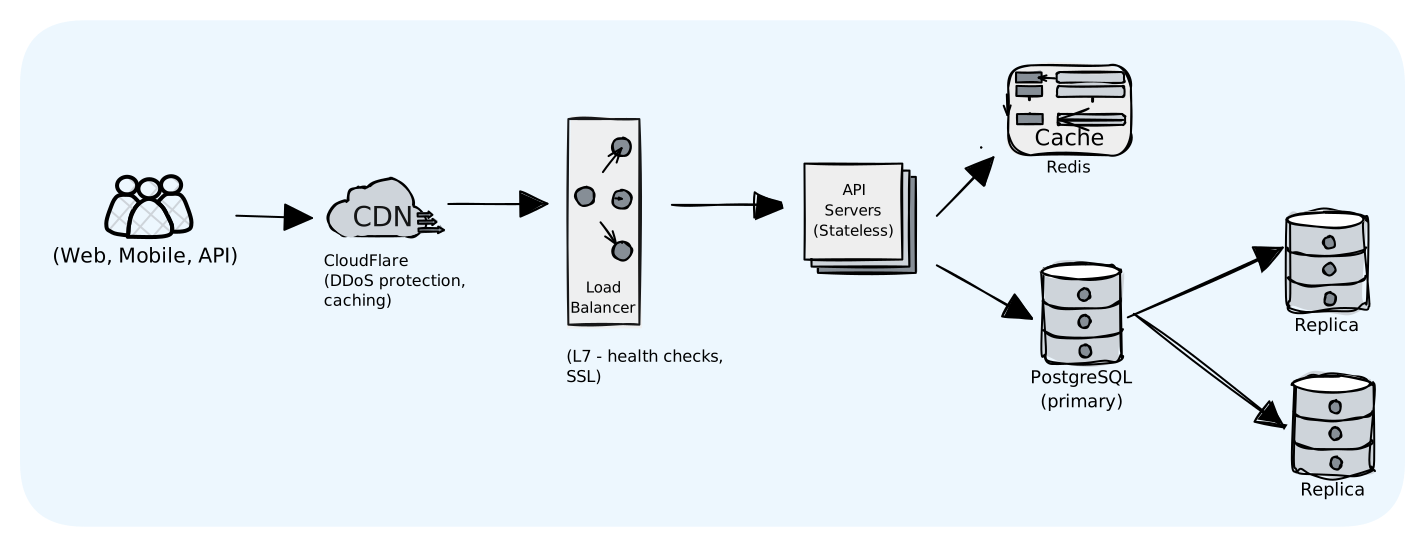
From our scalability lesson: a single server is a single point of failure. If it crashes, the entire service goes down. We need multiple API servers, which means we need a load balancer to distribute traffic. The load balancer also handles health checks which is if one server becomes unhealthy, traffic automatically routes to healthy ones.
Why Multiple API Servers?
Two reasons:
- Fault tolerance: if one server dies, others keep serving requests
- Horizontal scaling: we can add more servers as traffic grows
API servers are stateless (they don't store any data locally), so any server can handle any request. This is what makes horizontal scaling possible.
Why a Cache (Redis)?
From our caching lesson: database queries are slow compared to in-memory lookups. With a 100:1 read-to-write ratio, most requests are redirects. If we can serve those from cache, we dramatically reduce database load and improve latency.
Redis gives us ~1ms lookups vs ~10ms for database queries. With a 95% cache hit rate, average latency drops from 10ms to ~1.5ms.
Why Database Replicas?
From our database lesson: a single database is another single point of failure. Read replicas give us:
- Fault tolerance: if the primary fails, we can promote a replica
- Read scaling: cache misses can be distributed across replicas
The Two Main Flows
Write path (creating a short URL):
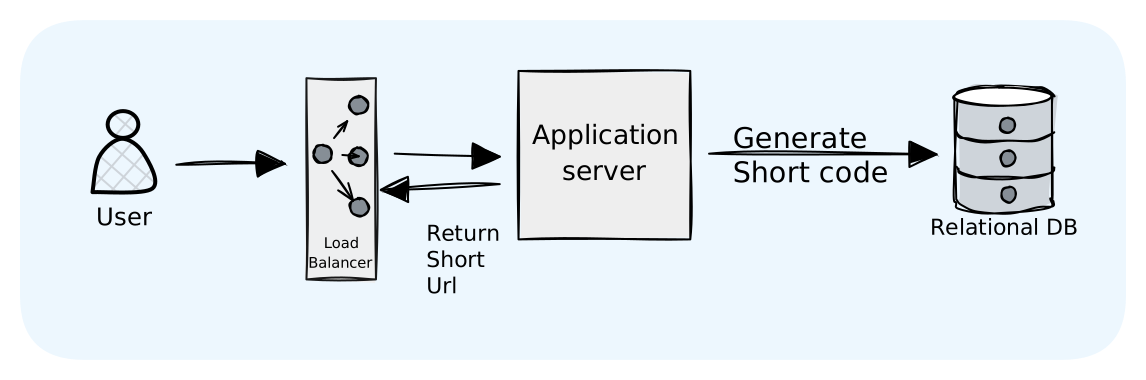
Writes always go to the primary database to maintain consistency. At 40 writes/second, a single primary handles this easily.
Read path (redirecting):
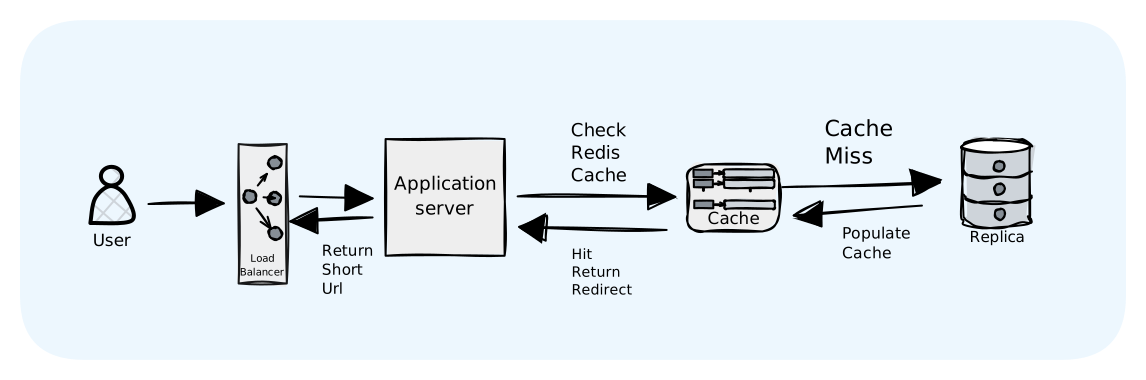
Reads check cache first. On a miss, we query a replica (not the primary) to avoid overloading writes. We then populate the cache so subsequent requests are fast.
The Architecture Diagram
Fault Tolerance Summary
Every component has redundancy:
| Component | Failure Scenario | How We Handle It |
|---|---|---|
| API Server | One server crashes | Load balancer routes to healthy servers |
| Redis Cache | Cache unavailable | Fall back to database (slower but works) |
| DB Primary | Primary goes down | Promote replica to primary |
| DB Replica | Replica fails | Other replicas continue serving reads |
This connects back to our Handling Failures lesson where we're applying graceful degradation (cache miss falls back to DB) and redundancy (multiple servers at each layer).
Step 4: Generating Unique Short Codes
This is the most interesting part of the design. There are several approaches, each with trade-offs.
Option 1: Hash the Long URL
Take the long URL, run it through MD5 or SHA-256, grab the first 7 characters.
pythonimport hashlib import base64 def hash_based_code(long_url: str) -> str: hash_bytes = hashlib.sha256(long_url.encode()).digest() # Base64 encode and take first 7 chars (URL-safe) return base64.urlsafe_b64encode(hash_bytes)[:7].decode()
Pros: Same URL always produces the same short code. Free deduplication.
Cons: Collisions are possible. With 7 characters of base64 (64^7 ≈ 4 trillion combinations), collisions are rare but not impossible. When they happen, you need a fallback. You can append a counter, rehash with a salt, etc.
Also, what if someone wants to shorten the same URL twice with different expiration dates? Hash-based approach makes that awkward.
Option 2: Auto-Increment Counter + Base62
Use a database sequence or distributed counter. Convert the integer to base62 (a-z, A-Z, 0-9) for a compact representation.
pythonCHARSET = "0123456789abcdefghijklmnopqrstuvwxyzABCDEFGHIJKLMNOPQRSTUVWXYZ" def to_base62(num: int) -> str: if num == 0: return CHARSET[0] result = [] while num: result.append(CHARSET[num % 62]) num //= 62 return ''.join(reversed(result)) # to_base62(1_000_000) → "4c92" # to_base62(1_000_000_000) → "15FTGg"
The math: 7 characters of base62 = 62^7 = 3.5 trillion unique codes. We're generating 6 billion over 5 years. Plenty of headroom.
Pros: Zero collisions. Deterministic. Easy to reason about.
Cons: Sequential codes are guessable. short.ly/abc123 implies short.ly/abc124 exists. For some use cases (private links), that's a security concern.
How to fix the guessability problem:
The goal is to make the output look random while still using a counter internally. Here's a simple approach:
pythonSECRET_KEY = 0x5F3759DF # Any random number you keep secret def obfuscate(counter: int) -> int: # XOR scrambles the bits, making output appear random return counter ^ SECRET_KEY # Counter 1 → obfuscate(1) → 1598029278 → base62 → "1mKj4E" # Counter 2 → obfuscate(2) → 1598029277 → base62 → "1mKj4D" # Counter 3 → obfuscate(3) → 1598029276 → base62 → "1mKj4C"
The codes look unrelated, but internally you're still using a simple counter. You get the benefits of counters (no collisions, predictable) without the guessability problem.
Option 3: Pre-Generated Random Codes
Generate a pool of random codes upfront, hand them out as needed.
pythonimport secrets def generate_random_code(length: int = 7) -> str: charset = "0123456789abcdefghijklmnopqrstuvwxyzABCDEFGHIJKLMNOPQRSTUVWXYZ" return ''.join(secrets.choice(charset) for _ in range(length))
Pros: Non-sequential. Simple to implement.
Cons: Collision checking required. Every new code needs a database lookup to verify uniqueness. As the database fills, collision probability increases (birthday paradox). At 1 billion URLs with 7-character codes, you're looking at ~0.03% collision rate per generation.
Choosing an Approach: Counter + Base62 with Obfuscation
For this design, we'll use the counter approach with the XOR obfuscation shown above because:
- No collision handling: the counter guarantees uniqueness
- Predictable performance: no retry loops
- Easy to distribute: give each server a range (server 1 gets 1-1M, server 2 gets 1M-2M, etc.)
- Non-guessable: the obfuscation makes codes appear random
Database Schema
The schema is straightforward:
sqlCREATE TABLE urls ( id BIGSERIAL PRIMARY KEY, short_code VARCHAR(10) NOT NULL, long_url TEXT NOT NULL, user_id BIGINT, -- nullable for anonymous shortening created_at TIMESTAMPTZ DEFAULT NOW(), expires_at TIMESTAMPTZ, click_count BIGINT DEFAULT 0, CONSTRAINT uk_short_code UNIQUE (short_code) ); -- This is the hot path - every redirect hits this CREATE INDEX idx_short_code ON urls(short_code); -- For user dashboards, if you have them CREATE INDEX idx_user_created ON urls(user_id, created_at DESC) WHERE user_id IS NOT NULL;
Why Postgres over NoSQL?
At this scale, a relational database works well:
- 3TB fits in a single Postgres instance
- 4,000 reads/second is manageable for an indexed lookup
- ACID transactions make the check uniqueness + insert atomic
- Most teams are already familiar with SQL
DynamoDB or Cassandra could also work, especially if you're already in AWS and want managed infrastructure. The choice often depends on what your team knows and what infrastructure you already have.
Caching Strategy
URL access follows a power law. A small fraction of URLs get most of the traffic (viral tweets, popular articles), while the long tail gets hit once and forgotten.
This pattern is ideal for caching. Hot URLs stay in cache, cold URLs fall through to the database.
pythonasync def get_long_url(short_code: str) -> str | None: # Try cache first cached = await redis.get(f"url:{short_code}") if cached: return cached # Cache miss - hit the database row = await db.fetchone( "SELECT long_url, expires_at FROM urls WHERE short_code = $1", short_code ) if not row: return None # Check expiration if row['expires_at'] and row['expires_at'] < datetime.utcnow(): return None # Populate cache for next time (1 hour TTL) await redis.setex(f"url:{short_code}", 3600, row['long_url']) return row['long_url']
This is called cache-aside (or lazy loading). We only cache what's actually requested. No wasted memory on URLs nobody visits.
The TTL of 1 hour balances freshness with hit rate. If someone updates a URL's destination, it takes up to an hour to propagate. For most use cases, that's acceptable. If you need instant updates, you'd add cache invalidation on writes.
Expected performance:
- Cache hit: ~1ms (Redis round-trip)
- Cache miss: ~10ms (Postgres query)
- With 95% hit rate: 0.95 × 1ms + 0.05 × 10ms = 1.45ms average
This is well under our 100ms target.
Step 5: Scaling Considerations
We've already built in some scaling from our high-level architecture. Let's think about what happens as we grow.
API Servers (Horizontal Scaling)
From our Scalability lesson: stateless services scale horizontally. Since our API servers don't store any state, we can add more servers behind the load balancer as traffic increases.
When to scale: Monitor CPU utilization and request latency. If CPU consistently exceeds 70% or p99 latency increases, add more servers.
How to scale: Use auto-scaling groups (AWS ASG, Kubernetes HPA) that automatically add/remove servers based on metrics.
Database Scaling
From our Database and Data Partitioning lessons: we have options depending on where the bottleneck is.
If reads are the bottleneck: Add more read replicas. Our caching layer should handle most reads, but if cache misses are high, replicas help.
If writes are the bottleneck: At 40 writes/second, this is unlikely. But if we hit 1000+ writes/second, we'd need to shard.
Sharding strategy (if needed):
- Shard by short_code's first character. Simple but uneven distribution.
- Consistent hashing. Better distribution, easier to add shards.
- Or migrate to DynamoDB/Cassandra which handle sharding automatically.
Cache Scaling
From our Caching lesson: Redis can become a bottleneck or single point of failure.
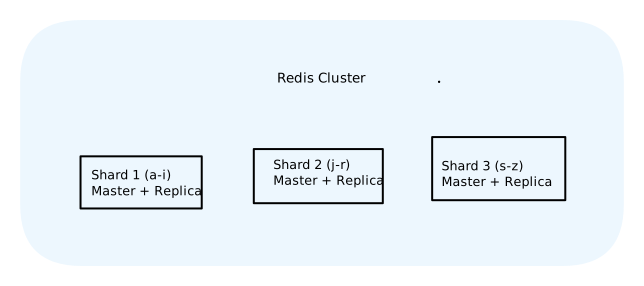
For high availability: Redis Cluster with master-replica pairs. If a master fails, its replica takes over.
For more capacity: Redis Cluster shards data across multiple masters. Each master handles a portion of the keyspace.
Step 6: Handling Edge Cases and Failures
From our Handling Failures lesson: we need to think about what happens when things go wrong.
What if the short code already exists?
With counter-based generation, this shouldn't happen. But defensive coding means handling it anyway:
pythondef create_short_url(long_url): for attempt in range(3): # Retry with backoff short_code = generate_short_code() try: save_to_db(short_code, long_url) return short_code except DuplicateKeyError: continue # Try again with next counter value raise Exception("Failed to generate unique code")
This is the retry pattern from our failures lesson. Transient failures get retried, but we limit attempts to avoid infinite loops.
What if the database is down?
For writes: Return an error with a clear message. The user can retry. This is fail-fast. Better to tell the user immediately than hang.
For reads (redirects): This is where graceful degradation helps:
- If Redis has the mapping, serve it (cache hit)
- If Redis misses and DB is down, return 503 Service Unavailable
- Never return a wrong redirect. It's better to fail than misdirect users.
What if Redis is down?
Graceful degradation: Fall back to database queries. Latency increases (10ms instead of 1ms), but the service stays up. This is why we have database replicas. They can handle the extra read load temporarily.
What about expired URLs?
Add expires_at column. Check on read:
pythondef get_long_url(short_code): url = cache.get(short_code) or db.get(short_code) if not url: return None # 404 if url.expires_at and url.expires_at < now(): return None # Expired, treat as 404 return url.long_url
Background job to clean up expired URLs from database.
What about abuse?
- Rate limiting: Max 100 URLs per IP per hour.
- Spam detection: Block known malicious domains.
- CAPTCHA: For excessive creation requests.
Step 7: The Complete Architecture
Step 8: Trade-offs Discussion
Every design involves trade-offs. Here are the key ones in this design:
SQL vs NoSQL
Chose: PostgreSQL
Why: Simple queries, ACID transactions for uniqueness, 3TB is manageable, team likely knows SQL.
Trade-off: Less automatic horizontal scaling than DynamoDB. Acceptable at this scale.
Cache-aside vs Write-through
Chose: Cache-aside (read-through)
Why: Most URLs are read once and never again. Don't want to cache everything.
Trade-off: First request for any URL hits database. Acceptable for cold URLs.
Counter vs Hash vs Random
Chose: Counter with base62
Why: No collisions, deterministic, easy to shard.
Trade-off: Somewhat predictable. Could add randomness if needed.
Single region vs Multi-region
Chose: Single region to start
Why: Simpler. Latency is dominated by redirect anyway.
Trade-off: Users far from region have higher latency. Add CDN and consider multi-region if needed.
Step 9: What to Monitor
Applying what we learned in the monitoring lesson:
Metrics:
- Request rate (create, redirect)
- Latency (p50, p95, p99)
- Error rate (4xx, 5xx)
- Cache hit rate
- Database connection pool utilization
Alerts:
- Error rate > 1% for 5 minutes
- p99 latency > 500ms
- Cache hit rate < 90%
- Database replication lag > 10 seconds
Dashboards:
- Real-time request flow
- Cache performance
- Database health
- Top short codes by traffic
Concepts Used in This Design
Let's map back to what you've learned:
| Lesson | Applied Here |
|---|---|
| Scalability | Horizontal scaling of API servers |
| Load Balancing | L7 load balancer for API routing |
| Caching | Redis cache-aside for fast redirects |
| Databases | PostgreSQL for persistence, read replicas |
| SQL vs NoSQL | Chose SQL for simplicity at this scale |
| CAP Theorem | Prioritized availability for reads, consistency for writes |
| API Design | Simple REST endpoints with clear contracts |
| CDN | CloudFlare for edge caching and DDoS protection |
| Handling Failures | Cache fallback, retry logic, graceful degradation |
| Monitoring | Metrics, alerts, dashboards defined |
| Security | Rate limiting, input validation, HTTPS |
| Cost | Right-sized for actual load, not over-engineered |
Final Thoughts
This design isn't perfect. No design ever is. Given more time, you might explore:
- Analytics pipeline for click tracking
- Multi-region deployment for global latency
- Custom short codes with reservation system
- URL preview/safety checking
But for a 45-minute interview or an MVP, this covers the essentials:
- Meets functional requirements
- Handles expected scale
- Has clear trade-offs
- Is operationally sound
Good system design isn't about perfection. It's about making thoughtful decisions with clear reasoning, and being able to explain why you made those choices.
What's Next
You've seen how to put all the pieces together.
Next we'll cover Interview Strategy to help you ace system design interviews.