Introduction to System Design
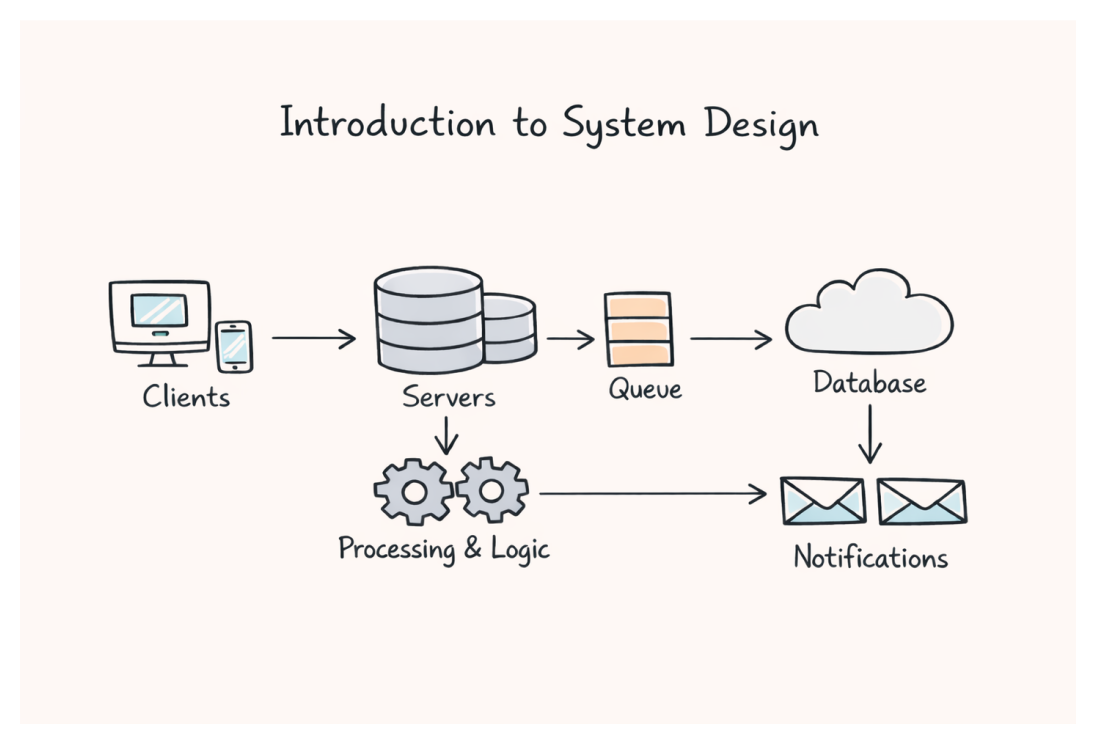
You open Instagram and scroll through your feed. Within milliseconds, photos and videos from people you follow appear on your screen. Behind that simple action, hundreds of servers are working together—fetching your personalized content, checking if you have new messages, updating your online status, and serving ads tailored to your interests.
How does all of this happen so fast? How does Instagram handle 2 billion users without crashing every minute? How do they store 100+ million photos uploaded daily?
These are system design questions. That reliability is not accidental. It is the result of system design. And if you are reading this, you are about to learn how to answer them.
What You Will Learn
- What system design actually means (beyond the buzzwords)
- Why it matters for your career—whether you are preparing for interviews or building real products
- The fundamental way of thinking that separates junior engineers from senior ones
- A practical framework to approach any design problem
- What this course will cover and how to get the most out of it
What is System Design?
Let me start with what system design is not. It is not about memorizing architectures. It is not about knowing every AWS service. It is not about drawing fancy diagrams with lots of boxes and arrows.
System design is the art of making decisions under constraints.
When you build software, you face choices:
- Should I use one database or two?
- Where should I store user sessions?
- What happens when my server crashes at 3 AM?
- How do I handle 10x more users during a sale event?
System design is the skill of answering these questions thoughtfully—understanding trade-offs, anticipating problems, and building systems that work reliably at scale.
A Simple Example
Imagine you are building a URL shortener like Bitly. Users give you a long URL, you give them a short one. Simple, right?
The naive approach:
plaintextUser sends: https://example.com/very/long/path/to/some/page You return: https://short.ly/abc123
You could build this in an hour with a single database table:
| short_code | original_url | created_at |
|---|---|---|
| abc123 | https://example.com/very/long/... | now() |
The naive architecture looks like this:
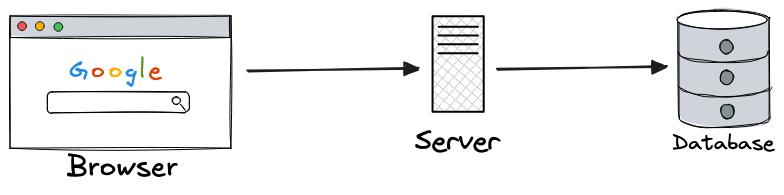
But then the questions start:
- What if two users submit the same URL? Do they get the same short code?
- What if you get 10,000 requests per second? Can one database handle it?
- What if your server crashes? Are all the URLs lost?
- What if someone tries to guess short codes to find private URLs?
- How do you generate unique short codes without collisions?
Suddenly, your simple system needs to evolve:
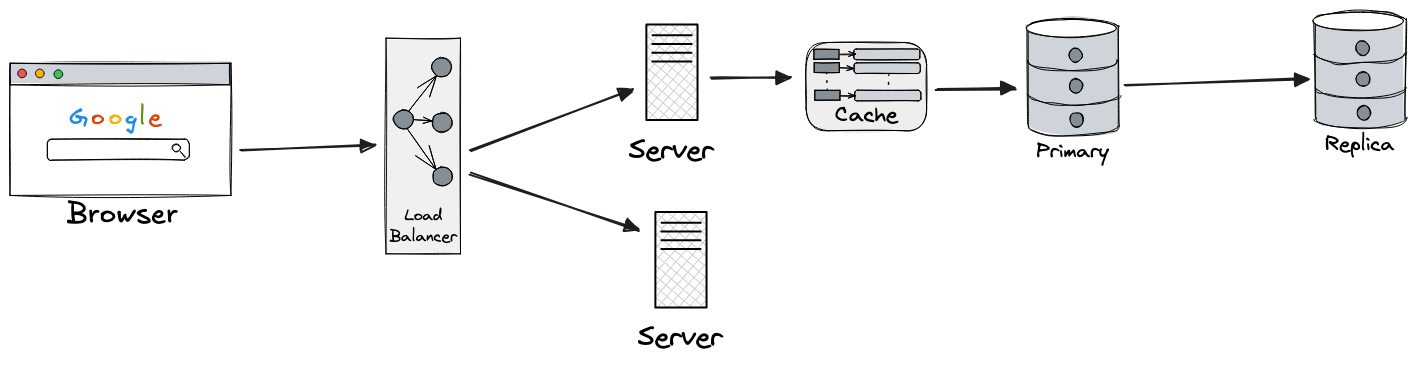
This is system design. Taking a simple problem and thinking through all the ways it can break, scale, or be misused—then designing solutions that handle these scenarios.
Why System Design Matters
For Interviews
Let's be direct: if you want to work at FAANG+ level companies or any well-funded startup, you will face system design interviews.
For SDE-1 (0-2 years):
- Interviews focus more on coding, but basic design questions appear
- "How would you design a simple cache?"
- "Walk me through how a request reaches your API"
For SDE-2 (2-5 years):
- System design becomes 1-2 dedicated rounds
- "Design a URL shortener" or "Design a rate limiter"
- Interviewers want to see structured thinking, not perfect answers
For Senior/Staff (5+ years):
- Multiple deep-dive design rounds
- "Design Twitter's feed" or "Design Uber's matching system"
- Expected to lead the discussion, identify edge cases, make trade-off decisions
The pattern is clear: the more senior you get, the more system design matters.
For Real Work
Here is something interviewers will not tell you: the skills tested in interviews are the same skills you use daily as a senior engineer.
I have seen this play out repeatedly:
- A startup's database crashes because no one thought about backups
- A feature launch fails because the cache was not sized correctly
- A payment system double-charges users because there was no idempotency
A Real Example: I was on-call one day when alerts started firing for an Elasticsearch cluster I had never worked on before. Queries were timing out, the cluster was overloaded. The immediate fix was adding more resources, but when I dug deeper, the pattern revealed something interesting: we only ever queried data from the last week, yet we were keeping months of data on expensive hot nodes.
The original developers had designed a simple cluster that worked perfectly at launch. But they never anticipated how much the data volume would grow. A system that worked for 10GB was buckling under 500GB. The fix? Introducing hot, warm, and cold node tiers—recent data on fast storage, older data on cheaper nodes.
That one design decision, made years earlier without thinking about growth, caused repeated incidents and wasted thousands in over-provisioned infrastructure.
These are not hypothetical scenarios. They happen at real companies, causing real damage. Engineers who understand system design catch these issues before they ship.
The difference between a junior and senior engineer is not just years of experience—it is the ability to anticipate problems before they happen.
For Your Own Projects
Even if you are building a side project or a small startup, system design thinking helps:
- You avoid over-engineering (no, you do not need microservices for your todo app)
- You make intentional choices (SQLite vs PostgreSQL vs managed database?)
- You know when Supabase's free tier is enough vs when you need a full AWS setup
- You can grow your system incrementally without painful rewrites
The System Design Mindset
Before we dive into specific topics, let me share the mental framework that will guide this entire course.
Think in Trade-offs, Not "Best Practices"
There is no universally "correct" architecture. Every choice involves trade-offs.
Example: Where to store user sessions?
| Option | Pros | Cons |
|---|---|---|
| In-memory (server) | Fast, simple | Lost on restart, can't scale horizontally |
| Database | Persistent, shared | Slower, database load |
| Redis | Fast, shared, persistent options | Extra infrastructure, cost |
| JWT tokens | Stateless, scales infinitely | Can't revoke easily, larger payload |
Experienced engineers do not say "always use Redis." They ask:
- How many users do we have?
- How critical is session persistence?
- What infrastructure do we already run?
- What is our budget?
Then they choose based on context.
Start Simple, Then Evolve
One of the biggest mistakes I see: engineers designing for scale they will never reach.
Your startup has 100 users. You do not need:
- Microservices (a monolith is fine)
- Multiple databases (MySQL handles a lot)
- Complex caching layers (the database is fast enough)
- Event-driven architecture (request-response works)
Design for your current scale, with a clear path to grow. Instagram started as a single Django server. Twitter was a monolithic Ruby app. They evolved their architecture as they scaled—and so should you.
Simplicity is a Feature
This deserves its own callout: the best system is often the one a tired engineer can understand at 3 AM.
Every component you add is a component that can fail. Every abstraction is cognitive load for future maintainers. Senior engineers optimize for:
- Debuggability (can I trace what went wrong?)
- Operability (can I roll this back safely?)
- Understandability (will someone new figure this out?)
A clever architecture that breaks in production—and nobody can debug it—is not clever at all.
Every system looks elegant on a whiteboard. Only a few survive real traffic, real data, and real on-call rotations.
Understand the Problem Before Solving It
In interviews and real work, the biggest mistakes come from jumping to solutions too quickly.
Bad approach:
"Design a chat application" "Okay, we'll use WebSockets, Redis pub/sub, Cassandra for messages..."
Good approach:
"Design a chat application" "Before I start, let me clarify some requirements:
- Is this 1:1 chat, group chat, or both?
- How many users are we designing for?
- Do messages need to be stored permanently?
- Do we need read receipts, typing indicators?
- What's the expected message volume?"
Requirements change everything. A chat app for 1,000 users looks completely different from one for 1 billion users.
How System Design Interviews Work
Since many of you are here for interview prep, let me demystify what actually happens in these rounds.
The Flow (45-60 minutes)
Interviews do not follow a rigid script, but generally flow like this:
1. Understand the Problem (~10-15 min)
- Interviewer gives a vague prompt: "Design Instagram" (this vagueness is intentional)
- You ask clarifying questions
- Define functional requirements (what the system does)
- Define non-functional requirements (scale, latency, availability)
- This is where most candidates fail—they skip straight to solutions
2. Design the System (~25-35 min)
- Start with high-level architecture
- Dive into specific components
- Discuss data models, APIs, key algorithms
- Interviewer will probe with "what if" questions
- Go deep on areas they find interesting
3. Wrap Up (~5-10 min)
- Summarize trade-offs you made
- Discuss what you would improve with more time
- Questions for the interviewer
The exact timing varies based on complexity. Be flexible.
What Interviewers Actually Look For
I have been on both sides of these interviews. Here is what actually matters:
1. Structured Thinking
- Do you have a clear approach?
- Can you break down a complex problem into manageable pieces?
- Do you communicate your thought process?
2. Requirement Clarification
- Do you ask good questions?
- Do you understand the difference between MVP and full-scale?
- Can you identify the core problem?
3. Trade-off Awareness
- Do you understand that every choice has pros and cons?
- Can you articulate why you chose option A over option B?
- Do you consider alternatives?
4. Depth Where It Matters
- Can you go deep on at least one area?
- Do you know how the components you mention actually work?
- Can you handle follow-up questions?
5. Practical Experience
- Do your answers reflect real-world understanding?
- Can you relate concepts to systems you have worked on?
- Do you know what actually matters vs. what is theoretical?
6. Communication & Collaboration
- Do you think out loud, or go silent for long stretches?
- Do you incorporate feedback gracefully when the interviewer hints?
- Can you explain complex ideas simply?
- Do you treat it as a conversation, not an exam?
Remember: in the real job, you design systems WITH your team, not alone. The interview simulates this.
What They Do NOT Care About
- Memorizing exact numbers (rough estimates are fine)
- Knowing every technology (depth beats breadth)
- Having the "perfect" answer (there isn't one)
- Drawing beautiful diagrams (clarity over aesthetics)
- Using the "right" buzzwords (saying "microservices" or "eventual consistency" means nothing if you cannot explain when to use it and why)
When You Get Stuck
It happens to everyone. Here is what to do:
- Say it out loud — "I'm not immediately sure how to handle this. Let me think through the options."
- Think through alternatives — "I could do X which has benefit A, or Y which has benefit B..."
- Ask for guidance — "Would you recommend I focus on availability or consistency here?"
- Start naive — "The simplest approach would be X, but that breaks when Y happens. Let me improve on that."
Silence is your enemy. Interviewers cannot help if they do not know where you are stuck.
A Framework for Any Design Problem
Here is the framework I recommend. We will use this throughout the course, and you should use it in interviews.
Step 1: Clarify Requirements (5-10 min)
Functional Requirements: What does the system do?
- Core features (must have)
- Secondary features (nice to have)
- Out of scope (will not cover)
Non-Functional Requirements: How well does it do it?
- Scale: How many users? How much data?
- Performance: What latency is acceptable?
- Availability: Can we have downtime?
- Consistency: Is stale data acceptable?
Example for URL Shortener:
plaintextFunctional: - Create short URL from long URL - Redirect short URL to original - (Maybe) Custom short codes - (Maybe) Analytics Non-Functional: - 100M URLs created per month - 10B redirects per month (100:1 read/write ratio) - Redirect latency < 100ms - 99.9% availability - URLs should not be guessable
Step 2: Estimate Scale (5 min)
Back-of-the-envelope calculations help you make informed decisions. Let me show you how to do this:
Numbers you should memorize:
plaintext1 day = 86,400 seconds ≈ 100K seconds (for quick math) 1 month = 2.6 million seconds ≈ 2.5M seconds 1 year = 31.5 million seconds 1 KB = 1,000 bytes 1 MB = 1,000 KB = 1 million bytes 1 GB = 1,000 MB = 1 billion bytes 1 TB = 1,000 GB = 1 trillion bytes
Example calculation for URL shortener:
plaintextGiven: 100M URLs created per month Step 1: Convert to per-second 100M / 2.5M seconds = 40 URLs/second Step 2: Account for peak (assume 2x average) Peak: 80 URLs/second Design for peak, not average! Step 3: Calculate read traffic (100:1 read/write ratio) Redirects: 40 × 100 = 4,000/second Step 4: Estimate storage (5 years) URLs: 100M × 12 months × 5 years = 6 billion URLs Size per URL: ~500 bytes (short code + long URL + metadata) Total: 6B × 500 = 3 TB
Do not worry if these numbers are not perfect. The goal is to understand the order of magnitude—are we dealing with gigabytes or petabytes? Hundreds of requests or millions?
Step 3: High-Level Design (10-15 min)
Start with the simplest architecture that could work:
Then evolve based on requirements:
- Need high availability? Add redundancy
- Need low latency? Add caching
- Need high throughput? Add more servers with a load balancer
Step 4: Dive Deep (15-20 min)
Pick the most critical components and design them in detail:
- Data model and schema
- API design
- Key algorithms (how to generate short codes?)
- Caching strategy
- Database choice and why
Step 5: Address Bottlenecks (5-10 min)
Identify what can go wrong:
- What if the database fails?
- What if traffic spikes 10x?
- What if a component becomes slow?
Propose solutions:
- Replication for availability
- Horizontal scaling for throughput
- Circuit breakers for resilience
What This Course Covers
Now that you understand what system design is and why it matters, here is the journey ahead:
| Part | Focus | What You Will Learn |
|---|---|---|
| 1. Foundations | Mental models | Scale, diagrams, calculations, scalability patterns |
| 2. Building Blocks | Core components | Networking, load balancing, caching, databases |
| 3. Data & Communication | Data flow | SQL vs NoSQL, partitioning, CAP theorem, queues |
| 4. APIs & Infrastructure | Interfaces | API design, CDNs, failure handling |
| 5. Production | Operations | Monitoring, security, cost optimization |
| 6. Wrap-up | Synthesis | Interview strategy, putting it all together |
Each part ends with a design exercise to apply what you have learned.
See the full syllabus for all 21 lessons.
How to Get the Most Out of This Course
A note before we continue: this course teaches you to think about systems, not to memorize solutions. If you are looking for copy-paste architectures or a checklist of AWS services to name-drop in interviews, you will be disappointed. But if you want to understand why systems are designed the way they are—so you can make good decisions yourself—you are in the right place.
If You Are Preparing for Interviews
- Do not just read—practice. After each lesson, try explaining the concept out loud as if in an interview
- Do the exercises. They are designed to build muscle memory for design thinking
- Time yourself. In real interviews, you have 45 minutes. Practice working under time pressure
- Build something. Implementing even a simplified version teaches you more than reading
If You Are Learning for Knowledge
- Connect to your work. For each concept, think: "Where have I seen this in systems I use or build?"
- Question everything. When I say "use caching here," ask yourself "why? what are the alternatives?"
- Go deeper on what interests you. The references at the end of each lesson are starting points, not endpoints
If You Are a Complete Beginner
- Do not panic. System design seems overwhelming at first—that is normal
- Focus on understanding why, not memorizing what. If you understand the problem, the solution makes sense
- Revisit lessons. Concepts connect to each other; things that were confusing will click later
- Build projects. Even a simple CRUD app teaches you about databases, APIs, and deployment
Key Takeaways
- System design is about making decisions under constraints—understanding trade-offs, anticipating problems, and building systems that work reliably
- It matters for interviews (especially as you grow senior) and for real work (catching problems before they ship)
- The mindset matters more than memorization: think in trade-offs, start simple, understand problems before solving
- Use a structured framework: clarify requirements → estimate scale → high-level design → deep dive → address bottlenecks
- This course takes you from foundations to production concerns, with exercises to apply what you learn
What is Next?
In the next lesson, we will explore Understanding Scale: From 100 to 100M Users. We will walk through what happens to a system as it grows—what breaks at each stage and what solutions emerge. This is the foundation that makes every other lesson make sense.
You will learn:
- The journey of a single server to a distributed system
- What actually breaks at different scales (with real examples)
- How companies like Instagram and WhatsApp evolved their architecture
- The key inflection points where you need to make architectural changes
This lesson sets the context for why load balancers, caches, and databases matter—not just what they are.
References & Further Reading
Books
- Designing Data-Intensive Applications by Martin Kleppmann — The bible of system design. Dense but comprehensive.
- System Design Interview by Alex Xu — Practical, interview-focused with good examples.
Online Resources
- High Scalability Blog — Real architecture case studies from major companies
- ByteByteGo Newsletter — Visual explanations of system design concepts
- AWS Architecture Center — Reference architectures for common patterns
For Interview Prep
- Practice explaining designs out loud (record yourself if needed)
- Start with classic problems: URL shortener, rate limiter, chat system
- Focus on the process, not memorizing solutions
Practice: Self-Assessment
Before moving to the next lesson, honestly answer these questions:
-
Can you explain what system design is to a non-technical friend?
- If not, re-read the "What is System Design?" section
-
Do you understand the difference between functional and non-functional requirements?
- Try listing both for an app you use daily (like WhatsApp or YouTube)
-
Can you name three trade-offs you would consider when choosing a database?
- If not, do not worry—we will cover this in depth later
-
Do you know roughly how many requests per second a single server can handle?
- If not, that is exactly what we will cover in the next lesson
Your answers will tell you where to focus as you continue through the course.
What's Next
Now that you understand what system design is and why it matters, let's see what happens when systems need to handle real scale.
Next up: Understanding Scale: 100 to 100M Users — we'll explore how architectures evolve as user counts grow, from a single server to distributed systems handling millions of requests.