Understanding Scale - From 100 to 100M Users

Your side project is working. Users are signing up. Then one morning, you wake up to angry tweets—the site is down. You SSH into your server and see the database at 100% CPU. Queries that took 10ms now take 10 seconds. You throw more RAM at it, restart everything, and pray.
Sound familiar? This is what scaling feels like before you understand it.
In the previous lesson, we defined system design as "making decisions under constraints." Scale is the constraint that humbles every engineer eventually. A system that works beautifully for 100 users will fall over at 10,000. The architecture that got you to a million users will not get you to a hundred million.
But here is the thing: scaling follows predictable patterns. The same problems show up, the same solutions emerge. Once you see the pattern, you stop being surprised.
This lesson walks you through the journey—from a single server to a distributed system. Not as a checklist of technologies, but as a story of what breaks and why.
What You Will Learn
- How to identify what is actually breaking (the bottleneck)
- The journey from single server to distributed system
- What breaks at different scales (with real numbers)
- Why reads and writes scale differently
- How companies like Instagram and Discord evolved their systems
- A mental model you can apply to any scaling problem
Before You Scale: Find the Bottleneck
Here is a mistake I have seen too many times: an engineer sees slow performance and immediately says "we need to add more servers." They spin up three app servers, put a load balancer in front, and... nothing changes. The site is still slow.
Why? Because the database was the problem, not the app servers. Adding more app servers just meant more servers waiting on the same overloaded database.
A system is only as fast as its slowest component. Think of it like a highway—you can have 10 lanes leading into a city, but if there is a 2-lane bridge at the entrance, everyone still crawls. That bridge is your bottleneck.
Before you add any infrastructure, you need to answer one question: where is the bottleneck?
The Five Bottlenecks
Every performance problem falls into one of these categories:
| Bottleneck | What It Looks Like | Common Causes |
|---|---|---|
| CPU | High CPU usage, slow computations | Complex calculations, inefficient code, no caching |
| Memory | Out of memory errors, swapping | Memory leaks, loading too much data, no pagination |
| Disk I/O | Slow reads/writes, high disk wait | Unindexed queries, logging too much, wrong storage type |
| Network | High latency, timeouts | Chatty services, large payloads, distant servers |
| Contention | Requests waiting on each other | Database locks, connection pool exhaustion, single-threaded code |
When something is slow, your first job is classification. Here is a quick cheat sheet:
| Symptom | Likely Bottleneck |
|---|---|
| High P99 latency but low CPU | Database or locks |
| High CPU, plenty of free memory | App logic or missing cache |
| Timeouts only under load | Connection pool or contention |
| Works locally, slow in production | Network latency |
| Gets slower over time (same load) | Memory leak or disk filling up |
This is how senior engineers think. They do not guess. They measure, classify, then fix.
In my experience, 80% of "scaling problems" turn out to be one bad database query. Seriously. Before you add infrastructure, run EXPLAIN ANALYZE on your slow queries. You might save yourself months of work.
The Reads vs Writes Asymmetry
One more concept before we dive in, because it will come up repeatedly: reads and writes do not scale the same way.
Think of a library. Many people can read the same book simultaneously—just make photocopies. But only one person can write in the original ledger at a time. If two people try to update the same page simultaneously, you get race conditions—and race conditions are how data gets corrupted at 2 AM on a Saturday.
Databases work the same way:
- Reads can be scaled by making copies (replicas). Everyone reads from copies.
- Writes must go to one place (the primary). You cannot copy a write.
This is why most scaling solutions focus on reads first. Caches, CDNs, read replicas—they all solve the read problem. Write scaling (sharding) is harder and comes later.
Most applications are read-heavy—but not all. Social feeds, e-commerce catalogs, content sites? Easily 100:1 read-to-write ratio. But chat apps, IoT sensors, analytics pipelines? Much more write-heavy. Know your workload before assuming.
Keep this asymmetry in mind as we go through the stages. It explains why certain solutions appear when they do.
Stage 0: The Single Server (0–100 Users)
Note: The user numbers in these stages are rough estimates for a typical web app. A real-time game might hit limits earlier; a static content site might go 10x further. Treat these as mental anchors, not hard rules.
Every system starts here. One server, everything running together. It is like a food truck—one person takes orders, cooks, and serves. Simple, but it works when the line is short.
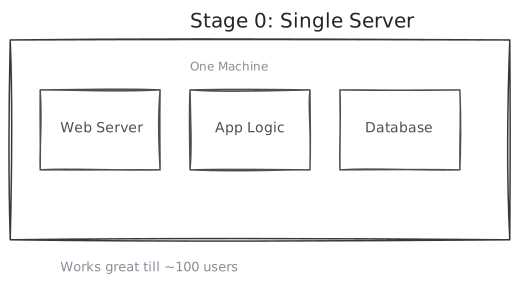
What is running:
- Web server (Nginx/Apache) handling HTTP requests
- Your application code (Node.js, Python, Java, whatever)
- Database (PostgreSQL, MySQL, MongoDB)
- All on one machine, talking to each other locally
Why this works fine:
- Traffic is low—maybe 10 requests per minute
- All your data fits in memory
- No network hops between components (everything is local)
- Dead simple to deploy and debug
Real numbers (Source: DigitalOcean sizing guides):
- An entry-level VPS (Virtual Private Server—a cloud VM like a $5 DigitalOcean droplet) handles ~100 concurrent users easily
- PostgreSQL on modest hardware: ~1,000 queries/second
- Response times: single-digit milliseconds for database queries
When to use this: MVPs, side projects, internal tools, anything under 1,000 daily active users. Seriously—do not over-engineer your first version.
The First Cracks
Then one day, you notice:
- Response times creeping up during peak hours
- Database CPU stuck at 80-90%
- Occasional timeouts
- Users complaining on Twitter
This is actually good news. It means people are using your product. Now you have a scaling problem worth solving.
Stage 1: Separate the Database (100–1,000 Users)
The first scaling move is almost always the same: give the database its own server.
Back to our food truck analogy—this is like moving the kitchen to a separate location. The person at the window can now focus entirely on taking orders and serving, while the kitchen focuses entirely on cooking. They communicate over a small window (the network), but each can work without stepping on the other.
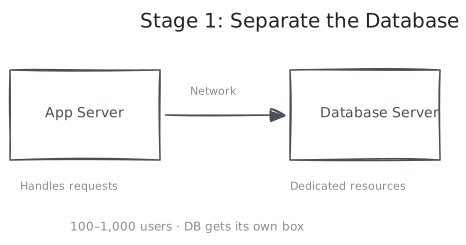
Why this helps:
- Database gets dedicated resources (CPU, memory, fast disks)
- App server stops competing with the database for resources
- You can upgrade them independently
- Database server can have specialized hardware (SSDs, more RAM)
The trade-off:
- Network latency appears (typically 0.5-2ms per query)
- Two machines to manage instead of one
- You need to think about connection pooling (more on this below)
Real numbers (Source: AWS RDS sizing):
- App server: 2 vCPU, 4GB RAM
- Database server: 4 vCPU, 16GB RAM
- Handles 500-1,000 concurrent users comfortably
Connection Pooling: Your First Optimization
Here is something that bites teams hard at this stage—and it is not obvious until it happens.
The problem: Opening a database connection is expensive. It involves TCP handshake, authentication, memory allocation on the database server. Takes 20-50ms. Now imagine every single HTTP request opens a fresh connection, runs one query, then closes it. At 100 requests/second, you are opening and closing 100 connections per second. The database spends more time on connection overhead than actual queries.
Worse: PostgreSQL defaults to 100 max connections. Hit that limit and new requests just... wait. Or fail.
From the trenches: In 2019, a Slack outage was traced back to connection pool exhaustion during a traffic spike. The database was fine—but new requests could not get connections. (Slack Engineering wrote about connection management patterns after similar incidents.) This is a common failure mode.
The fix: Connection pooling. Keep a pool of, say, 20 connections open permanently. Requests borrow a connection, use it, return it. No open/close overhead.
plaintextWithout pooling: Request → Open connection (50ms) → Query (5ms) → Close Total: 55ms, and you burn a connection slot With pooling: Request → Borrow from pool (0ms) → Query (5ms) → Return Total: 5ms, connection stays open for next request
Think of it like a car rental at the airport. You do not buy a car, drive to town, then sell it. You rent, use, return. Much more efficient.
Tools: PgBouncer (PostgreSQL), ProxySQL (MySQL), or built-in ORM pools. These are production-standard—GitLab and Heroku run PgBouncer in front of every PostgreSQL instance. Set this up early.
Stage 2: Add a Load Balancer (1,000–10,000 Users)
Your app server is drowning. CPU at 100%, request queue building up. You could upgrade to a bigger machine, but you have hit the ceiling of what vertical scaling can do. Time to go horizontal—add more servers.
But here is the problem—how do users know which server to talk to? You cannot give them three different URLs. You need a traffic cop that sits in front and routes requests. That is the load balancer.
Think of it like a restaurant host. Customers do not pick their own table—the host assigns them to balance the load across waiters. If one waiter is overwhelmed, the host sends new customers elsewhere.
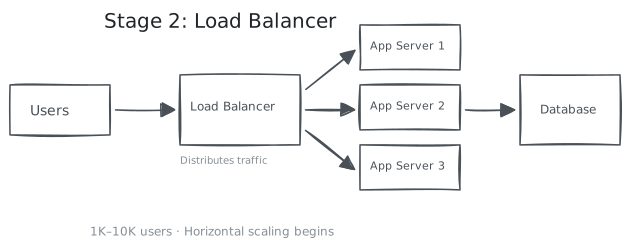
What the load balancer does:
- Spreads requests across your app servers
- Checks if servers are healthy and stops sending traffic to dead ones
- Handles SSL termination (one less thing for app servers to do)
- Can route based on URL, headers, or other rules
How it decides where to send requests:
| Algorithm | How It Works | Best For |
|---|---|---|
| Round Robin | Takes turns: Server 1, Server 2, Server 3, repeat | Servers with equal capacity |
| Least Connections | Sends to whichever server has the fewest active requests | Requests that vary in duration |
| IP Hash | Same user always goes to the same server | When you need "stickiness" |
| Weighted | Server A gets 70%, Server B gets 30% | Mixed server sizes |
The Critical Rule: Stateless Servers
This is where horizontal scaling gets tricky. For it to work, any server must be able to handle any request. They cannot have local memory of users.
From the trenches: This exact issue hit early Twitter. Users would get logged out "randomly" because sessions were stored in local memory, and requests bounced between servers. The fix—moving sessions to memcached—became a standard pattern. (Source: High Scalability)
Imagine a waiter who remembers your order in their head. If a different waiter brings your food, they have no idea what you ordered. That is what happens when your servers are stateful behind a load balancer.
plaintextBad: User logs in → Session stored on Server A Next request goes to Server B → "Who are you?" Good: User logs in → Session stored in Redis Any server can read the session from Redis
This means:
- No local session storage → use Redis or your database
- No local file uploads → use S3 or cloud storage
- No in-memory caches that other servers need → use Redis
This is a mindset shift. Your servers become interchangeable workers, not individuals with memory. It feels like a constraint, but it is actually freedom—you can add or remove servers without breaking anything.
Stage 3: Database Read Replicas (10,000–100,000 Users)
Your app servers are happy now, but the database is struggling. Remember the reads vs writes asymmetry we discussed? This is where it pays off.
Most apps are read-heavy. For every time someone posts a photo, that photo gets viewed a thousand times. So let us solve the read problem first.
The solution: make copies of the database. The original (primary) handles all writes. The copies (replicas) handle reads. It is like having one master recipe book that only the head chef can edit, but photocopies everywhere that anyone can read.
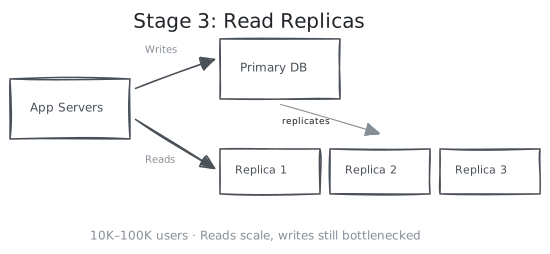
How it works:
- One primary database handles all writes
- Replicas get copies of data automatically (replication)
- Your app sends reads to replicas, writes to primary
The Catch: Replication Lag
Here is the gotcha. There is a delay—usually milliseconds—between writing to the primary and that write appearing on replicas.
This creates a weird bug:
plaintext1. User updates their bio 2. Write goes to primary ✓ 3. User refreshes page 4. Read goes to replica... which hasn't caught up yet 5. User sees their OLD bio 6. User thinks the update failed, tries again
Solutions:
- Read-your-own-writes: After a write, read from primary for a few seconds
- Causal consistency: Track which replica has your latest write
- Accept staleness: For non-critical data (view counts, likes), slight delay is fine
Most teams use option 3 for most data and option 1 for sensitive stuff like profile updates.
Real numbers (Source: Citus Data benchmarks):
- PostgreSQL primary with 3 replicas can handle:
- ~5,000 writes/second to primary
- ~15,000 reads/second spread across replicas
- Replication lag: typically 10-100ms (but can spike under load)
Stage 4: Caching Layer (100,000–1,000,000 Users)
Even with replicas, every request still hits a database. And here is the thing about databases: they are optimized for durability and flexibility, not raw speed.
The actual problem: A typical database query takes 5-50ms. That sounds fast until you do the math. At 10,000 requests/second, your database is spending 50-500 seconds of compute time per second. That is not sustainable. Your replicas are sweating, query queues are building up, and P99 latency is creeping past 500ms—the point where users start rage-clicking refresh.
But step back and ask: do you actually need fresh data every time?
That user profile you just fetched? It changes maybe once a month. But it gets viewed thousands of times per day. You are doing the same expensive query over and over for data that has not changed. That is the waste.
The insight: Most data is read far more often than it changes. Think about your own profile page—you might view it occasionally, but update it maybe once a year. Meanwhile, hundreds of people might view it. That is a 100:1 read-to-write ratio on data that barely changes. Cache the result, skip the query.
Caching means keeping frequently-accessed data in fast storage (RAM). A Redis lookup takes <1ms. A database query takes 10-50ms. That is 10-50x faster—and more importantly, it takes load off your database so it can handle the queries that actually matter.
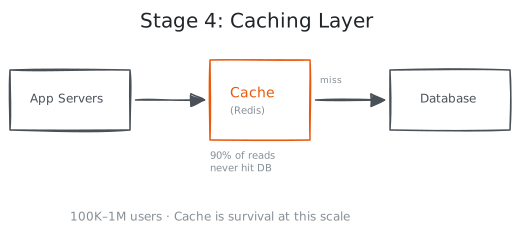
How it works:
- Request for user profile comes in
- Check cache: "Do we have user:123?"
- Cache HIT → Return instantly (< 1ms)
- Cache MISS → Query database, store result in cache, return
javascriptfunction getUser(userId) { cached = redis.get("user:" + userId) if (cached) return cached user = database.query("SELECT * FROM users WHERE id = ?", userId) redis.setex("user:" + userId, 3600, user) // Cache for 1 hour return user }
What to cache (and what not to):
| Good Candidates | Bad Candidates |
|---|---|
| User profiles | Real-time data (stock prices) |
| Product listings | Data that changes every request |
| Session data | Highly personalized content |
| API responses | Security-sensitive data |
| Expensive computations | Large files (use CDN instead) |
The Hard Part: Cache Invalidation
"There are only two hard things in Computer Science: cache invalidation and naming things." — Phil Karlton
When data changes, your cache becomes a liar. It confidently serves old data. This is called stale cache, and it causes the kind of bugs that make you question your career choices.
From the trenches: Facebook engineers coined the term "stale cache stampede" for a related problem—when a popular cached item expires, thousands of requests simultaneously hit the database. They wrote extensively about cache invalidation challenges in their TAO paper. The pattern of "user updates data, cache serves old version" is so common it has a name: read-after-write inconsistency.
Strategies:
- TTL (Time-to-Live): Cache expires after X seconds. Simple. Accepts some staleness.
- Write-through: Update cache whenever you update database. Consistent, but more complex.
- Cache-aside with invalidation: Delete cache entry when data changes. Most common.
Most teams use TTL for things that can be stale (product listings, view counts) and explicit invalidation for things that cannot (user sessions, permissions).
Real numbers (Source: Redis benchmarks):
- Redis: 100,000+ operations/second on modest hardware
- Cache hit rates: 90%+ is common for read-heavy apps
- Response time: 50-100ms (database) → 1-5ms (cache)
That is a 10-50x speedup. Caching is not optional at scale—it is survival.
Stage 5: CDN for Static Assets (1,000,000+ Users)
Your servers are humming along for dynamic content. But users in Tokyo are staring at a loading spinner, waiting for images to load from your server in Virginia. Physics is the problem—light takes time to travel around the world.
A CDN (Content Delivery Network) solves this by putting copies of your static files on servers around the world. It is like having vending machines in every neighborhood instead of one store downtown. The product is the same; it is just closer.
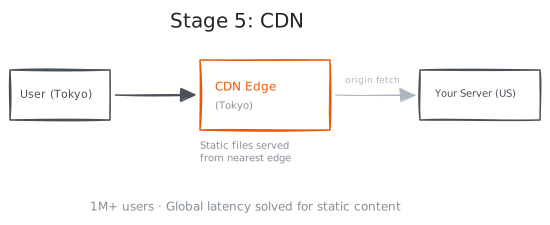
What a CDN does:
- Caches static files (images, CSS, JS) at "edge" locations worldwide
- Serves content from the location nearest to the user
- Takes load off your origin servers
- Built to handle massive traffic spikes (their whole business model)
The difference is dramatic:
| Without CDN | With CDN |
|---|---|
| User in Sydney requests image from Virginia | User in Sydney requests image |
| Round-trip: ~200ms (just network latency) | CDN edge in Sydney serves it |
| Your server handles the request | Round-trip: ~20ms |
| Your server never sees the request |
What belongs on a CDN:
- Images, videos, audio files
- CSS and JavaScript bundles
- Fonts
- Static HTML pages
What does NOT belong on a CDN:
- Dynamic content (API responses)
- User-specific data
- Anything that changes frequently
Real numbers (Source: Cloudflare CDN docs):
- Cache hit rates: 80-95% for static content
- Latency reduction: 50-80% for global users
- Cost: pennies per GB (typically $0.05-0.15/GB transferred)
Stage 6: Database Sharding (10,000,000+ Users)
Remember the reads vs writes asymmetry? We have been solving read problems this whole time—replicas, caches, CDNs. But writes still go to one place: the primary database.
At some point, that single primary cannot handle the write volume. You have upgraded it to the biggest machine money can buy. It is still not enough. Now what?
Sharding. You split your data across multiple databases. Each database (shard) holds a portion of the data. It is like splitting a library's collection across multiple buildings—books A-M in Building 1, N-Z in Building 2.
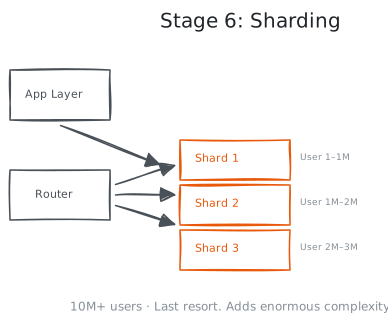
Sharding strategies:
| Strategy | How It Works | Pros | Cons |
|---|---|---|---|
| Range-based | Users 1-1M → Shard 1, 1M-2M → Shard 2 | Simple, range queries work | Hot spots (new users all hit one shard) |
| Hash-based | hash(user_id) % num_shards | Even distribution | Range queries become expensive |
| Geographic | EU users → EU shard, US → US shard | Data locality, compliance | Users moving regions is messy |
Why Engineers Fear Sharding
💡 Interview vs reality: In interviews, you casually say "we'll shard by user_id" and move on. In reality, sharding touches every query in your codebase—some need rewrites, some become impossible. The migration itself can take weeks to months depending on data size and uptime requirements. Interviewers know this. If you treat sharding as a simple box on a diagram, you signal inexperience.
Sharding solves the write problem. But it creates a dozen new problems:
1. Cross-shard queries are painful
On a single database, this is easy:
sqlSELECT * FROM orders WHERE created_at > '2024-01-01'
With sharding, you must query ALL shards, merge results, sort again. Much slower. Much more complex.
2. Joins across shards are nearly impossible
If user is on Shard 1 and their orders are on Shard 3, this becomes a nightmare:
sqlSELECT users.name, orders.total FROM users JOIN orders ON users.id = orders.user_id
3. Transactions across shards are hard
- Distributed transactions exist but are slow and complex
- Most teams just avoid them entirely
4. Rebalancing is painful
- Shard 1 is full. You need to move half its data to a new shard.
- While keeping the system running.
- Without losing data.
- Without breaking queries mid-flight.
- This part sucks. There is no clean way around it.
The Real Talk on Sharding
Here is what I tell every team that asks about sharding: you probably do not need it yet. For a detailed look at what sharding actually involves, see Notion's sharding story—it is one of the best real-world write-ups out there.
And look at when major companies actually needed it:
- Instagram: single PostgreSQL until 25 million users
- Discord: 2.5 million concurrent users before sharding
- Most startups: will never reach the scale where sharding is necessary
Sharding is a last resort. Before you shard:
- Have you optimized your queries?
- Have you added proper indexes?
- Have you upgraded to a bigger machine?
- Have you cached aggressively?
- Have you separated read and write workloads?
Only when all of that is exhausted do you shard. And when you do, shard by something that makes sense for your access patterns—usually user ID for user-centric apps.
When Things Break: Failure at Scale
Here is something the stages above do not tell you: at scale, things will fail. Not might. Will.
💡 Interview vs reality: Interviews focus on the happy path—"how would you design X?" Real systems spend more engineering time on failure handling than feature building. If your design discussion does not include "what happens when Y fails," you are not thinking like a senior engineer.
A single server rarely fails. But when you have 100 servers, databases, caches, and load balancers—something is always broken. A disk dies. A network switch flaps. A replica falls behind. A cache fills up.
The question is not "will it fail?" but "what happens when it does?"
The Mindset Shift
At small scale, you prevent failure. At large scale, you accept failure and design for resilience.
Graceful degradation: When the cache goes down, your app should be slow, not dead. When one database replica fails, traffic should shift to others automatically.
Timeouts everywhere: Never wait forever. If a service does not respond in 500ms, give up and return a fallback. A slow response is often worse than no response.
Retries with backoff: When something fails, try again—but wait a bit. And wait longer each time. Do not hammer a struggling service into the ground.
This is a staff-level mindset: assume failure, design for recovery.
We will cover resilience patterns in depth later. For now, just know that scaling is not just about handling more load—it is about handling more failures.
A Note on Async: Message Queues
You may have noticed something: everything so far is synchronous. User sends request → server processes → server responds. The user waits.
But what about tasks that take a long time? Sending emails. Processing videos. Generating reports. You cannot make users wait 30 seconds.
This is where message queues come in. Instead of processing immediately, you drop the task into a queue and respond instantly: "Got it, we will process this." A background worker picks it up later.
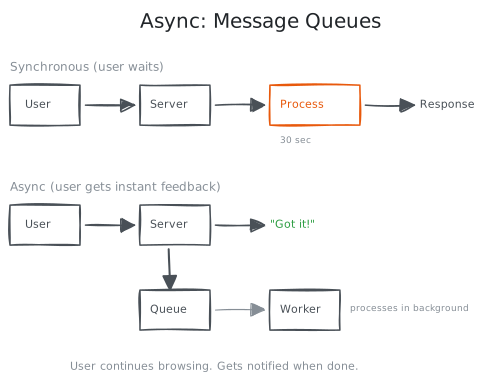
Queues also help with traffic spikes. Instead of your servers drowning under sudden load, the queue absorbs the burst and workers process at a steady pace.
We will dive deep into message queues later. For now, know they exist and solve the "user waits too long" and "traffic spike" problems.
The Scale Journey: A Summary
Important caveat: Real systems do not evolve linearly through these stages. You might skip stages, revisit earlier ones, or need Stage 4 solutions before Stage 2 problems. Use this as a mental model, not a prescription.
| Stage | Users | Architecture | Key Change |
|---|---|---|---|
| 0 | 0-100 | Single server | — |
| 1 | 100-1K | App + DB separated | Dedicated database server |
| 2 | 1K-10K | Multiple app servers | Load balancer, stateless design |
| 3 | 10K-100K | Database replicas | Read/write splitting |
| 4 | 100K-1M | Caching layer | Redis/Memcached for hot data |
| 5 | 1M+ | CDN | Edge caching for static content |
| 6 | 10M+ | Sharding | Horizontal data partitioning |
These numbers are rough guides, not rules. A real-time gaming app might need sharding at 100K users. A static blog might serve 10M users from a single server. Your mileage will vary.
Real-World Evolution Stories
Theory is nice. Let us see how actual companies scaled—and what we can steal from them.
💡 Interview reality check: In interviews, you draw clean boxes and arrows. In reality, these companies iterated through messy, painful migrations over years. Do not let whiteboard diagrams fool you into thinking this is clean work.
Instagram: Simplicity Wins
Instagram is the case study I point junior engineers to first. Not because it is simple—but because it stayed simple longer than anyone expected.
At launch (2010): 2 servers. Django (Python). PostgreSQL. 25,000 users signed up on day one. (Source: High Scalability)
What happened next: Database became the bottleneck within weeks. Their response? Add read replicas. Add Redis for caching. That is it. No rewrite. No microservices. No sharding of user data.
At acquisition (2012): 30 million users. Still PostgreSQL. Still no user data sharding. 3 engineers.
The lesson I take from this: Most teams shard too early, rewrite too early, add microservices too early. Instagram proves you can get incredibly far with boring, well-optimized infrastructure. Caching and replicas are not sexy. They work.
But what happens when simplicity is not enough? When your use case has fundamental constraints that break normal patterns?
Discord: When "Average Load" Is a Lie
Discord's scaling story taught me something important: averages lie.
The problem: Discord has millions of small servers (10-100 people). Easy to handle. But they also have massive public servers—millions of members, billions of messages. One big server created more load than thousands of small ones combined.
Their database was designed for average usage. But load is not average—it is spiky and uneven. The big servers created "hot spots" that overwhelmed specific database partitions while others sat idle.
Their fix: They moved to a faster database (ScyllaDB), separated recent messages from old ones, and redesigned how messages get distributed across storage. (Source: Discord Engineering Blog)
The lesson: When designing for scale, ask: "What happens if one user/tenant/entity is 1000x bigger than average?" If your answer is "it breaks," you have a hot spot problem waiting to happen.
Discord optimized for their specific problem. WhatsApp took this even further—they optimized everything for messaging.
WhatsApp: Right Tool, Ruthless Focus
WhatsApp numbers still blow my mind. At acquisition: 450 million users, 50 billion messages/day, 32 engineers. (Source: High Scalability)
How? Two things.
1. They picked Erlang. Erlang was built for telephone switches—millions of concurrent connections, isolated failures. Each WhatsApp user connection was a tiny Erlang "process." They handled 2 million connections per server. A typical Node.js or Java server handles maybe 10,000. That is 200x more efficient at the connection layer.
2. They ruthlessly scoped the problem. Messages were stored only until delivered, then deleted. No message history. No read receipts initially. No complex features. This was not a limitation—it was a choice that made the architecture dramatically simpler.
The lesson: Generic solutions solve generic problems at generic efficiency. If you deeply understand your specific constraints, you can often achieve 10-100x better efficiency. But it requires saying "no" to features that do not fit your architecture.
Why This Matters for the Rest of the Course
Every component we will study in later lessons exists because of a scaling problem:
| Component | Scaling Problem It Solves | Stage |
|---|---|---|
| Load Balancer | Single server can't handle all traffic | Stage 2 |
| Database Replicas | Single database can't handle read load | Stage 3 |
| Cache (Redis) | Database queries are too slow/expensive | Stage 4 |
| CDN | Static assets slow for global users | Stage 5 |
| Message Queue | Synchronous processing creates bottlenecks | Stage 4-5 |
| Sharding | Single database can't handle write load | Stage 6 |
When you encounter these topics in later lessons, you will understand why they exist—not just what they are. This context makes everything easier to remember and apply.
Common Scaling Mistakes
I have seen all of these. Multiple times. Learn from other people's pain.
1. Premature Optimization
"We might have a million users someday, so let us shard now."
No. You have 1,000 users. Sharding will cost you months of engineering time and add complexity that slows down every future feature. Meanwhile, a $50/month database upgrade would have solved your actual problem.
The rule: Solve the problems you have, not the problems you imagine.
2. Ignoring the Database
The app is slow, so the team adds more app servers. Still slow. More servers. Still slow.
Meanwhile, nobody looked at the database. Turns out a missing index made one query take 2 seconds instead of 2 milliseconds.
The rule: Before scaling horizontally, squeeze everything out of vertical scaling. Add indexes. Optimize queries. Upgrade hardware. It is cheaper, simpler, and often all you need.
3. Not Measuring
"Users say it is slow. Let us add more servers."
Which users? Which pages? Which requests? How slow? Without metrics, you are guessing. And guessing is expensive.
The rule: Instrument first. Know that P99 latency is 2 seconds, and 80% of that time is spent in database queries. Then decide what to fix.
A quick primer on latency percentiles:
- P50 (median): Half of requests are faster than this
- P95: 95% of requests are faster than this
- P99: 99% of requests are faster than this
P99 matters more than average. If your average is 100ms but P99 is 5 seconds, 1 in 100 users is having a terrible experience.
4. Scaling the Wrong Thing
"Users in Europe say the site is slow. Let us add a CDN!"
But the slowness is your API endpoint that takes 5 seconds to respond. A CDN caches static files. It does not make your database faster.
The rule: Find the bottleneck first. Then pick the solution that actually addresses it.
Key Takeaways
-
Find the bottleneck first. Is it CPU? Memory? Database? Network? Contention? The solution depends on the problem. Do not guess.
-
Reads and writes scale differently. Reads are easy (replicas, caches, CDNs). Writes are hard (sharding). Most apps are read-heavy—solve that first.
-
Scale incrementally. Start simple, add complexity only when forced. Instagram reached 30 million users without sharding.
-
Stateless servers enable horizontal scaling. Move state to dedicated stores (Redis, database). Your servers should be interchangeable.
-
Caching is survival. A 90% cache hit rate means 10x fewer database queries. At scale, this is the difference between fast and dead.
-
Sharding is a last resort. Exhaust every other option first. The complexity cost is enormous.
-
Assume failure. At scale, something is always broken. Design for graceful degradation, not perfect uptime.
-
Measure, then optimize. P99 latency matters more than averages. Without metrics, you are guessing.
What is Next?
In the next lesson, we will learn Reading Architecture Diagrams—the visual language of system design. You will learn to quickly understand and draw system architectures, a critical skill for both interviews and real engineering work.
Practice Questions
Test your understanding. Try to answer before looking at the hints.
-
Your e-commerce site has 50,000 daily users and the database is at 90% CPU. What would you try first?
-
You added caching but your hit rate is only 30%. What might be wrong?
-
Your app has 3 app servers behind a load balancer, but users complain about being logged out randomly. What is likely happening?
-
You are building a chat application. At what user count would you start thinking about sharding the messages table? What would you shard by?
-
Your P90 latency is 50ms but P99 is 3 seconds. What does this tell you?