Reading Architecture Diagrams

You walk into a system design interview. The interviewer says, "Design a notification system." You start talking, but within 30 seconds, they interrupt: "Can you draw it out?"
You freeze. You know how notifications work, but translating concepts into boxes and arrows? Your mind goes blank.
This happens more often than people admit. Architecture diagrams are the universal language of system design—yet nobody teaches you how to read or draw them. This lesson changes that.
By the end, you'll be able to look at any architecture diagram and understand what's happening within 60 seconds. More importantly, you'll be able to draw clear diagrams that communicate your ideas effectively.
What You Will Learn
- The visual vocabulary of system architecture (what each symbol means)
- How to read a diagram and understand data flow
- Common diagram patterns you will see repeatedly
- How to draw clear diagrams quickly (especially in interviews)
- Red flags that indicate poor system design
Why Diagrams Matter
Here's what I've learned: in system design, if your diagram is unclear, your design usually is too.
In interviews, diagrams are how you show your thinking. In real work, diagrams are how you align with your team. The person who can take a complex system and make it visually clear has an enormous advantage.
Note on diagrams: At all major companies, every significant design starts with a document that includes architecture diagrams. I have seen excellent ideas rejected because the diagram was confusing, and mediocre ideas approved because the diagram made them look simple. Clarity wins.
The good news: architecture diagrams follow consistent patterns. Once you learn the vocabulary, you can read any system diagram—and draw your own.
The Visual Vocabulary
Every architecture diagram uses the same basic building blocks. Think of these as the alphabet of system design.
1. Clients (The Starting Point)
Clients are where requests originate. These can be user, mobile, desktop, web etc.
What to look for:
- Multiple client types (web, mobile, API consumers)
- Whether clients connect directly to servers or through intermediaries
2. Servers and Services
Boxes represent servers, services, or logical components. The shape often indicates the type:
| Shape | Meaning |
|---|---|
| Rectangle | Generic server or service |
| Rounded rectangle | Application/microservice |
| Cylinder | Database or storage |
| Cloud shape | External service (AWS, third-party API) |
| Hexagon | Load balancer or gateway |
3. Arrows (Data Flow)
Arrows show how data moves. This is where most of the information lives.
| Arrow Style | Meaning |
|---|---|
| Solid arrow → | Synchronous request (caller waits for response) |
| Dashed arrow ⇢ | Asynchronous message (fire and forget) |
| Double arrow ↔ | Bidirectional communication |
| Numbered arrows | Sequence of operations (1→ 2→ 3→) |
Pro tip: In interviews, always label your arrows. "HTTP request," "Write," "Publish event"—this shows you understand the data flow, not just the components.
4. Groupings and Boundaries
Dotted boxes or shaded regions group related components:
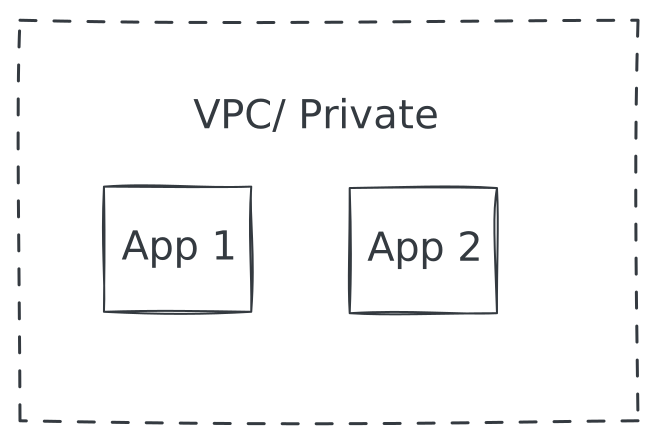
Common groupings:
- VPC/Private network: Components not directly accessible from internet
- Region/Zone: Geographic or availability zone boundaries
- Service boundary: What belongs to one team or domain
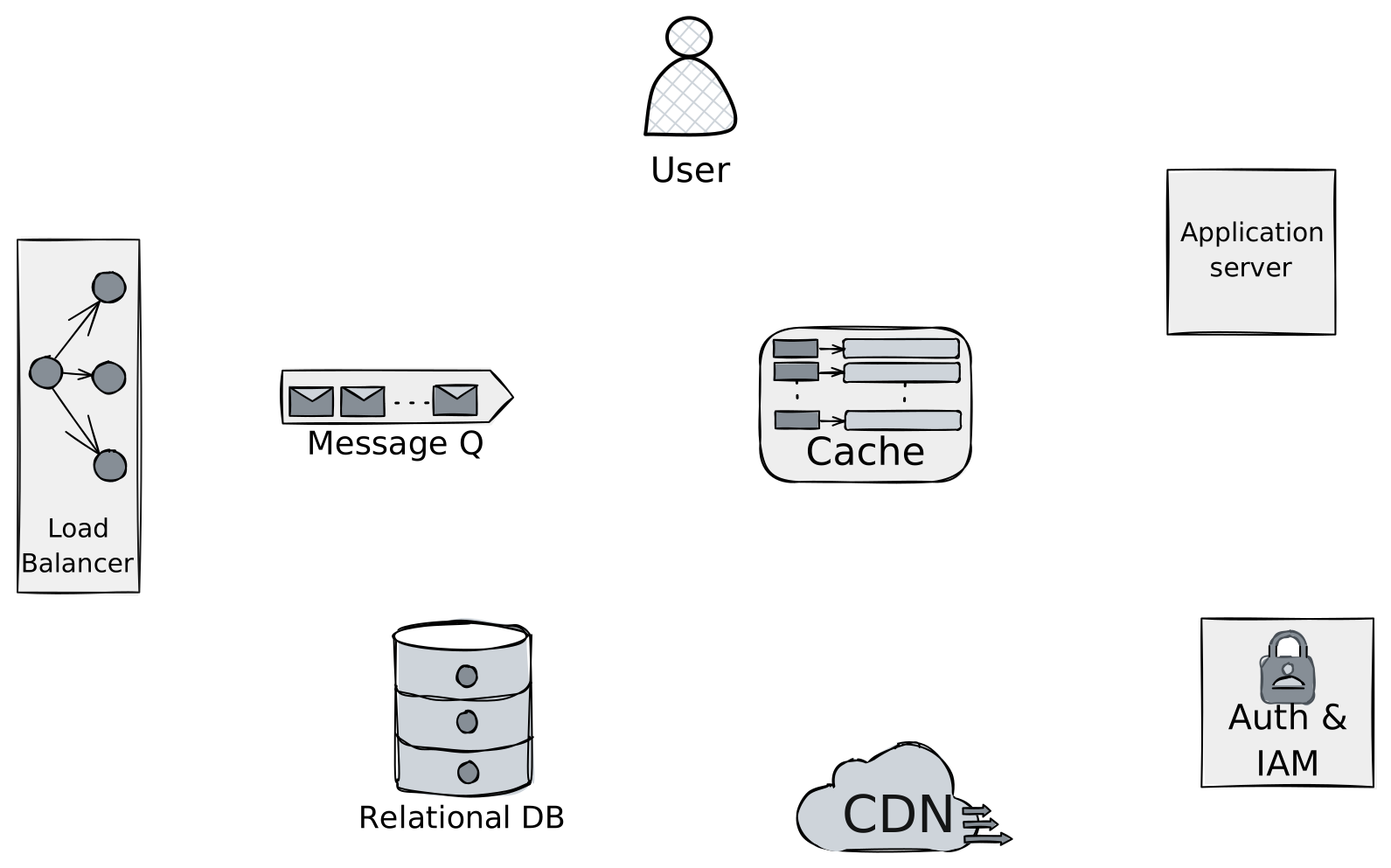
5. Special Components
Some components appear so often they have standard representations:
| Component | Purpose |
|---|---|
| Load Balancer | Distributes traffic |
| Cache | Fast temporary storage |
| Queue | Async message buffer |
| CDN | Edge content delivery |
| API Gateway | Entry point, auth, routing |
Excalidraw/Lucidchart has some libraries already which will be helpful while drawing architecture diagrams.
Here are the above mentioned components:
Reading a Diagram: The Method
When you see a new architecture diagram, don't try to understand everything at once. Follow this method:
Step 1: Find the Entry Point
Where do requests come in? Look for:
- Client icons at the top or left
- Load balancers or API gateways
- Public-facing components
Step 2: Trace the Happy Path
Follow the main flow from start to finish. Ignore error handling, caching, and edge cases for now. Ask:
- What is the primary user action?
- What data moves where?
- Where does the data end up?
Step 3: Identify Data Stores
Find all the cylinders (databases) and understand:
- What data lives where?
- Is there one database or many?
- Are there caches in front of databases?
Step 4: Look for Scale Patterns
Now look for the complexity:
- Multiple instances of the same component? (horizontal scaling)
- Read replicas? (read/write splitting)
- Queues between components? (async processing)
- CDN or cache layers? (performance optimization)
Step 5: Find the Failure Points
Ask yourself:
- What happens if this component goes down?
- Are there single points of failure?
- Is there redundancy?
Example: Reading a Real Architecture
Let me walk through reading a typical e-commerce architecture:
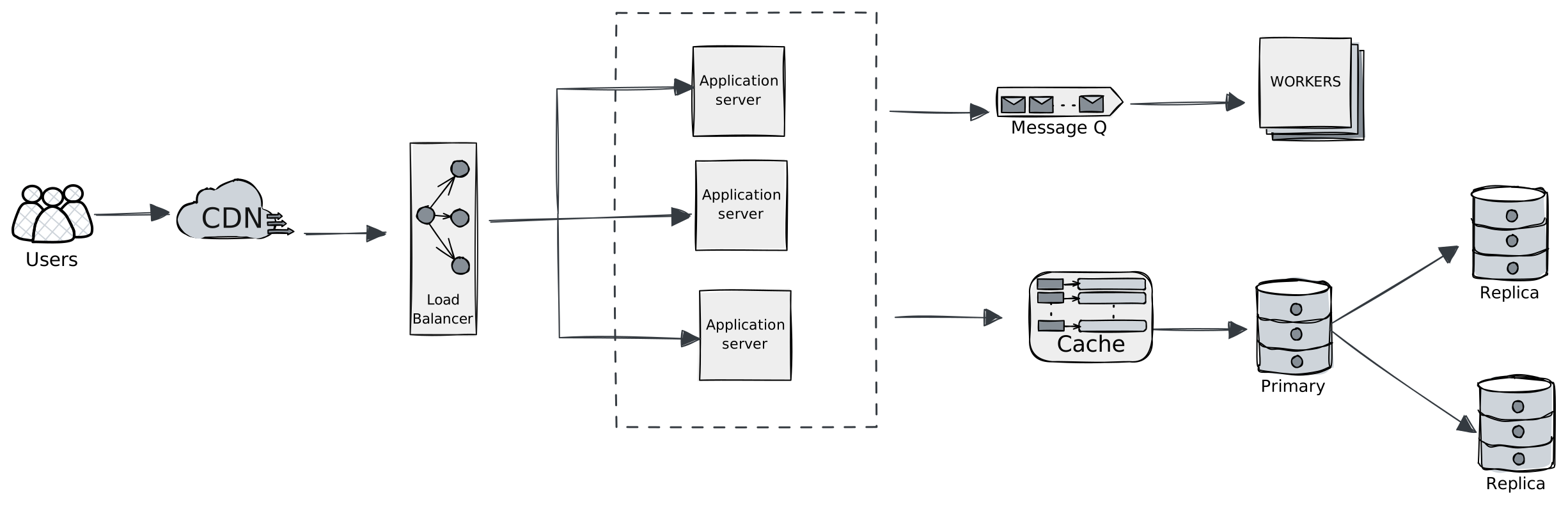
Step 1 - Entry point: Users at top, entering through CDN.
Step 2 - Happy path: User → CDN (static files) → Load Balancer → One of three App servers → Cache check → Database if needed.
Step 3 - Data stores:
- Redis cache (fast lookups)
- Primary database with two read replicas
Step 4 - Scale patterns:
- Three app servers behind load balancer (horizontal scaling)
- Read replicas (read/write splitting)
- Queue + Workers (async processing for heavy tasks)
Step 5 - Failure points:
- CDN is third-party, likely reliable
- Load balancer is single (could be a problem)
- App servers are redundant (good)
- Primary database is single point of failure for writes
This analysis took 60 seconds. With practice, you will do it in 30.
Common Diagram Patterns
You've already seen the building blocks. Now let's look at how they combine into patterns you'll see again and again in real systems and interviews.
Recognize these instantly—they appear in almost every system design discussion.
Pattern 1: The Three-Tier Architecture
The most common pattern. Simple, proven, boring (in a good way).
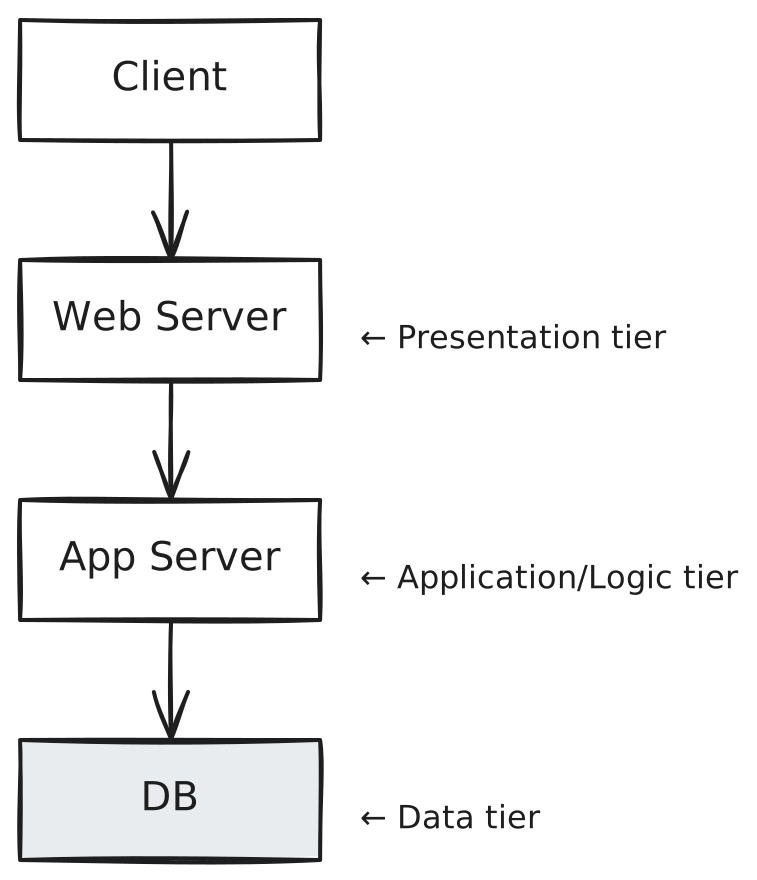
When you see it: Traditional web apps, enterprise systems Strengths: Simple, well-understood, each tier scales independently Weaknesses: Can become bottleneck at database tier
Pattern 2: Microservices
Multiple small services, each with its own database.
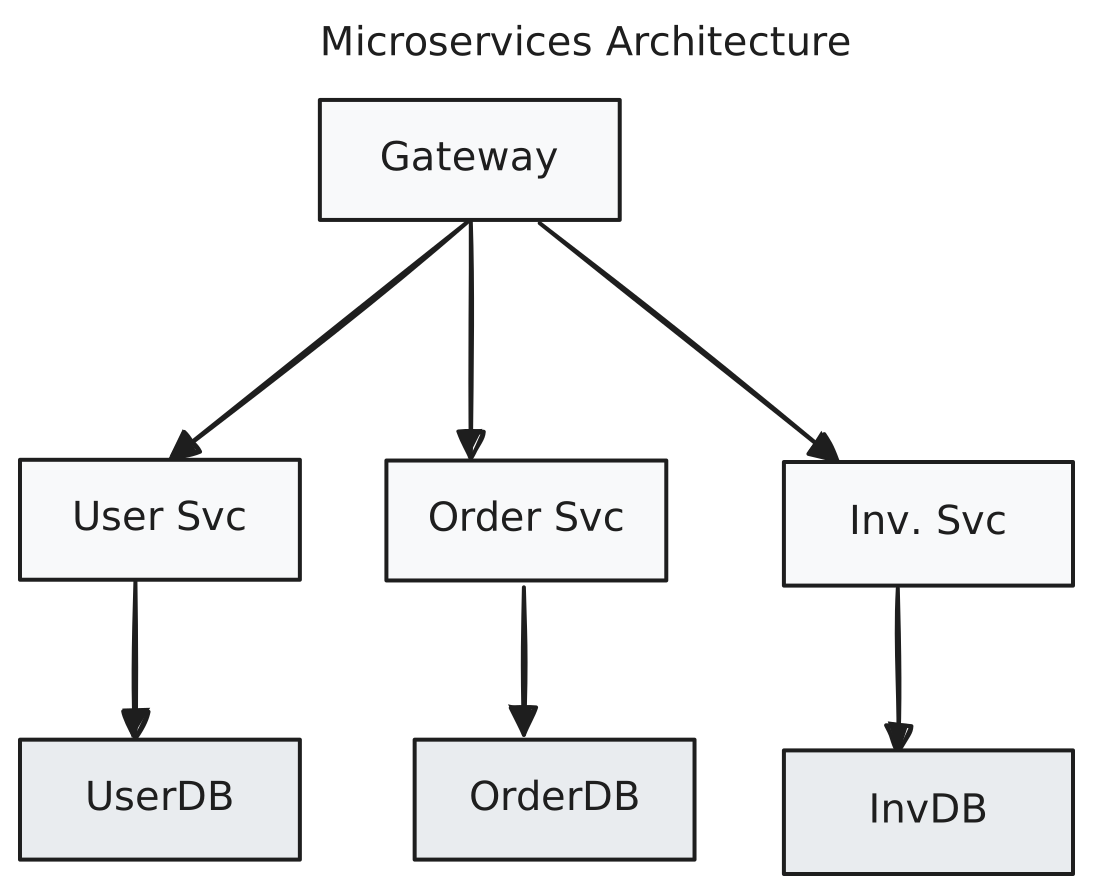
When you see it: Large organizations, complex domains Strengths: Teams can deploy independently, technology flexibility Weaknesses: Operational complexity, distributed transactions are hard
Microservices tradeoff: Distributed transactions are complex. In a monolith, one database transaction handles everything. In microservices, you need Saga patterns and eventual consistency. Only use microservices when organizational scale justifies the complexity.
Pattern 3: Event-Driven
Services communicate through events, not direct calls.
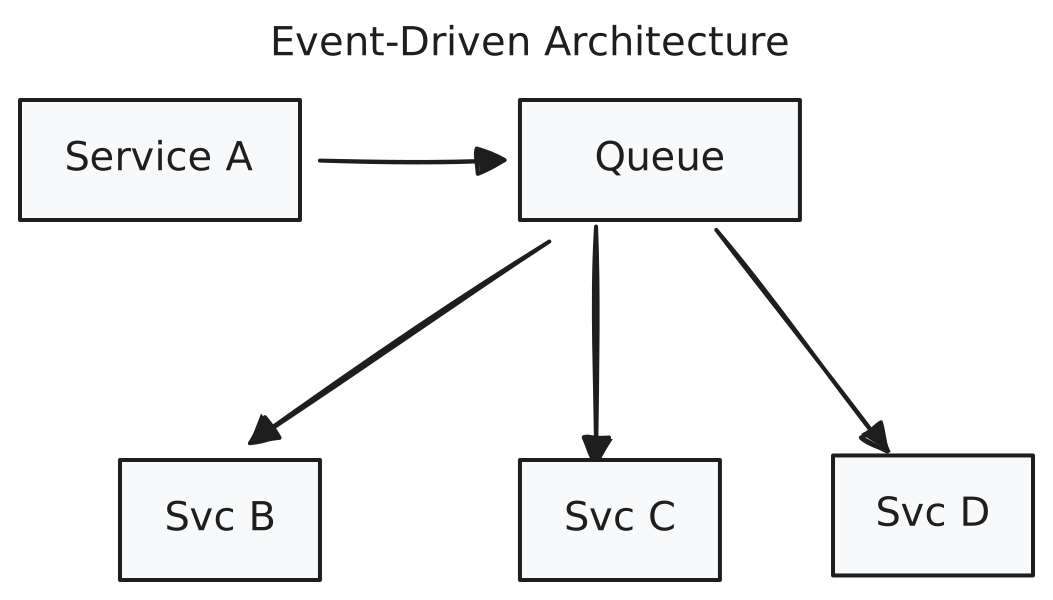
When you see it: High-scale systems, decoupled architectures Strengths: Loose coupling, handles spikes, services can fail independently Weaknesses: Eventual consistency, debugging is harder
Pattern 4: CQRS (Command Query Responsibility Segregation)
Separate paths for reads and writes.
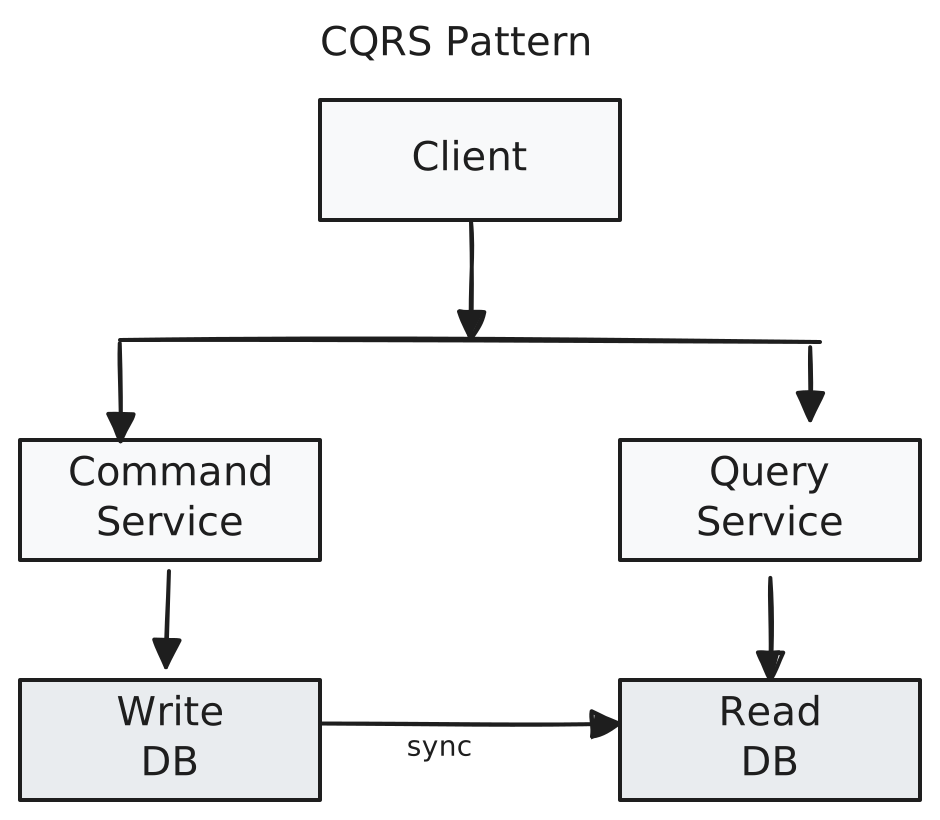
When you see it: Read-heavy systems, different read/write patterns Strengths: Optimize reads and writes independently Weaknesses: Consistency lag, more infrastructure
Drawing Diagrams: The Interview Skill
In interviews, you need to draw diagrams quickly and clearly. Here is how.
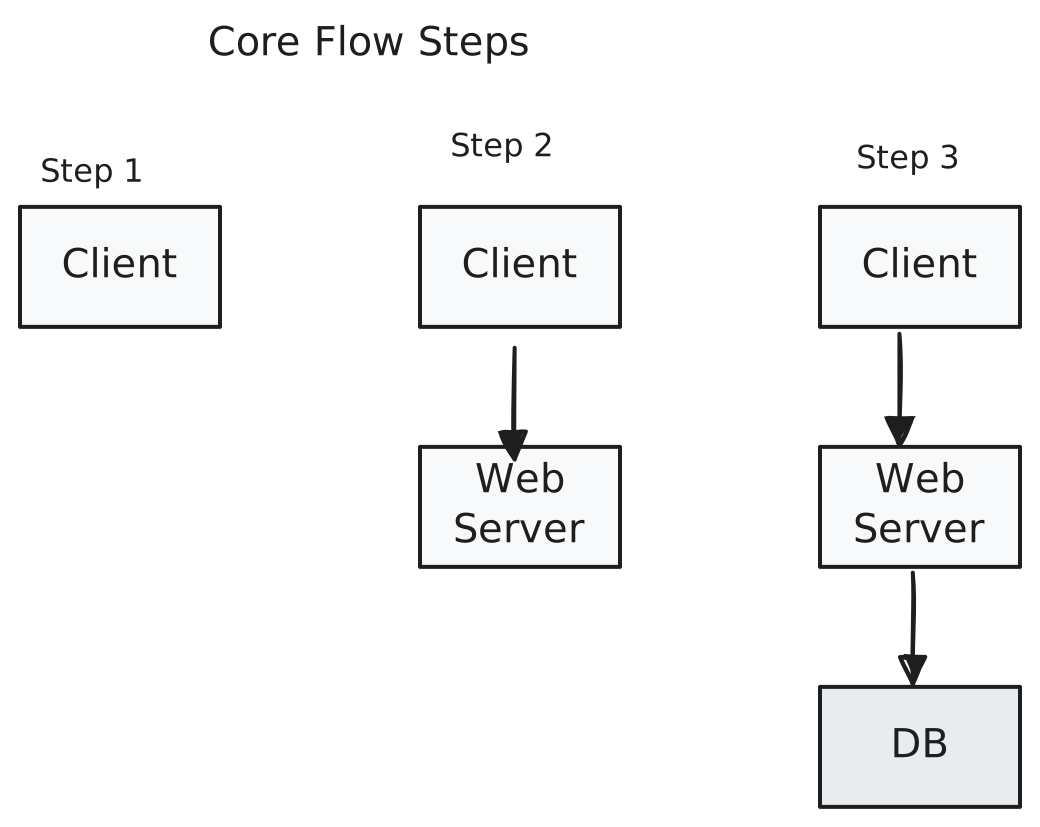
Start with the Core Flow
Do not draw everything at once. Start with the minimum viable architecture:
- Draw the client (top or left)
- Draw the main service (center)
- Draw the data store (bottom or right)
- Connect with arrows
Add Complexity Incrementally
Only add components when you explain why they are needed:
- "We will need a load balancer because one server cannot handle the traffic" → Add LB
- "Database queries are expensive, so we will add a cache" → Add cache
- "Email sending should be async" → Add queue
Example: How Diagrams Evolve in Interviews
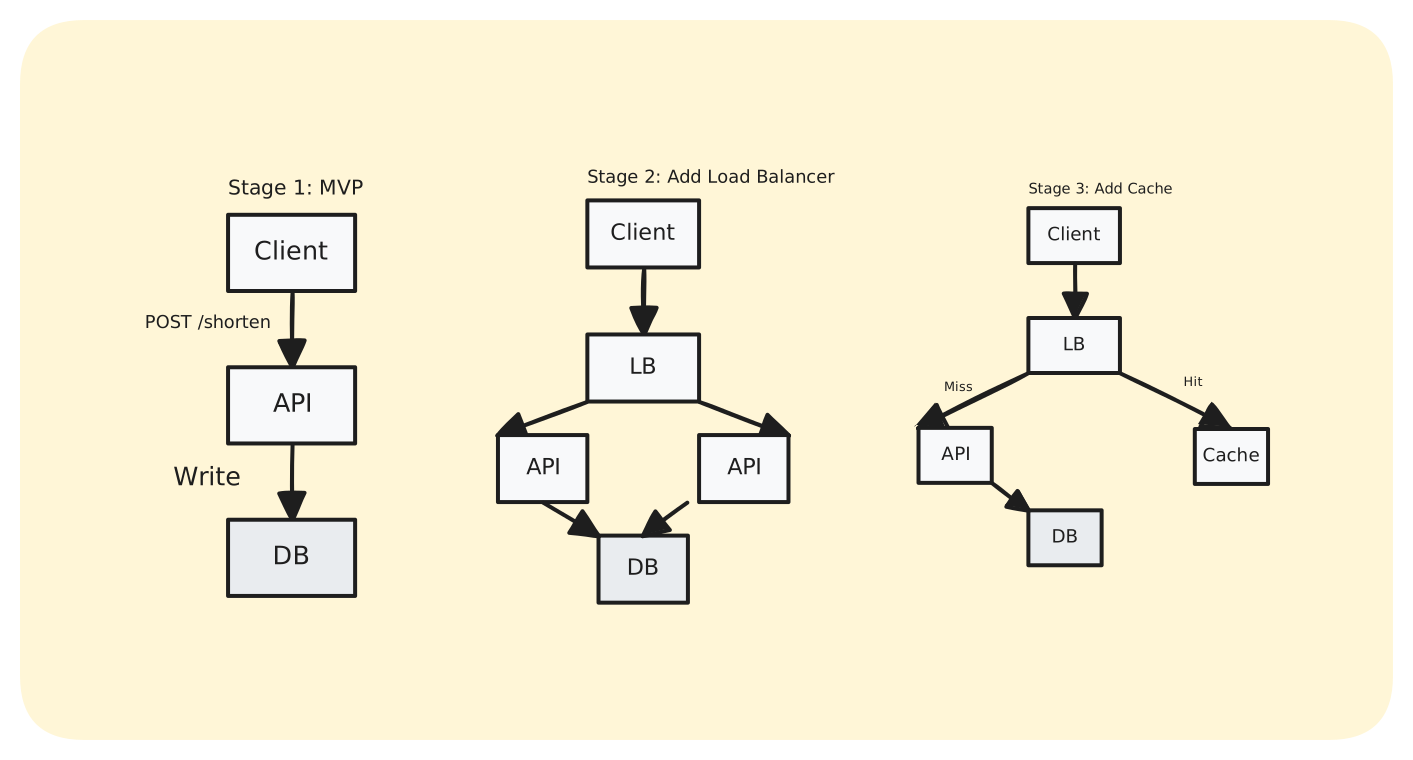
Here is how a real interview conversation might unfold, with the diagram growing step by step:
Interviewer: "Design a URL shortener."
Stage 1 - MVP :
Users send long URLs, we generate short codes, store mapping in database.
Stage 2 - Add Load Balancer :
One server won't handle millions of requests. Load balancer distributes across multiple API servers.
Stage 3 - Add Cache :
Redirects happen way more often than URL creation. Cache hot short codes in Redis.
Stage 4 - Add Analytics Queue :
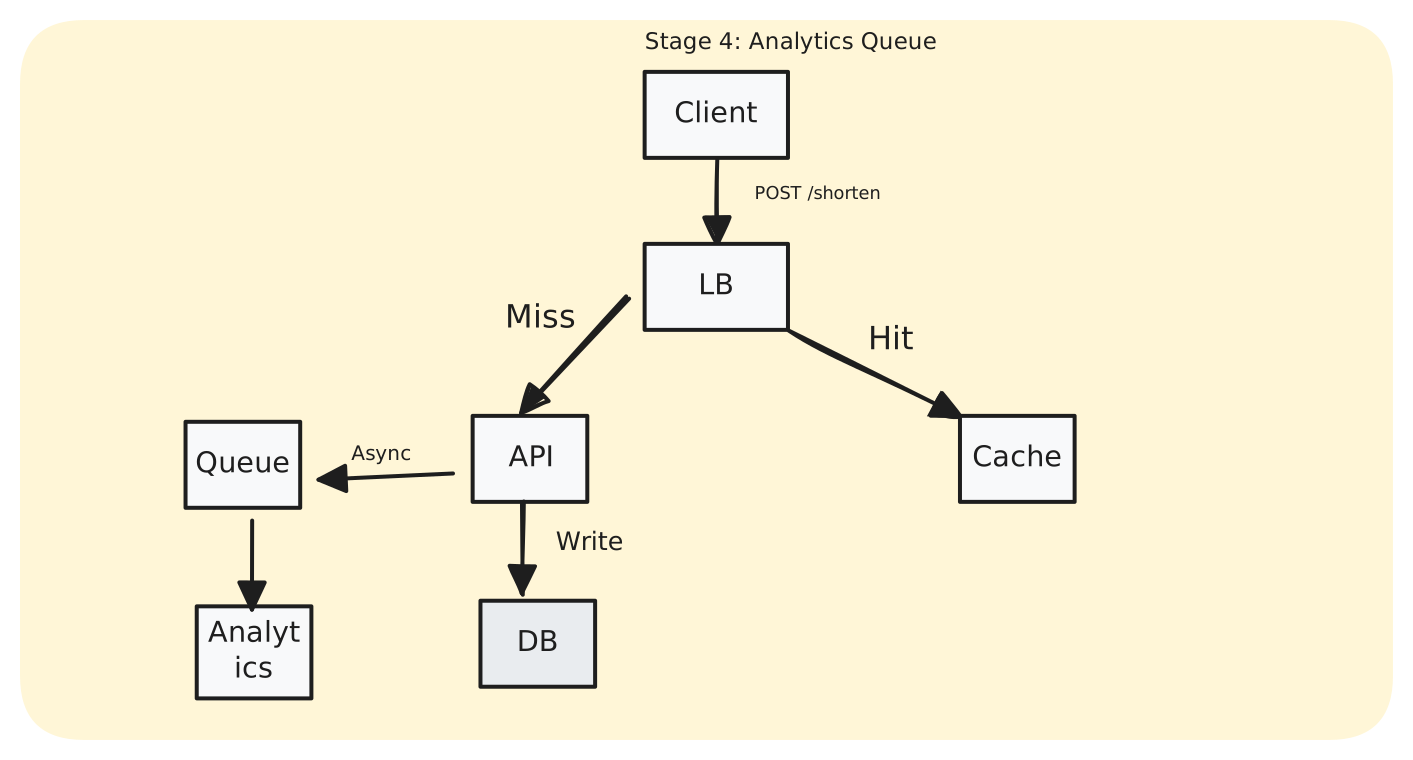
We want click analytics, but can't slow down redirects. Queue + workers process async.
Key lesson: Good diagrams evolve as requirements evolve. Each component appears only when you explain its necessity. This approach shows clear thinking and helps interviewers follow your design process.
Label Everything
In an interview, unlabeled boxes are useless. Always write:
- Component names (API Server, Redis, PostgreSQL)
- Arrow labels (HTTP, Write, Publish)
- Data flow direction (numbered if complex)
Use Consistent Layout
- Left to right or top to bottom for main flow
- Databases at the bottom (they are the foundation)
- External services on the sides (they are dependencies)
- Keep related things close
Drawing Tips
Use Excalidraw for quick diagrams:
- Rectangles = services, Cylinders = databases (always)
- Solid arrows = sync, Dashed = async
- Label every arrow ("POST /api", not "API Call")
- Keep layout clean: left-to-right or top-to-bottom
- Start with Client → Service → Database, then add complexity
Interview Signal: What Interviewers Actually Watch For
Interviewers care less about the diagram itself and more about:
- Why you added each component - Can you justify every box and arrow?
- Whether you noticed failure points - Do you proactively identify weaknesses?
- Whether complexity appears only when justified - Are you adding tech because it's necessary or because it sounds impressive?
A simple diagram with clear reasoning beats a complex diagram with buzzwords every time.
The diagram is a communication tool, not a test of your drawing skills. If you're explaining your thinking clearly while drawing, you're doing it right.
Common Diagram Drawing Mistakes
Even experienced engineers make these mistakes. Catch them early and your diagrams will be 10x clearer.
Mistake 1: Unlabeled Arrows
The problem:

You know what's happening, but does the interviewer? Are those HTTP requests? gRPC? WebSocket connections?
The fix:

Label every arrow with the operation or protocol. "HTTP GET", "Write", "Pub/Sub", "Query"—anything that makes the data flow obvious.
Mistake 2: Backwards Data Flow
The problem: Arrows pointing in the wrong direction:
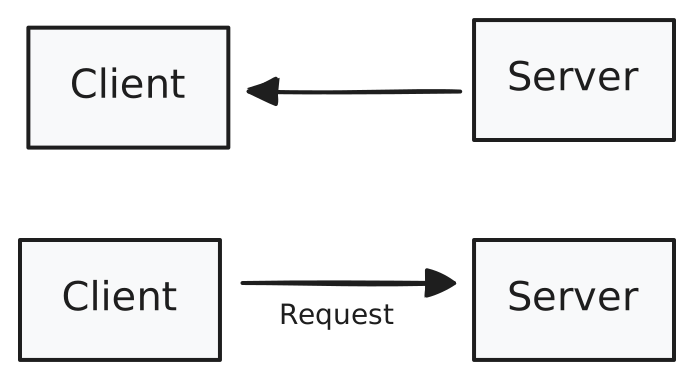
This looks like the server is requesting something from the client. Confusing.
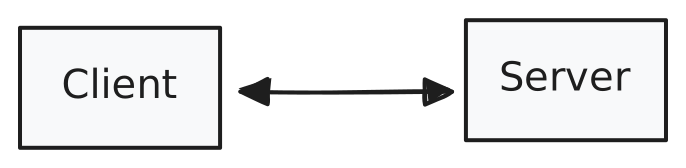
The fix: Arrows should point in the direction data flows.
For bidirectional communication, use double arrows or two separate arrows with clear labels:
Mistake 3: Inconsistent Shapes
The problem: Using random shapes for similar components:
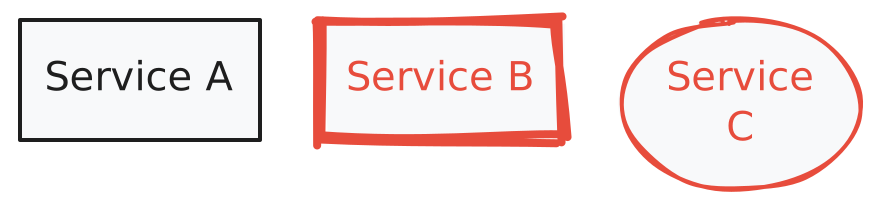
Are these different types of services? Or did you just forget which shape you were using?
The fix: Pick one representation and stick with it:

Reserve different shapes for different types of components (rectangles for services, cylinders for databases).
Mistake 4: Mystery Boxes
The problem: Components with vague names:

What API? What logic? What kind of store?
The fix: Be specific:

Name your components with their actual technology or purpose. "PostgreSQL" is clearer than "DB". "Order Service" is clearer than "Logic".
Keep related components close. Use consistent spacing. Minimize arrow crossings.
Mistake 5: Over-Engineering Too Early
The problem: Starting with complex architecture before understanding requirements.
Before you've even explained what the system does.
The fix: Start simple, add complexity only when you explain why in stages:
Build it up component by component as you discuss requirements.
Mistake 6: No Visual Hierarchy
The problem: Everything is the same size and importance. This doesn't show what's critical vs. what's auxiliary.
The fix: Use size, position, or grouping to show importance.
Red Flags in Architecture Diagrams
Every good pattern has a failure mode. Let's look at what goes wrong when diagrams ignore fundamentals—these are the warning signs that indicate weak system design.
Red Flags Interviewers Watch For
1. Single Points of Failure
One box with many arrows pointing to it, no backup.
What happens: Database goes down at 3 AM. Your entire application stops working. No reads, no writes, no service. Users see error pages. Your on-call engineer gets paged.
Real example: Early Instagram had a single PostgreSQL instance. When it went down, the entire service went offline. They had to scramble to add read replicas and failover.
Fix:
- Add read replicas for redundancy
- Set up automatic failover with a standby database
- Use a managed database service (RDS, Cloud SQL) that handles this automatically
- At minimum, have backups and a tested restore process
2. Everything Talks to Everything
Spaghetti architecture—every service calls every other service.
What happens: One service has a bug and slows down. Now every other service that depends on it also slows down. Debugging becomes impossible because you can't tell where a problem started. Deploying any service is risky because it might break something unexpected.
Real example: This is what happens when microservices go wrong. Teams can't deploy independently because everything depends on everything. What should have been "fast iteration" becomes "coordinate 10 teams for one deployment."
Fix:
- Introduce an API Gateway or event bus to centralize communication
- Define clear service boundaries—services should only talk to immediate neighbors
- Use event-driven architecture where services publish events instead of calling each other directly
- Draw a dependency graph and eliminate circular dependencies
3. No Caching for Read-Heavy Paths
Arrows going directly from many clients to the database with no cache.
What happens: Your homepage loads slowly because every request hits the database. Database CPU spikes to 100%. Queries start timing out. Users complain about slow load times. Your AWS bill increases because you keep scaling up the database.
Real example: Reddit's early architecture directly queried the database for every page load. When they hit the front page of Digg, the database couldn't handle it and the site went down repeatedly. They added memcached and the problem disappeared.
Fix:
- Add Redis or Memcached in front of the database
- Cache frequently accessed data (user profiles, hot posts, product listings)
- Set appropriate TTLs (time-to-live) based on how fresh data needs to be
- Use CDN for static assets
- Typical pattern: Check cache first → If miss, query database → Store result in cache
4. Synchronous Chains
Long chains of synchronous calls—if any one fails, everything fails:
plaintextClient → A → B → C → D → E → DB (all synchronous)
What happens: Service C has a temporary network hiccup and times out after 30 seconds. Service B waits 30 seconds before timing out. Service A waits another 30 seconds. The client finally gets an error after 90+ seconds. Meanwhile, threads are blocked waiting, and your whole system grinds to a halt. This is called a cascading failure.
Real example: In 2018, a minor issue in one of GitHub's services caused a domino effect that brought down multiple services. The problem? Too many synchronous dependencies without proper timeout and circuit breaker patterns.
Fix:
- Identify which operations don't need immediate responses
- Add message queues (SQS, RabbitMQ, Kafka) for async processing
- Use circuit breakers to fail fast instead of waiting
- Set aggressive timeouts (better to fail fast than wait forever)
- Example: Order confirmation can be sync, but sending confirmation email should be async
5. Missing Monitoring
What happens: System fails, you don't know which service is the problem.
Fix: Add logging (CloudWatch, Datadog), metrics (Prometheus), and health checks. Mention "Monitoring" in your diagram.
Key Takeaways
-
Learn the visual vocabulary: Rectangles for services, cylinders for databases, arrows for data flow. Master this alphabet.
-
Read diagrams methodically: Entry point → Happy path → Data stores → Scale patterns → Failure points.
-
Recognize common patterns: Three-tier, microservices, event-driven, CQRS. Know what each solves.
-
Draw incrementally: Start simple, add complexity only when you explain why it is needed.
-
Watch for red flags: Single points of failure, spaghetti connections, missing caches, synchronous chains.
Practice: Building Your Diagram Reading Skills
Level 1: Guided Practice
Let's practice the five-step reading method with a concrete example. Here's a simplified Twitter-like feed architecture:
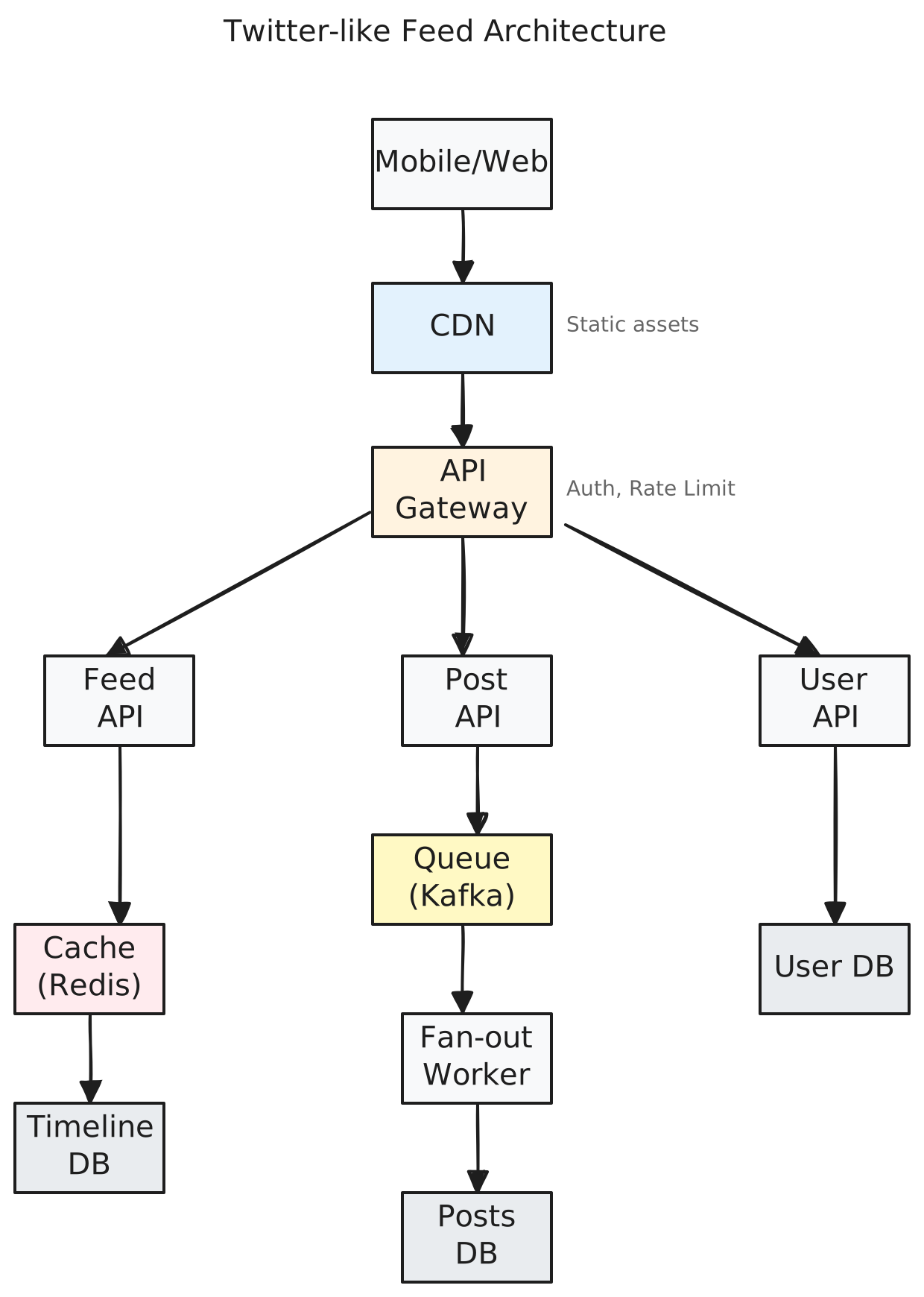
1. Entry Point:
- Users come through Mobile/Web clients at the top
- CDN handles static assets (images, CSS, JS)
- API Gateway is the actual entry point for dynamic requests—handles auth and rate limiting
2. Happy Path:
- Reading feed: Client → API GW → Feed API → Check Redis cache → If miss, query Timeline DB → Return posts
- Creating post: Client → API GW → Post API → Queue → Fan-out Worker → Write to Posts DB and followers' timelines
3. Data Stores:
- User DB: User profiles, follower relationships
- Posts DB: Actual post content
- Timeline DB: Pre-computed feeds for each user
- Redis Cache: Hot timelines, frequently accessed posts
4. Scaling Patterns:
- Three API services (Feed, Post, User) - can scale independently based on load
- Cache layer (Redis) - reduces database load for reads
- Message queue (Kafka) - decouples post creation from fan-out (async processing)
- Fan-out worker - can scale horizontally to handle post distribution
5. Failure Points:
- API Gateway is a single point of entry (likely has redundancy in production, but not shown)
- Kafka queue - if this fails, posts can't be distributed to followers
- Timeline DB - if down, users can't see feeds (cache helps but eventually expires)
- No retry mechanism shown - if fan-out worker fails, post might not reach all followers
Improvements I'd suggest:
- Add retry logic for fan-out failures
- Show database read replicas for scaling reads
- Add health checks and monitoring
Level 2: Practice
Study real architectures:
Apply the five steps: Entry point → Happy path → Data stores → Scale patterns → Failure points
What is Next
You've learned to visualize systems with diagrams. But how do you know if that design actually works? That's where math comes in. In the next lesson, we'll learn Back-of-the-Envelope Calculations which is a the skill that lets you size your architecture before you build it. You'll learn to look at a diagram and say this database will die at 10,000 users or this cache will handle it fine. Let's do the math.