Scalability Fundamentals

In the last lesson, you calculated that Instagram needs ~150 petabytes of storage and handles 50,000+ requests per second. Those are big numbers. But here's the question that should immediately follow: how do you actually build something that handles that load?
Imagine you run a small coffee shop. Ten customers? Easy. You make each coffee yourself. A hundred customers during morning rush? You're sweating, but manageable. A thousand customers show up because you went viral on social media? Your single espresso machine catches fire.
This is scalability in a nutshell. Systems that work at small scale break at large scale. The architecture that serves 100 users will collapse at 100,000. The design that handles 100,000 will struggle at 10 million.
But here's what took me years to internalize: most scalability problems are solved by throwing money at them, not clever engineering. A bigger espresso machine. A bigger server. More RAM, faster SSDs. The clever engineering comes later, when money stops being enough.
This lesson teaches you how systems grow and what decisions you'll face at each stage.
What You Will Learn
- The two fundamental approaches to scaling (and when to use each)
- Why stateless design is non-negotiable for growth
- How to identify what's actually slow before you scale
- The scaling ladder: what to do at 1K, 10K, 100K, and 1M users
- Real examples from Instagram and other companies
- The trade-offs every scaling decision involves
Two Ways to Scale: The Restaurant Analogy
When your coffee shop can't handle the morning rush, you have exactly two choices:
Option 1: Buy a bigger espresso machine (Vertical Scaling)
Your current machine makes 100 cups/hour. Buy one that makes 500 cups/hour. Same setup, more capacity. In server terms: more CPU, more RAM, faster disks.
Option 2: Open more locations (Horizontal Scaling)
Instead of one shop making 500 cups, have five shops each making 100 cups. More machines, distributed load. In server terms: add more servers.
That's it. Every scaling strategy in computing is one of these two approaches, or a combination.
Why You Should Start Vertical
Here's advice that might surprise you: vertical scaling is underrated.
Think about it. Upgrading your espresso machine is simple. You don't need to coordinate between locations. You don't need to figure out which customer goes to which shop. You just make more coffee but faster.
The same applies to servers. A $20/month VPS handles more than most side projects will ever need. A $200/month server handles 10x that. A $2,000/month beast handles 100x.
Instagram ran on one PostgreSQL database until they hit 30 million users. Their 2011 stack:
- 3 nginx load balancers
- 25 Django app servers
- 1 PostgreSQL primary + 1 replica
- 6 Memcached servers
- Total cost: ~$50K/month
That's it. 30 million users. One database.
The lesson? Don't prematurely optimize for scale you don't have. Vertical scaling buys time, and time lets you ship features that actually matter.
When Vertical Hits Its Limits
But here's the thing about that mega espresso machine: eventually, there's no bigger machine to buy.
AWS's biggest instances top out around 96 cores and 2TB RAM (these numbers keep growing, but there's always a ceiling). More critically, one server means one point of failure. If your single mega-machine dies at 3 AM, your entire business is offline.
Go horizontal when:
- You've maxed out reasonable hardware upgrades
- You need high availability (can't afford any downtime)
- Traffic is spiky and unpredictable (Black Friday, viral moments)
- Multiple smaller servers cost less than one giant server
The catch? Opening multiple coffee shop locations is complicated. You need to figure out which customer goes where. You need each location to have the same menu. If a customer starts an order at Location A and finishes at Location B, things get messy.
This is exactly what happens with horizontal scaling. You need load balancing (directing customers to locations). You need shared state (so any location can serve any customer). Things that were simple become complex.
The Golden Rule of Scaling
Start vertical, but write code that doesn't prevent horizontal scaling later.
This mostly means one thing: don't store important information only in one server's memory. More on this next.
The Stateless Imperative: Why Servers Can't Have Memories
Let's go back to our coffee shop analogy. Imagine a customer walks into Location A and says, "I'll have my usual." The barista knows them and makes their oat milk latte.
Next day, same customer walks into Location B. "I'll have my usual." The barista stares blankly. "What's your usual?"
This is exactly what happens with stateful servers. User logs into your app. Their session is stored in memory on Server A. Next request gets routed to Server B. Server B has no idea who they are. User sees a login page. They're confused. They're angry. They leave.
This is why horizontal scaling requires stateless servers.
A stateless server is like a barista who doesn't remember any customer. Instead, every customer carries a card with their preferences. Show the card to any barista at any location, and they can make your drink. The information travels with the request, not stored in the server's memory.
Bad: state in memory
javascriptconst sessions = {}; // dies on restart, breaks with multiple servers app.post('/login', (req, res) => { const sessionId = generateSessionId(); sessions[sessionId] = { userId: 'user_123', preference: 'oat milk latte' }; res.cookie('sessionId', sessionId); }); app.get('/order', (req, res) => { const session = sessions[req.cookies.sessionId]; // If load balancer routes to different server, session is undefined! res.json({ drink: session.preference }); // crashes });
Good: state in Redis
javascriptapp.post('/login', async (req, res) => { const sessionId = generateSessionId(); await redis.setex(`session:${sessionId}`, 3600, JSON.stringify({ userId: 'user_123', preference: 'oat milk latte' })); res.cookie('sessionId', sessionId); }); app.get('/order', async (req, res) => { const session = JSON.parse(await redis.get(`session:${req.cookies.sessionId}`)); // Works on any server - state is external res.json({ drink: session.preference }); });
What to externalize (the customer card approach):
| Local State (Bad) | External State (Good) | Why |
|---|---|---|
| Sessions in memory | Sessions in Redis | Any server can validate |
| Uploaded files on disk | Files in S3 | Any server can serve |
| Background jobs in memory | Jobs in SQS/RabbitMQ | Any server can process |
| Logs on local disk | Logs in CloudWatch/Datadog | Centralized debugging |
| Cache in local memory | Cache in Redis/Memcached | Shared across servers |
With external state, your servers become interchangeable. Load balancers can route requests anywhere. One server dies? Another picks up seamlessly. This is the foundation of horizontal scaling.
Find the Bottleneck First: Don't Scale Blindly
Here's a mistake I've seen too many times: a team sees slow performance and immediately says we need more servers. They spin up three more app servers, put them behind a load balancer, and... nothing changes. The site is still slow.
Why? Because the database was the problem, not the app servers. Adding more app servers just meant more servers waiting on the same overloaded database.
A system is only as fast as its slowest component. Think of it like a highway with a two-lane bridge. You can have 10 lanes leading to the bridge, but everyone still crawls through those two lanes.
Before you scale anything, figure out what's actually slow.
If your database handles 1,000 queries/second but your app servers only generate 500, adding database capacity does nothing. You need more app servers.
The bottleneck shifts as you scale (This varies but a good way to think about it):
| Users | Typical Bottleneck |
|---|---|
| 0-10K | Single server CPU |
| 10K-100K | Database connections |
| 100K-500K | Cache misses on deploy |
| 500K-1M | Database write throughput |
| 1M+ | Cross-region latency |
From the trenches: We once spent 2 weeks optimizing database queries. Response times didn't budge. The actual bottleneck? Connection pool size. A one-line config change fixed what weeks of query optimization couldn't.
How to Find It
Add basic monitoring. At minimum:
- App servers: CPU, memory, request latency (P50, P95, P99)
- Database: query time, active connections, disk I/O
- Cache: hit rate
Look at your slowest requests (P99 latency). Trace where time goes:
plaintextTotal: 2,000ms ├── App logic: 50ms ├── Query 1: 30ms ├── Query 2: 1,800ms ← Here's your problem └── Response: 120ms
Fix the slow query, whole system gets faster. Don't guess but measure.
Scaling Each Layer
Application Servers (Easy)
App servers are the easiest to scale horizontally. Put them behind a load balancer. Add more when you need them.
How many?
plaintextServers = Peak QPS / QPS per server × 1.5 safety margin
If you expect 10,000 requests/second at peak and each server handles 2,000:
plaintext10,000 / 2,000 × 1.5 = 7.5 → 8 servers
Add one more for redundancy. If you need 8 to handle peak and one dies, you can't handle peak.
Auto-scaling config that works:
- Scale up when CPU > 70% for 3 minutes
- Scale down when CPU < 30% for 15 minutes
- Minimum instances: enough to survive one failure
- Cooldown between scaling: 5 minutes (prevents thrashing)
Thrashing is basically more time spent in scaling up/down rather than handling the requests.
Database (Hard)
Databases hold state. That makes them hard to scale.
Step 1: Vertical first. Bigger instance, more RAM, SSDs. A beefy PostgreSQL server handles 15,000-20,000 simple queries/second.
Step 2: Read replicas. Most apps are read-heavy. Send writes to primary, reads to replicas.
The catch is replication lag. We measured ours over a week ( These numbers depends on the set up):
- P50: 12ms
- P95: 180ms
- P99: 2.1 seconds
- Max: 47 seconds (during backups)
Users would update their profile, refresh, see old data.
Route critical reads (user's own data) to primary. Non-critical reads (feed, search results) can be slightly stale.
Step 3: Sharding (last resort). Split data across multiple databases. Users A-M on Shard 1, N-Z on Shard 2.
Sharding is painful. Cross-shard queries are expensive. Joins across shards are nearly impossible. Rebalancing data when you add shards is a nightmare.
Delay sharding as long as possible. Caching and read replicas get you surprisingly far.
Cache (Easy, But Has Gotchas)
Put Redis in front of your database. With 90% cache hit rate, your database sees 10x less load.
The key design mistake: A friend shared that (Slightly altered) they are caching user:123:posts (all posts for a user). Should have been user:123:posts:page:1. One change took their hit rate from 40% to 94% and dropped their Redis cluster from 10 nodes to 3.
The thundering herd problem: Popular cache entry expires. Thousands of requests simultaneously hit the database. Database dies.
Solutions:
- Staggered TTLs (add random jitter)
- Lock on cache miss (only one request fetches, others wait)
- Never expire hot keys (update in background)
The Scaling Ladder: A Roadmap
Most systems follow a predictable progression. Here's the roadmap with details on what happens at each stage:
Stage 1: The Single Server (0-1K users)
Everything runs on one machine: web server, application code, database.
Why it works: Simple. One server to monitor, one server to deploy to, one server to debug. A $50/month server handles this easily.
When to move on: When you can't fit everything on one server, or when you need redundancy.
Stage 2: Separate the Database (1K-10K users)
Move the database to its own server. Now they can scale independently.
Why it helps: Database can have more RAM for caching. App server can have more CPU for processing. If the app server crashes, your data is safe.
Stage 3: Add Caching (10K-50K users)
Put Redis between your app and database. Cache frequent queries.
Why it helps: 90% of requests hit cache, database load drops 10x. Response times improve dramatically.
Stage 4: Multiple App Servers (50K-100K users)
Add a load balancer and multiple app servers. This is where horizontal scaling begins.
Why it helps: More capacity, plus redundancy. If one app server dies, others keep serving.
Stage 5: Read Replicas (100K-500K users)
Database becomes the bottleneck. Add read replicas.
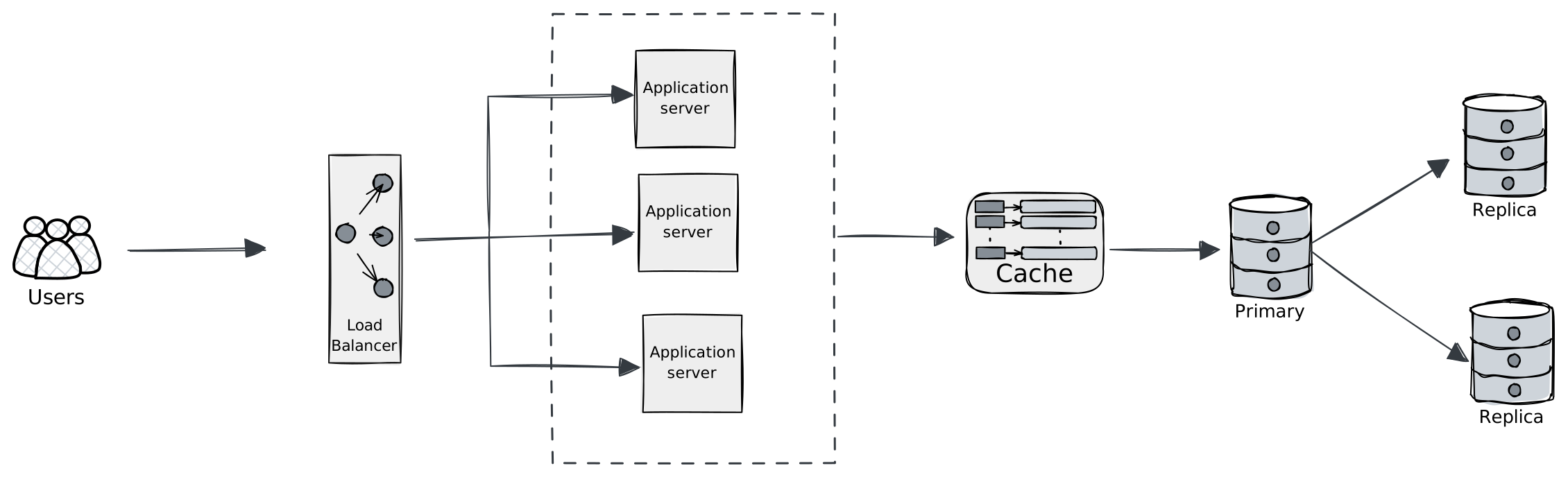
Why it helps: Reads (typically 90% of traffic) spread across replicas. Primary handles writes only.
Stage 6: CDN for Static Assets (500K-1M users)
Offload images, CSS, JS to a CDN. Users download from servers near them.
Why it helps: Faster load times globally. Less load on your servers.
Stage 7: Sharding (1M+ users)
Only when absolutely necessary. Split data across multiple database clusters.
Why it's painful: Cross-shard queries, no joins, rebalancing nightmares. Delay as long as possible.
The key insight: Each stage solves a specific bottleneck. Don't skip ahead. Don't shard when you haven't tried caching. Don't add microservices when a monolith works fine.
Trade-offs to Remember
Consistency vs Availability: Strong consistency means reads are always fresh, but system may reject requests during failures. Eventual consistency stays available but may serve stale data. Social feeds? Eventual is fine. Bank balances? Need strong.
Simplicity vs Scale: Monolith + single database is easy to build, scales to ~100K users. Microservices + sharded databases scale to billions, but are 10x harder to build and operate.
Latency vs Throughput: Batching increases throughput (more operations per second) but adds latency (each operation waits longer). Real-time games need low latency. Analytics can batch.
Choose the simplest thing that works. Add complexity only when you hit actual limits, not theoretical ones.
Key Takeaways
Start vertical. A big single server gets you further than you think. Instagram: 30M users, one database.
Stateless servers are mandatory for horizontal scaling. Move sessions, files, and jobs to external storage.
Measure before you scale. The bottleneck is rarely where you think it is.
Database scaling is hard. Exhaust caching and read replicas before considering sharding.
Every scaling decision is a trade-off. Know what you're giving up.
What's Next
You know how to scale systems. But scaling requires distributing load across servers, which means understanding how servers talk to each other. Next up: Networking Fundamentals where we'll cover DNS, TCP/IP, HTTP, and the plumbing that makes distributed systems possible.