Networking Fundamentals

Remember our coffee shop from the last lesson? We scaled from one location to five. Customers are distributed across locations. But here's a question we skipped: how does a customer even find your coffee shop?
In the physical world, they use Google Maps. Type Best Coffee Shop, get an address, follow directions. Simple.
In the internet world, the same thing happens, just with different names. Your browser needs to find where pranaybathini.com actually lives. It needs directions. It needs to establish a connection. And it needs to do all of this securely.
This is networking. And when someone says the app is slow, understanding networking is how you figure out whether the problem is the coffee shop (your server) or the directions to get there (the network).
What You Will Learn
- How DNS works (the internet's Google Maps)
- Why TCP connections take time to establish
- The difference between latency and bandwidth (and why it matters)
- How HTTP and HTTPS work
- Connection pooling and why it's crucial for performance
- How to debug common network issues
- Timeout strategies that prevent cascading failures
The Journey of a Request: Following the Directions
When you visit a website, here's what actually happens:
plaintext1. Browser asks DNS: "What's the IP for pranaybathini.com?" 2. Browser opens TCP connection to that IP 3. Browser negotiates TLS encryption (HTTPS) 4. Browser sends HTTP request 5. Server responds 6. Browser renders the page
Each step can fail. Each step can be slow. Let's understand each one.
DNS: The Internet's Address Book
Think of DNS as the contact list on your phone. You don't memorize phone numbers. You save as Mom and your phone knows to dial 555-123-4567.
DNS works the same way. Humans remember names (google.com). Computers need numbers (142.250.80.14). DNS translates between them.
How it works: When you type pranaybathini.com, your browser asks a DNS resolver (like your phone's contact list). The resolver might already know the answer (cached). If not, it asks a chain of servers until it finds Google's authoritative DNS server, which says pranaybathini.com lives at 64.29.17.65.
This lookup typically takes 10-100ms for a fresh request, but results are cached at multiple levels (browser, operating system, ISP), so repeated lookups are nearly instant.
Why DNS Matters for System Design
DNS-based load balancing is a simple way to distribute traffic. Configure your DNS to return different IPs for the same domain:
plaintextRequest 1: pranaybathini.com → 10.0.0.1 (Server A) Request 2: pranaybathini.com → 10.0.0.2 (Server B)
But it has serious limitations:
- No health checks: DNS happily returns IP addresses of dead servers
- Slow updates: Caching means changes take minutes to hours to propagate
- No intelligence: Can't route based on server load or capacity
GeoDNS is smarter as it returns different IPs based on where the user is located. User in India gets an IP for your Mumbai datacenter. User in the US gets your Virginia datacenter. This reduces latency by routing users to nearby servers.
TTL (Time To Live) controls caching duration. Short TTLs (60 seconds) let you change IPs quickly during outages. Long TTLs (1 day) reduce DNS lookup overhead but make failover slow.
Rule of thumb: For critical services, use 1-5 minute TTLs. You want the ability to redirect traffic quickly when things break.
TCP: The Polite Introduction
Imagine you're calling someone on the phone. Before you can talk, there's a ritual:
- You: "Hello?"
- Them: "Hello, who's this?"
- You: "It's Pranay, can we talk?"
- Them: "Sure, go ahead."
Only then do you start the actual conversation. TCP works the same way with its three-way handshake:
plaintextClient: "Hey, want to talk?" (SYN) Server: "Sure, let's talk" (SYN-ACK) Client: "Great, here we go" (ACK)
This handshake guarantees both sides are ready. But it costs time which is one full round-trip before any actual data flows.
For a server in the same datacenter, this is ~1ms. No big deal. For a server across the world? That's 150ms of just saying hello. For every new connection.
UDP is the rude alternative. No handshake, no guarantees. It just starts sending data and hopes for the best. Packets can arrive out of order or not at all. But it's faster. Use UDP for real-time stuff (video calls, games) where pretty good most of the time beats perfect but delayed.
Latency vs Bandwidth: The Highway Analogy
These two concepts confuse people constantly. Let me make it simple.
Latency is how long it takes for data to travel from A to B. Think of it as the length of a highway. A 100 kilometer highway takes time to drive, no matter how fast you go.
Some numbers to give perspective:
plaintextSame datacenter: 0.5 ms (across the room) Same region: 5-20 ms (across the city) Cross-continent: 50-100 ms (New York to LA) Around the world: 150-300 ms (New York to Tokyo)
Light in fiber travels ~200km per millisecond. New York to London is ~5,500km = 27ms one way, 55ms round trip. No amount of money or engineering beats physics.
Bandwidth is how much data can flow at once. Think of it as how many lanes the highway has. More lanes = more cars at the same time.
Some numbers to give perspective:
plaintextHome internet: 100 Mbps - 1 Gbps (2-4 lanes) Datacenter: 10-100 Gbps (hundreds of lanes)
The key insight: More bandwidth doesn't reduce latency. They're different problems with different solutions.
HTTP: The Conversation Protocol
HTTP is how your browser talks to servers. Think of it like a formal letter exchange:
The Request (your letter):
plaintextPOST /api/orders HTTP/1.1 ← Method + Path + Version Host: api.coffeeshop.com ← Which server Authorization: Bearer abc123 ← Who you are Content-Type: application/json ← What format {"drink": "latte", "size": "large"} ← The actual content
The Response (their reply):
plaintextHTTP/1.1 201 Created ← Status code Content-Type: application/json {"order_id": 456, "status": "preparing"}
HTTP Methods: What You're Asking For
| Method | Purpose | Example |
|---|---|---|
| GET | Retrieve data | Get user profile |
| POST | Create something new | Place an order |
| PUT | Replace entirely | Update entire profile |
| PATCH | Partial update | Change just the email |
| DELETE | Remove | Cancel an order |
Status Codes: What Happened
Think of these as the tone of the reply:
2xx - Success (thumbs up)
200 OK- Here's what you asked for201 Created- Made the new thing you wanted204 No Content- Done, nothing to say
3xx - Redirect (go elsewhere)
301 Moved Permanently- It's at a new address forever302 Found- Temporarily somewhere else
4xx - Client Error (you messed up)
400 Bad Request- Your request doesn't make sense401 Unauthorized- Who are you? Log in first403 Forbidden- I know who you are, but you can't do this404 Not Found- That doesn't exist429 Too Many Requests- Slow down, you're being rate limited
5xx - Server Error (we messed up)
500 Internal Server Error- Something broke on our end502 Bad Gateway- The server behind us is broken503 Service Unavailable- We're overloaded or down for maintenance
HTTP Versions: Getting Faster
HTTP/1.1: One request at a time per connection. Browsers work around this by opening 6 parallel connections.
HTTP/2: Multiplexes multiple requests on one connection. Compresses headers. The modern default.
HTTP/3: Uses QUIC instead of TCP for even faster connection setup. Emerging for latency sensitive applications like video streaming.
HTTPS: Not Optional
Without HTTPS, anyone on the network can read your data, modify it in transit, or impersonate your server. HTTPS is not optional for any production system.
HTTPS = HTTP + TLS encryption. TLS requires a handshake to establish encryption:
- TLS 1.2: 2 round trips before data flows
- TLS 1.3: 1 round trip (or 0 with session resumption)
For a 100ms round trip, TLS 1.2 adds 200ms. TLS 1.3 cuts this in half. Use TLS 1.3.
Certificate management: Certificates expire. Automate renewal with Let's Encrypt or AWS ACM. Monitor expiration dates as expired certs cause outages.
TLS termination: Most systems decrypt HTTPS at the load balancer. Simpler for backends, though they see plaintext internally. If you need end-to-end encryption, terminate at the application (costs more CPU).
Connection Management: Don't Rebuild the Road Every Trip
Remember all those steps to establish a connection? DNS lookup, TCP handshake, TLS handshake. For a server 50ms away, that's 150-200ms before any actual data flows.
Now imagine doing that for every single request. User clicks a button? 200ms of handshaking. Loads an image? Another 200ms. Fetches data? 200ms more. Your app feels sluggish even though your server responds in 5ms.
Keep-Alive: Leave the Phone Line Open
Old phones required dialing for each call. Modern phones can keep the line open.
HTTP/1.1 introduced keep-alive connections:
plaintextWithout keep-alive: [dial][talk][hang up] -> [dial][talk][hang up] -> [dial][talk][hang up] With keep-alive: [dial][talk][talk][talk][talk]...[hang up later]
One handshake, many requests. Modern browsers and servers enable this by default.
Connection Pooling: A Fleet of Open Lines
For server-to-server communication, connection pooling is essential. Instead of opening a new connection for each request, maintain a pool of ready-to-use connections:
python# Slow: new connection every time (like dialing for each call) for url in urls: conn = open_connection(url) # 150ms overhead conn.request(url) # 5ms actual work conn.close() # Fast: reuse connections (pool of open lines) pool = ConnectionPool(max_size=20) for url in urls: conn = pool.get_connection() # Nearly instant conn.request(url) # 5ms actual work pool.return_connection(conn)
Watch for connection leaks: If code borrows a connection but forgets to return it, the pool slowly drains until nothing works. Always use try/finally:
pythondef query(): conn = pool.get_connection() try: return conn.query("SELECT ...") finally: pool.return_connection(conn) # Always return!
Server-Side Connection Limits
Every open connection consumes server memory. Servers enforce limits:
plaintextMySQL: max_connections = 151 (default) PostgreSQL: max_connections = 100 (default) Redis: maxclients = 10000 (default)
When these limits are hit, new connections wait or fail. I've seen production outages where the database was barely working not because queries were slow, but because connection limits were exhausted. Check your connection pool sizes and server limits.
Latency Budgets
When your system is slow, you need to know where time goes. Break down a request:
plaintextTotal: 200ms ├── Network to server: 50ms ├── App processing: 10ms ├── Database query: 30ms ├── Network to client: 50ms └── Buffer: 60ms
If any component exceeds its budget, overall latency fails.
Measure percentiles, not averages. P50 (median) is fine, but P99 matters more. An average of 50ms hides the fact that 1% of users wait 2 seconds.
plaintextAverage: 50ms (looks great!) P99: 2000ms (1% of users are furious)
Reducing Latency
| Technique | What it fixes |
|---|---|
| Caching | Avoids repeated slow work |
| Connection pooling | Eliminates connection setup |
| CDN | Reduces network distance |
| Async processing | Removes work from critical path |
| Database indexes | Speeds up queries |
Some latency is physics. To serve global users fast, put servers near them (CDNs, multi-region deployment).
Timeouts: Non-Negotiable
Every network call needs a timeout. Without one, a stuck dependency blocks your service forever.
Recommended timeouts:
- Database queries: 5-30 seconds
- Internal API calls: 1-5 seconds
- External API calls: 5-10 seconds
- User-facing requests: 30 seconds total
Cascading timeouts matter: If Service A calls B calls C:
plaintextA's timeout to B: 5 seconds B's timeout to C: 3 seconds (must be less)
If B's timeout is longer than A's, A gives up before B even finishes. Always make downstream timeouts shorter than upstream.
Network Architecture Basics
Public vs Private Networks
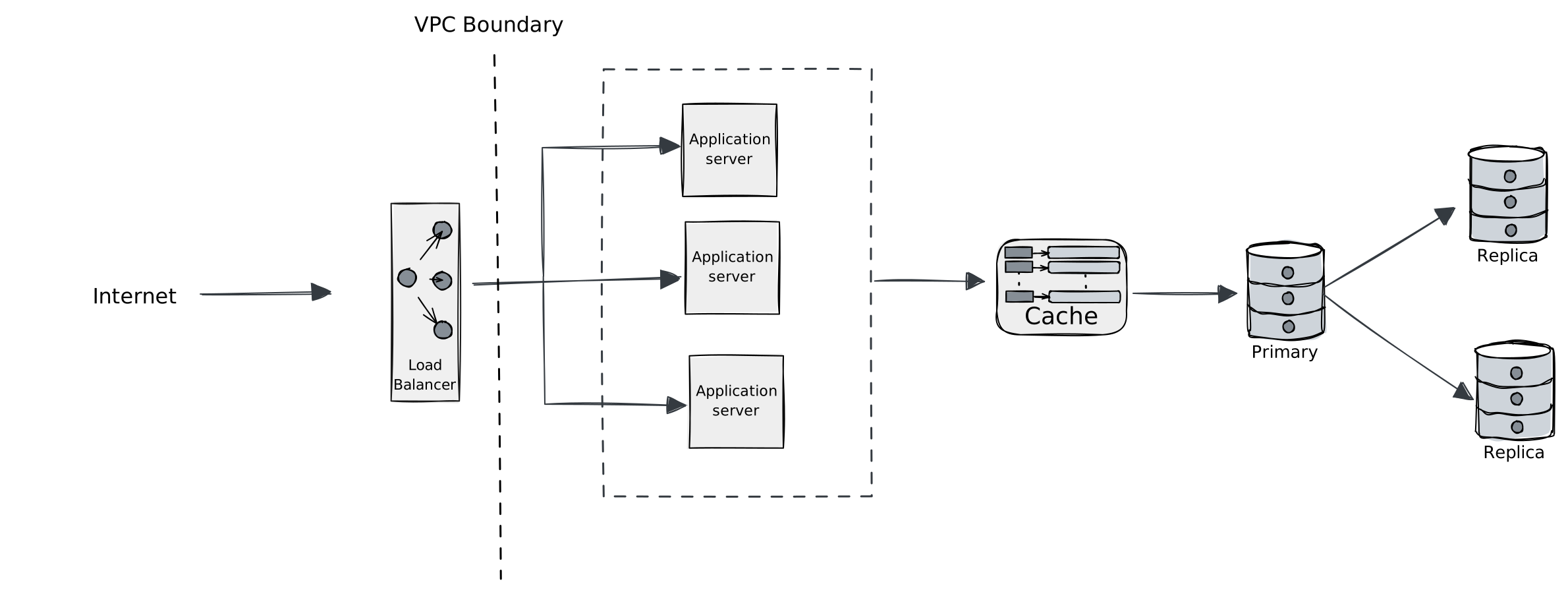
Only load balancers need public IPs. App servers and databases stay in private subnets. Databases should never be directly internet-accessible.
Service-to-Service Communication
Direct HTTP: Simple but tight coupling. Service A must know Service B's location.
Message queue: Service A → Queue → Service B. Decoupled and async, but adds latency.
Service mesh: Sidecars handle discovery, load balancing, and encryption. More infrastructure, but cleaner application code.
Debugging Network Issues
High latency:
- Check user locations (maybe they're far from servers)
- Measure DNS lookup time (should be <50ms)
- Count connections being opened (should reuse)
- Trace the request path (find slow dependencies)
Connection timeouts:
- Server overloaded? Scale up.
- Connection pool exhausted? Increase pool size or fix leaks.
- Firewall blocking? Check security groups.
Intermittent failures:
- Often DNS issues or connection pool exhaustion
- Add retries with exponential backoff
- Check if you're hitting server connection limits
Key Takeaways
DNS is the first step. Misconfigured DNS causes hard-to-debug failures. Keep TTLs appropriate for your failover needs.
TCP adds latency for reliability. Connection setup takes round trips. Reuse connections with pooling and keep-alive.
Latency and bandwidth are different. Latency is physics (distance). Bandwidth is money (bigger pipe). No amount of bandwidth fixes cross-continent latency.
HTTPS is mandatory. Use TLS 1.3. Automate certificate management.
Every network call needs a timeout. Cascade timeouts correctly so downstream is shorter than upstream.
Keep databases private. Only load balancers need public IPs.
What's Next
Now that you understand how data travels across networks, the next question is: when multiple servers exist, how do you decide which one handles each request? Next up: Load Balancing where we talk about algorithms, health checks, and making sure traffic goes to healthy servers.