
Back to our coffee shop. You now have five locations across the city. Customers know how to find you (DNS from the last lesson). But here's a new problem: all your customers are going to Location 1.
Location 1 has a line out the door. Baristas are overwhelmed. Meanwhile, Locations 2 through 5 are empty. The baristas there are literally playing cards.
This is what happens without load balancing. You have capacity, but it's not being used efficiently.
What you need is someone directing traffic. First customer? Location 1. Second customer? Location 2. Third customer? Location 3. Keep rotating so no single location gets overwhelmed.
In the server world, this is called a load balancer.
What You Will Learn
- What load balancers actually do (more than just distributing traffic)
- The main algorithms for choosing which server gets each request
- Layer 4 vs Layer 7 load balancing
- How health checks prevent sending traffic to dead servers
- Session persistence (sticky sessions) and when to use them
- High availability patterns for the load balancer itself
- Which products to use (cloud vs self-managed)
What Load Balancers Actually Do
Beyond distributing traffic:
Health monitoring - Check if servers are alive, stop sending traffic to dead ones.
SSL/TLS termination - Handle HTTPS encryption so backends don't have to.
Session persistence - Route a user's requests to the same server when needed.
Connection management - Pool connections to backends, handle slow clients.
Content-based routing - Route based on URL paths, headers, cookies.
Why Not Just DNS?
DNS can return different IPs for the same domain (poor man's load balancing), but:
- No health checking. They happily returns dead servers
- Slow failover. DNS caching means users hit dead IPs for hours
- No real-time adaptation to load
- Round-robin only
DNS is fine for geographic distribution. For real load balancing, you need an actual load balancer.
Algorithms
How does the LB decide which server gets each request?
Round Robin
Each server takes a turn.
plaintextRequest 1 → Server A Request 2 → Server B Request 3 → Server C Request 4 → Server A (repeat)
Good for: Identical servers, fast stateless requests.
Bad for: Servers with different capacity, requests with varying duration.
Weighted Round Robin
Same as round robin, but some servers get more traffic:
plaintextServer A (weight 3): 3 out of every 6 requests Server B (weight 2): 2 out of every 6 requests Server C (weight 1): 1 out of every 6 requests
Good for: Mixed server sizes, gradual rollouts (new server gets weight 1, increase over time).
Least Connections
Send to the server with fewest active connections:
plaintextServer A: 10 connections Server B: 5 connections ← route here Server C: 15 connections
Good for: Requests with variable duration (some quick, some slow), WebSockets, long-lived connections.
Gotcha: New servers get flooded initially (0 connections initially).
IP Hash
Hash client IP to pick server. Same IP always goes to same server.
plaintexthash(192.168.1.100) % 3 = 1 → Server B (always)
Good for: Simple session persistence without cookies.
Bad for: Users behind NAT/proxies (many IPs map to same server). Adding/removing servers reshuffles everyone.
Algorithm Choice
| Algorithm | Load-Aware | Persistence | Best For |
|---|---|---|---|
| Round Robin | No | No | Simple, fast requests |
| Weighted RR | No | No | Mixed server sizes |
| Least Connections | Yes | No | Variable request duration |
| IP Hash | No | Yes | Simple persistence |
For most web apps: least connections or round robin with health checks. Don't overthink it until you have a specific problem.
Layer 4 vs Layer 7
Load balancers operate at different network layers:
Layer 4 (Transport): Sees TCP/UDP packets. Knows source/destination IPs and ports. Doesn't understand HTTP.
Layer 7 (Application): Sees full HTTP requests. Can route based on URLs, headers, cookies. Can modify requests.
Use L4 for non-HTTP protocols (databases, custom protocols), maximum performance, simple routing.
Use L7 for HTTP traffic, path-based routing, anything that needs to inspect or modify requests.
Most web apps use L7 because you typically want path-based routing, SSL termination, and the ability to add headers.
Health Checks: Is This Server Alive?
Back to the coffee shop analogy. Your traffic director (load balancer) keeps sending customers to Location 3. But Location 3 had a kitchen fire and is closed. Customers walk in, see the chaos, and leave angry.
The traffic director needs a way to check: "Is this location actually open and serving customers?"
That's what health checks do. The load balancer periodically asks each server: "Are you okay?" Servers that don't respond (or respond with errors) get removed from rotation.
Types of Health Checks
TCP check (basic): Can I knock on the door?
- Load balancer tries to open a connection
- If the connection opens, server is healthy
- Problem: Server might accept connections but the application is crashed
HTTP check (better): Can you serve a customer?
- Load balancer sends a request to
/healthendpoint - If it returns
200 OK, server is healthy - Better because it checks if the application is actually working
Deep check (thorough): Is everything working?
python@app.route('/health') def health(): db.execute("SELECT 1") # Can we reach the database? redis.ping() # Can we reach the cache? return {"status": "ok"}, 200
- Checks that dependencies are also healthy
- Risk: If the database is slow, health check is slow, and server gets marked unhealthy even though it's fine
Health Check Configuration
plaintextInterval: 10 seconds (how often to check) Timeout: 5 seconds (how long to wait for response) Unhealthy threshold: 3 failures (marks server unhealthy after 3 failed checks) Healthy threshold: 2 successes (marks server healthy after 2 passed checks)
Why thresholds matter: You don't want one slow response to remove a server. Requiring 2-3 failures prevents false positives. Similarly, requiring 2 successes before adding a server back prevents flapping.
Common mistake: Timeout longer than interval. Health checks overlap and behave unpredictably. Timeout should always be less than interval.
Connection Draining
When removing an unhealthy server:
plaintextWithout draining: Active requests dropped, users see errors With draining: Wait for active requests to finish, then remove
Always enable connection draining (30-60 second timeout).
Sticky Sessions
Sometimes a user's requests must go to the same server:
- Shopping cart in server memory (bad architecture, but exists)
- WebSocket connections
- Expensive per-user initialization
Methods
Cookie-based: LB sets a cookie with server ID. Subsequent requests read the cookie.
IP hash: Hash client IP to pick server (covered above).
Application-controlled: Store session in Redis. Any server can handle any request.
Avoid If Possible
Sticky sessions create problems:
- Uneven load (users cluster on some servers)
- Server failure = lost sessions
- Harder to scale
Better approach: Store sessions externally (Redis). Any server handles any request. True statelessness.
High Availability
Your load balancer is a single point of failure. Fix it.
Active-Passive
Two LBs, one handles traffic, one monitors via heartbeat. If active fails, passive takes over.
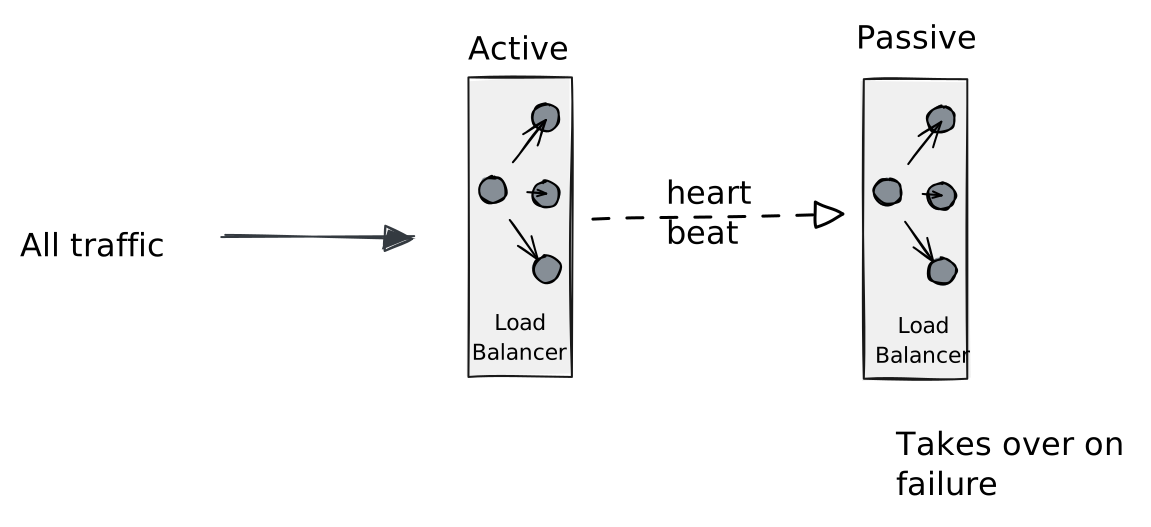
Failover time: 1-30 seconds.
Active-Active
Both LBs handle traffic. DNS returns both IPs.
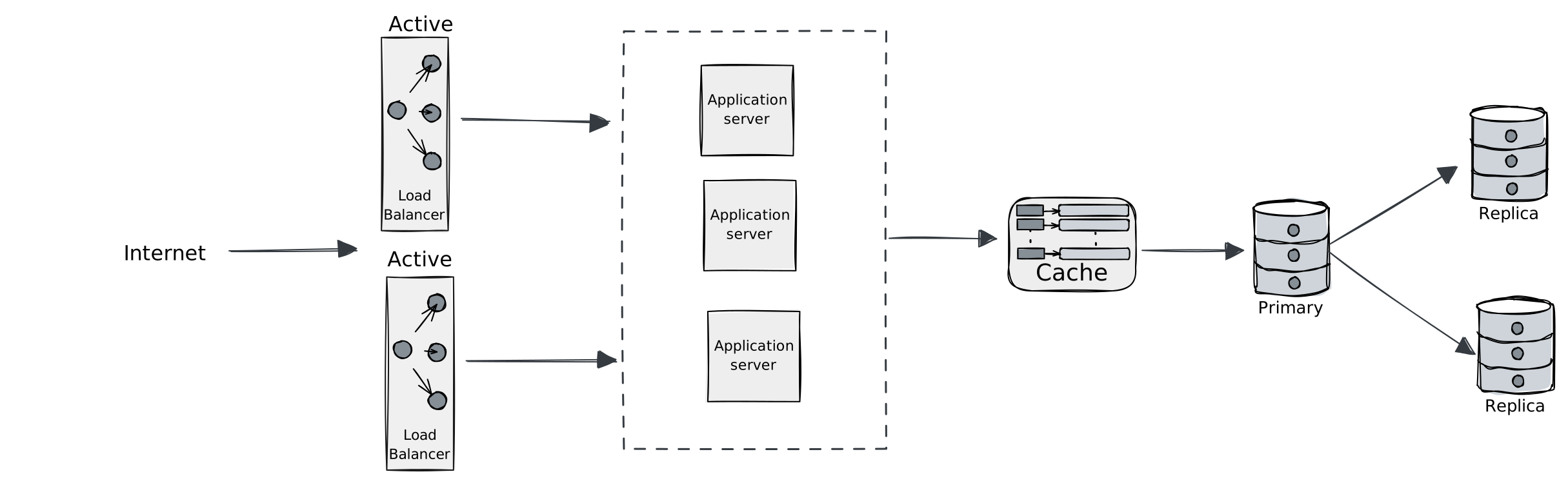
Better utilization, faster failover. More complex.
Products
Cloud-Managed (Recommended to Start)
| Product | Type | Notes |
|---|---|---|
| AWS ALB | L7 | Path routing, WebSocket, ECS/EKS integration |
| AWS NLB | L4 | High performance, static IPs |
| GCP Load Balancer | L4/L7 | Global, auto-scaling |
Pros: No management, scales automatically, integrates with cloud ecosystem.
Cons: Vendor lock-in, can get expensive.
Self-Managed
| Product | Type | Notes |
|---|---|---|
| Nginx | L7 | Versatile, widely used |
| HAProxy | L4/L7 | High performance, battle-tested |
| Envoy | L7 | Modern, service mesh ready |
Pros: Full control, portable, often cheaper.
Cons: You handle operations, scaling, HA.
Recommendation: Start with cloud-managed. Don't run your own until you have a specific reason.
Key Takeaways
Load balancers do more than distribute traffic. Health checking and SSL termination are equally important.
Least connections handles most cases. Round robin for simple setups.
L7 for HTTP, L4 for everything else. Most web apps need L7.
Health checks must be meaningful. TCP checks miss application failures.
Avoid sticky sessions. External session storage is more scalable.
Load balancers need HA too. Active-passive or active-active.
Start with cloud-managed. Operational simplicity beats cost savings early on.
What's Next
Load balancing distributes requests. But what if many requests ask for the same data? Computing it fresh every time is a waste of resources. Next up: Caching Strategies where we avoid repeated work and make systems dramatically faster.