Caching Strategies

Let's continue with out coffee shop analogy. Our coffee shop is now getting popular because a famous influencer posted about it on Instagram. The baristas are great, but there's one problem: every customer who orders an Double Espresso waits 5 minutes while the barista makes it from scratch. Ten customers order the same drink in an hour. That's 50 minutes of making the exact same thing.
What if the barista made a batch in the morning and kept them ready? Customer orders the same and can grab from the ready supply. This way we can serve in 10 seconds instead of 5 minutes.
That's caching. Storing the result of expensive work so you don't have to redo it.
In system design, this expensive work is usually the database queries. Let's assume your database is struggling. Queries that took 10ms before now take 500ms. You're thinking about scaling the database by adding read replicas and even thinking about sharding.
But there is a simpler answer: cache the results.
plaintextWithout cache: Request 1: Query DB (50ms) Request 2: Query DB (50ms) ... Request 1000: Query DB (50ms) Total: 50,000ms of database work With cache: Request 1: Query DB (50ms) → Store in cache Request 2: Read cache (1ms) ... Request 1000: Read cache (1ms) Total: ~1,050ms
50x faster. And the database can breathe now
What You Will Learn
- When caching helps (and when it makes things worse)
- The different types of caches in a system
- Cache-aside pattern: the most common approach
- Write-through and write-behind patterns
- How to handle cache invalidation (the hard problem)
- Common pitfalls: stampedes, penetration, hot keys
- Redis basics for distributed caching
When Caching Helps (and Hurts)
Caching works because of a principle called temporal locality. What does it even mean? It's basically data accessed recently is likely to be accessed again soon.
Cache when:
- Read-heavy workloads (most web apps are 90% reads)
- Expensive computations (product recommendations, search results)
- Data that changes infrequently (product catalogs, user profiles)
- Same data requested by many users (homepage, trending items)
Real examples:
- E-commerce sites cache product details. Thousands of users view the same phone listing.
- Banking apps cache account balance for 30 seconds. Balance doesn't change that often.
- Food delivery apps cache restaurant menus. Menu updates are rare compared to views.
Don't cache when:
- Write-heavy workloads (stock trading, real-time bidding)
- Highly personalized data (your specific cart, your transaction history)
- Real-time requirements (live cricket scores, stock prices)
- Unique requests (one-time reports, custom analytics)
The key metric: hit rate. If 90% of requests hit cache, you're winning. If only 10% hit, you're paying for infrastructure that barely helps.
Types of Caches
Caches exist at multiple levels:
Browser cache: Static assets (CSS, JS, images) cached locally. Control via HTTP headers (Cache-Control: max-age=31536000).
CDN cache: Edge servers cache content close to users. A user in Bangalore gets cached response from Bangalore edge in 20ms instead of US origin in 200ms.
Application cache (in-memory): Your process caches data in its own memory. It is fast, but local to each server. If you have 10 app servers, each has its own cache which is very inconsistent.
Distributed cache (Redis/Memcached): Separate cache service shared by all app servers. This is what most web apps use.
Database cache: The DB itself caches query results and data pages internally.
The Cache Hierarchy
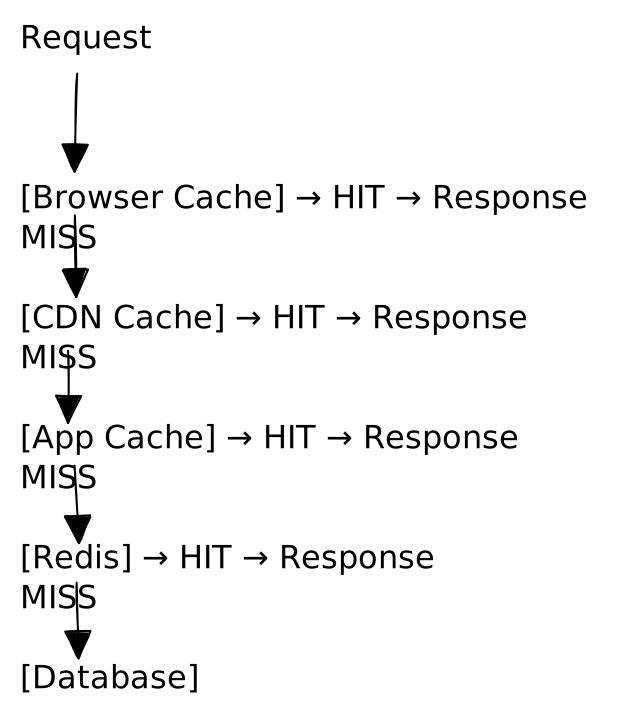
Each layer absorbs traffic. By the time you hit the database, most requests are already served.
Cache-Aside Pattern: The Recipe Card Approach
Back to the coffee shop. A customer orders an Iced Caramel Macchiato. Here's what the barista does:
- Check the ready shelf (cache): Is there one already made?
- If yes: Grab it and serve (cache hit)
- If no: Make it fresh from the recipe (database query)
- Make an extra and put it on the ready shelf for the next customer (populate cache)
This is the called the cache-aside pattern which is the most common caching approach:
pythondef get_user(user_id): # 1. Check the ready shelf (cache) cached = cache.get(f"user:{user_id}") if cached: return cached # Cache hit! Serve immediately # 2. Cache miss: make it fresh (query database) user = database.get_user(user_id) # 3. Put one on the shelf for next time (populate cache) cache.set(f"user:{user_id}", user, ttl=3600) return user
What Happens on Updates?
When a user updates their profile, you need to handle the cache:
pythondef update_user(user_id, data): database.update_user(user_id, data) cache.delete(f"user:{user_id}") # Remove stale version
Why delete instead of update? Imagine two requests happening at once:
- Request A reads user (gets old data)
- Request B updates user in database
- Request B updates cache with new data
- Request A (still processing) writes old data to cache
Now cache has stale data! Deletion is safer since anyway the next read fetches fresh data.
This pattern handles 90% of caching needs. Start here.
Other Caching Patterns
Write-Through: Always Keep Cache Fresh
Every write goes to both cache and database:
pythondef update_user(user_id, data): cache.set(f"user:{user_id}", data) # Update cache first database.update_user(user_id, data) # Then database
Coffee shop analogy: Every time you make a drink, you also make one for the ready shelf.
Pros: Cache is always up-to-date. Reads are always fast.
Cons: Writes are slower (must update two places). You might cache data nobody ever reads.
Write-Behind (Write-Back): Speed Over Safety
Writes go to cache immediately. Database is updated later, asynchronously:
pythondef update_user(user_id, data): cache.set(f"user:{user_id}", data) # Update cache queue.add("update_user", user_id, data) # Queue DB update for later
Pros: Extremely fast writes.
Cons: If cache crashes before database is updated, data is lost. Use only when you can tolerate some data loss.
Pattern Comparison
| Pattern | Read Speed | Write Speed | Consistency | Data Safety |
|---|---|---|---|---|
| Cache-aside | Fast (on hit) | Fast | Manual invalidation | Safe |
| Write-through | Always fast | Slower | Strong | Safe |
| Write-behind | Always fast | Fastest | Eventual | Risky |
Recommendation: Start with cache-aside. It's simple, safe, and handles most cases.
Eviction and TTL
Caches have limited memory. When full, something gets evicted.
LRU (Least Recently Used): Evict the item accessed longest ago. Good default for most workloads.
TTL (Time To Live): Items expire after a set time. Guarantees freshness.
Use both. LRU handles capacity, TTL ensures staleness doesn't exceed a threshold.
pythoncache.set("user:123", data, ttl=3600) # Expires in 1 hour # Plus LRU eviction when memory is full
Cache Invalidation
There are only two hard things in Computer Science: cache invalidation and naming things - Phil Karlton.
When data changes, the cache must know. There are three approaches to do this:
TTL expiration: Let entries expire naturally. Simple, but data is stale for up to TTL. Should be fine for profiles, posts, product listings.
Explicit invalidation: Delete cache when data changes. Immediate consistency, but you must remember to invalidate everywhere.
Pub/sub: Database changes publish events, caches subscribe the events and invalidate. This is decoupled and scalable, but adds infrastructure complexity.
For most apps: cache-aside with explicit invalidation and TTL is a good enough safety net.
Redis Basics
Redis is the standard distributed cache. Good to learn a thing or two about this. Here are some key operations:
pythonimport redis r = redis.Redis(host='localhost', port=6379) # Basic operations r.set("key", "value", ex=3600) # Set with TTL r.get("key") r.delete("key") # Hash (structured data) r.hset("user:123", mapping={"name": "Alice", "email": "a@b.com"}) r.hgetall("user:123")
Data structures: Strings (simple key-value), Hashes (objects), Lists (ordered items), Sets (unique items), Sorted Sets (leaderboards).
Redis vs Memcached: Redis has richer data types, persistence, replication, and clustering. Use Redis unless you have a specific reason for Memcached.
Refer this basics doc for more details.
Common Pitfalls
Cache Stampede (Thundering Herd)
A popular cache entry expires. Suddenly 1000 requests simultaneously hit the database and the database dies.
This happens during flash sales. An e-commerce site caches product inventory. Cache expires at 12:00 PM. At 12:00:01 PM, 10,000 users (this is overly simplified) refresh the page. All miss cache and all hit database. The database can't handle the load and crashes.
Fix: Lock on miss. First request acquires lock and fetches from DB. Others wait for that result.
pythondef get_popular_post(): cached = cache.get("popular_post") if cached: return cached # Try to acquire lock if cache.set("popular_post:lock", "1", nx=True, ex=10): post = database.get_popular_post() cache.set("popular_post", post, ex=3600) cache.delete("popular_post:lock") return post else: time.sleep(0.1) # Wait for winner return get_popular_post()
Or use stale-while-revalidate: return stale data immediately, refresh in background.
Cache Penetration: The "Doesn't Exist" Problem
Imagine someone keeps asking for user ID 99999999, which doesn't exist. Without caching negative results:
plaintextRequest: Give me user 99999999 Cache: I don't have that (MISS) Database: That user doesn't exist Response: User not found Request: Give me user 99999999 (again) Cache: MISS (again!) Database: That user doesn't exist (queried again!)
The cache never learns that this user doesn't exist. Every request hits the database.
Real scenario: Now Imagine an e-commerce site has product IDs from 1 to 100,000. An attacker sends requests for product IDs 200,000 to 300,000. None exist. Every request bypasses cache and hits the database and it crashes.
The fix: Cache the "not found" result too.
pythonuser = database.get_user(user_id) if user: cache.set(f"user:{user_id}", user, ex=3600) else: # KEY INSIGHT: Cache the fact that this user doesn't exist cache.set(f"user:{user_id}", "NOT_FOUND", ex=300) # Shorter TTL # On read: cached = cache.get(f"user:{user_id}") if cached == "NOT_FOUND": return None # We know it doesn't exist, don't hit DB if cached: return cached # Only query DB if cache has no information
Now subsequent requests for non-existent users are served from cache. Database stays healthy.
Hot Key Problem
One key is so popular it overwhelms a single cache server.
Example: During IPL finals, millions of users refresh the live score. That's one cache key (match:ipl-final-score) getting hammered. Even Redis has limits.
Fix: Local in-memory cache for extremely hot keys. Or replicate the key across multiple cache entries (score:1, score:2, score:3) and randomly pick one.
Cold Start Problem
Cache is empty after deployment. Everything hits database at once. I've seen this take down production systems during routine deploys.
Fix: Pre-warm cache with known hot data before taking traffic. Or gradually route traffic (10%, 25%, 50%, 100%) to new instances.
From the Trenches: Real-World Caching stories
Shopify: 5x Faster Storefront Rendering
Shopify rebuilt their storefront rendering engine with a multi-layer caching strategy. The results:
- Average response time improved by 5x
- 75% of requests served in under 45ms
- 90% of requests served in under 230ms
Their Liquid object memoizer (in-memory cache) prevents 16-20 database calls per request on average. In extreme cases, it prevents up to 4,000 calls to data stores per single request.
The stack: Ruby application with MySQL database, Redis for distributed caching, and multiple caching layers (in-memory, node-local Redis, full-page caching, and database query result caching).
Source: Shopify Engineering Blog
Facebook: TAO for Social Graph Queries
Facebook built TAO (The Associations and Objects) as a caching layer on top of MySQL to handle billions of social graph queries per day. Before TAO, engineers had to manually manage memcache and MySQL, leading to bugs and inconsistencies.
TAO simplified this with a two-tier caching architecture:
- Followers: First-tier cache servers that handle client requests
- Leaders: Second-tier cache servers that talk to MySQL and maintain consistency
The system handles cache misses, writes, and invalidation automatically. It protects MySQL from cache stampedes during viral posts when millions of users access the same data simultaneously.
The key insight: A relatively large percentage of social graph queries are for relations that don't exist (e.g., "Does this user like that story?" is false for most stories). TAO caches these negative results efficiently.
Source: Facebook Engineering Blog
Key Takeaways
Cache-aside is the default. Check cache → miss → query DB → populate cache.
Delete on invalidation, don't update. Avoids race conditions.
LRU + TTL. LRU handles capacity, TTL ensures freshness.
Watch for stampedes. Lock on miss or stale-while-revalidate.
Cache negative results. Prevents penetration attacks.
Monitor hit rate obsessively. It's your key indicator of cache effectiveness.
Redis is the standard. Rich data types, clustering, persistence.
What's Next
Caching sits in front of your database, but eventually you need to understand the database itself. Next up: Database Fundamentals where we explore relational vs NoSQL, indexing, transactions, and choosing the right database for your use case.