Data Partitioning & Replication

Our coffee shop chain is thriving. We now have 500 locations, 10 million customers, and process 100,000 orders per day. But the problem is our single database server has become a bottleneck.
Here's what's happening: the database is like a single librarian managing a library with 10 million books. Every customer asks this one librarian for help. She's fast, but there's only one of her. The line is getting longer.
We have two options:
- Hire more librarians (replication) with each having a copy of the catalog, so multiple people can answer questions simultaneously
- Split the library into sections (partitioning) with one librarian handling Fiction A-M, another handling Fiction N-Z, and so on
Most large systems do both. Let's understand how.
What You Will Learn
- Why single databases eventually hit limits
- Replication: keeping copies of your data in sync
- Partitioning (sharding): splitting data across servers
- When to use each strategy
- Common patterns and their trade-offs
- How companies like Uber and Instagram handle this
Replication: Multiple Copies of Everything
The Concert Ticket Analogy
Imagine you're selling concert tickets. One ticket booth with one seller. Works fine for 100 customers. But for a Taylor Swift concert with 50,000 fans? That single booth becomes a disaster.
Solution: Open 5 identical ticket booths, each with the same information about available seats. Now 5 customers can be served simultaneously.
That's called replication. Multiple database servers, each with a complete copy of your data.
How Replication Works
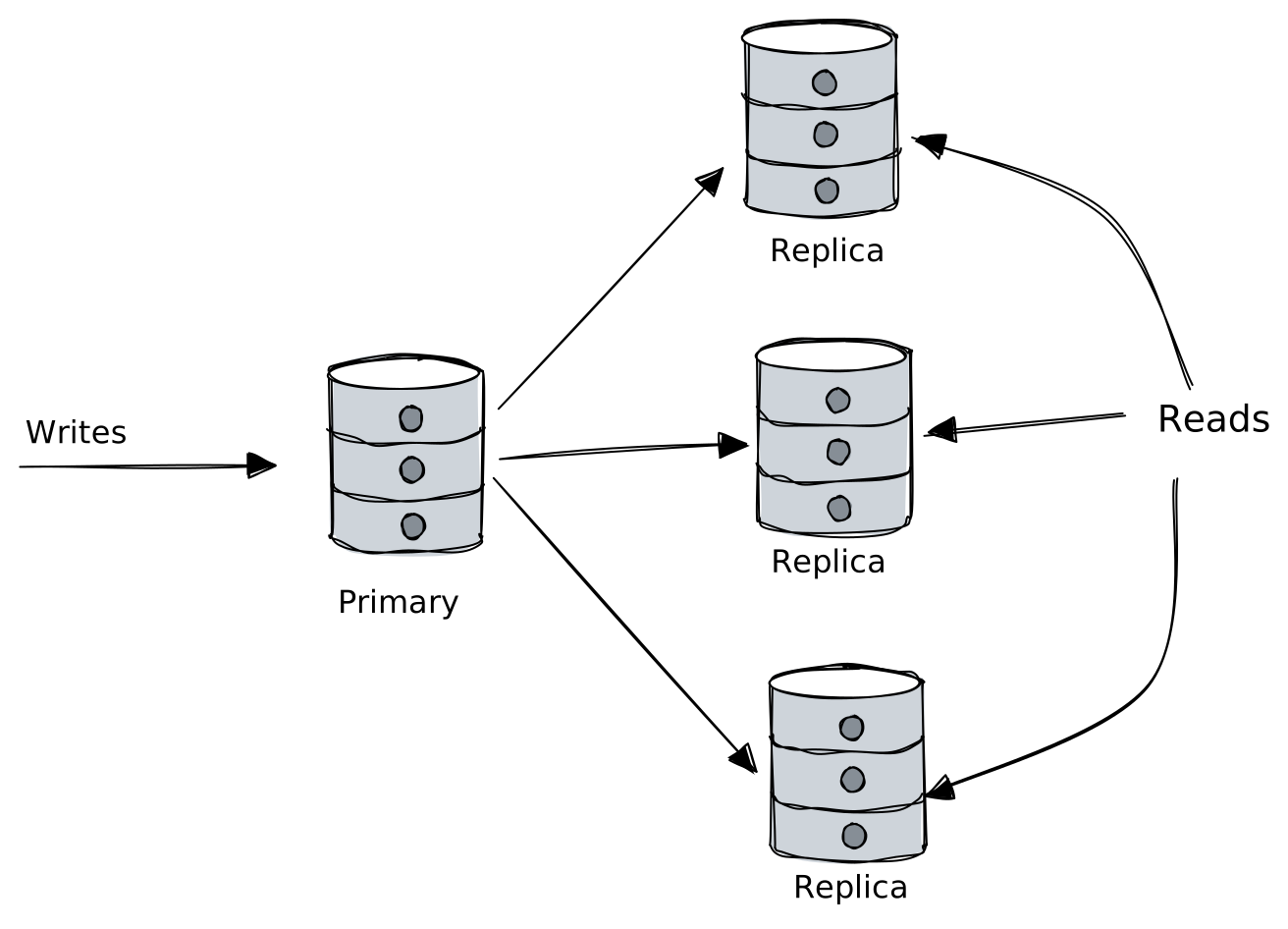
Primary (Leader): Handles all writes. The source of truth.
Replicas (Followers): Receive copies of data from primary. Handle reads.
Types of Replication
Synchronous Replication
The primary waits for replicas to confirm they've received the data before acknowledging the write.
plaintextClient: "Save this order" Primary: "Got it, let me tell the replicas..." Primary → Replica 1: "Save this" → "Done!" Primary → Replica 2: "Save this" → "Done!" Primary → Client: "Order saved!"
Pros: Data is guaranteed to exist on multiple servers. If primary dies, replicas have everything.
Cons: Slower writes. If any replica is slow or down, writes slow down or fail.
Asynchronous Replication
The primary acknowledges immediately and sends to replicas in the background.
plaintextClient: "Save this order" Primary: "Order saved!" (immediate response) Primary → Replicas: "Here's the data" (happens later)
Pros: Fast writes. Primary doesn't wait for replicas.
Cons: Replicas might be slightly behind. If primary crashes before replicating, data can be lost.
The Replication Lag Problem
With async replication, replicas can be behind:
plaintextTime 0: User updates profile on Primary Time 1: Primary returns "Success!" Time 2: User refreshes page, hits Replica (still has old data) Time 3: User sees OLD profile → "My update didn't save!" Time 4: Replication catches up Time 5: User refreshes, sees correct data → Confused
Solutions:
- Read-your-writes consistency: Route the user who just wrote back to the primary for their next read
- Sticky sessions: Same user always hits the same replica
- Wait for replication: Delay response until replicas catch up (slower but consistent)
When to Use Replication
| Scenario | Replication Helps? |
|---|---|
| Read-heavy workload | Yes, spread reads across replicas |
| High availability needed | Yes, failover to replica if primary dies |
| Write-heavy workload | No, all writes still go to one server |
| Data locality (multi-region) | Yes, replica in each region |
Partitioning (Sharding): Dividing the Data
Replication gives you more copies. But what if your data is too big for one server? Or writes are overwhelming a single primary?
That's where partitioning comes in.
The Library Analogy
Our library has 10 million books. Even with multiple librarians, the building is full. Solution: open multiple library branches.
- Branch A: Books with authors A-M
- Branch B: Books with authors N-Z
Now each branch has half the books and half the traffic. You can add more branches as you grow.
How Partitioning Works
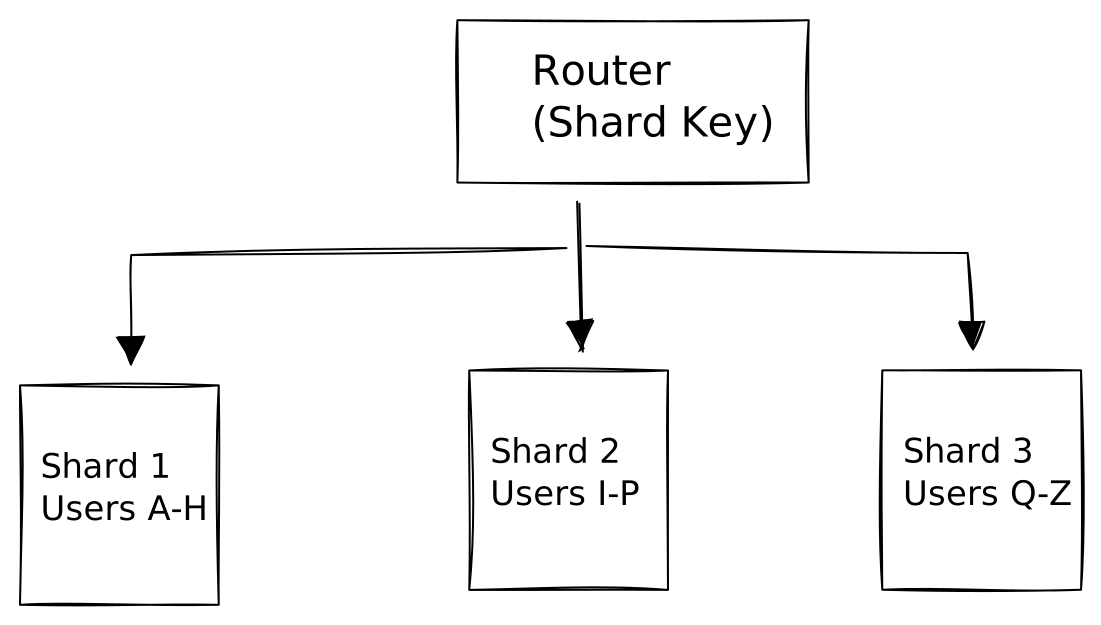
Each shard is an independent database holding a portion of the data.
Choosing a Shard Key
The shard key determines which shard holds each piece of data. This is the most important decision in sharding.
Option 1: Range-Based Sharding
Divide by ranges of the shard key.
plaintextShard 1: user_id 1 - 1,000,000 Shard 2: user_id 1,000,001 - 2,000,000 Shard 3: user_id 2,000,001 - 3,000,000
Pros: Simple. Range queries are efficient (get users 500-600 → just hit Shard 1).
Cons: Hot spots. New users all hit Shard 3. Celebrity users might all be in Shard 1.
Option 2: Hash-Based Sharding
Hash the shard key and distribute based on the hash.
pythonshard = hash(user_id) % number_of_shards hash("alice") % 3 = 1 → Shard 1 hash("bob") % 3 = 0 → Shard 0 hash("carol") % 3 = 2 → Shard 2
Pros: Even distribution. No hot spots from sequential IDs.
Cons: Range queries are expensive (must query all shards). Adding shards requires rehashing.
Option 3: Directory-Based Sharding
A lookup table tells you which shard has each piece of data.
plaintextLookup Table: user_id 12345 → Shard 2 user_id 12346 → Shard 1 user_id 12347 → Shard 3
Pros: Flexible. Can move data between shards easily.
Cons: Lookup table is a single point of failure. Extra hop for every query.
The Shard Key Selection Problem
Bad shard key choices cause pain:
Too much data on one shard (hot partition):
plaintextShard key: country Result: 80% of users are in USA → Shard "USA" is overwhelmed
Related data on different shards:
plaintextShard key: user_id Query: "Get all orders for user 123" Problem: Orders sharded by order_id, user sharded by user_id Result: Must query ALL order shards to find user 123's orders
Good shard key criteria:
- High cardinality (many unique values)
- Even distribution
- Query patterns align (queries usually filter by the shard key)
- Doesn't change frequently
Cross-Shard Operations: The Hard Part
With data split across shards, some operations become much harder:
Cross-Shard Queries
sql-- Easy in single database: SELECT * FROM users u JOIN orders o ON u.id = o.user_id WHERE o.total > 100; -- With sharding: -- Must query all user shards, all order shards, join results in application -- Slow, expensive, complex
Cross-Shard Transactions
sql-- Easy in single database: BEGIN; UPDATE accounts SET balance = balance - 100 WHERE id = 1; UPDATE accounts SET balance = balance + 100 WHERE id = 2; COMMIT; -- With sharding, if accounts 1 and 2 are on different shards: -- No simple way to make this atomic -- Need distributed transactions (2PC) or saga patterns
Combining Replication and Partitioning
Production systems typically use both:
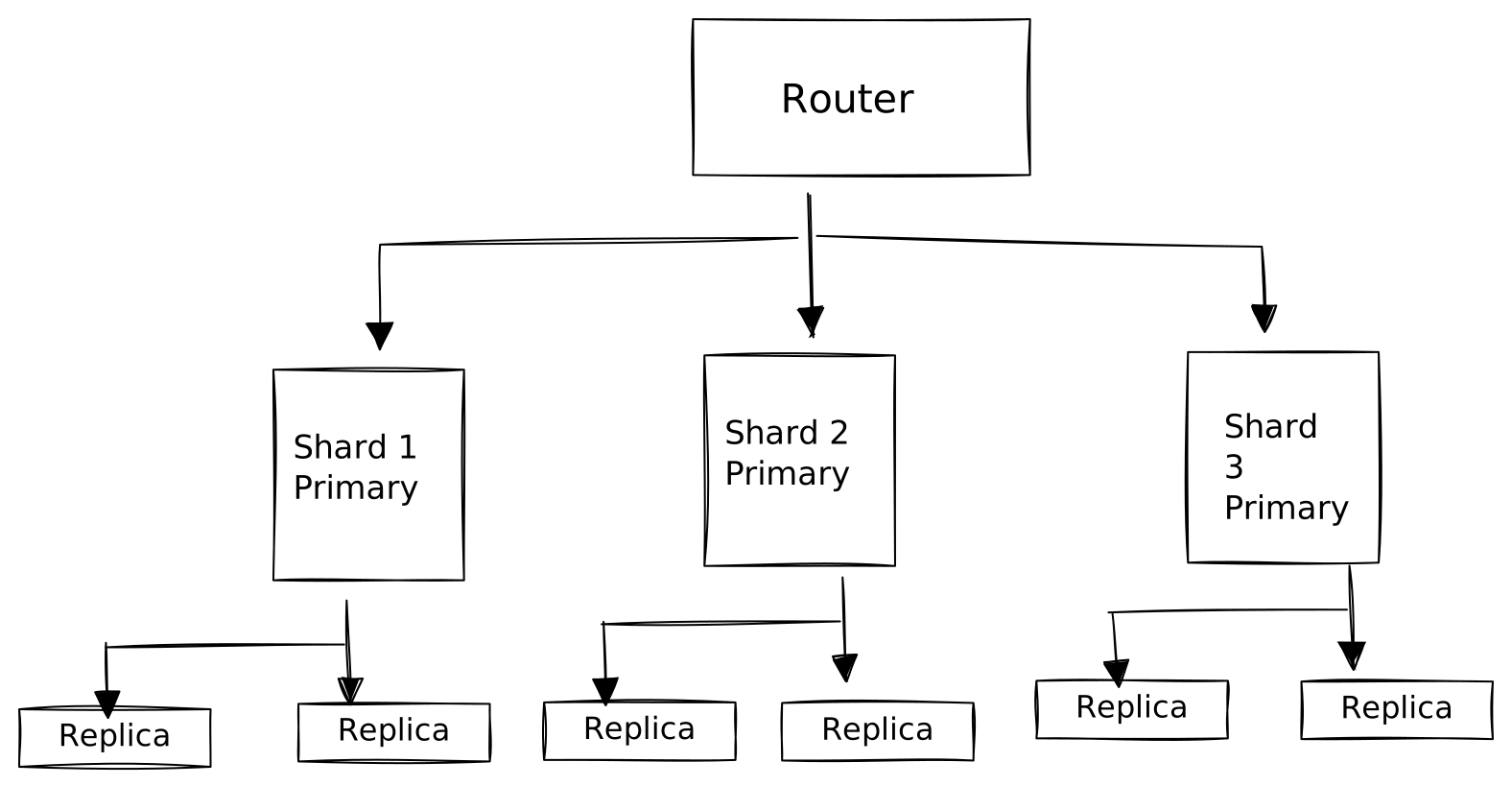
Each shard has its own primary and replicas. This gives you:
- Horizontal scale: More shards = more capacity
- High availability: Replica takes over if primary fails
- Read scale: Replicas handle read traffic within each shard
Real-World Patterns
Instagram: Sharding by User ID
Instagram shards data by user ID. All of a user's photos, followers, and likes are on the same shard.
Why it works: Most queries are user-centric. "Show me Alice's photos" hits one shard.
The challenge: "Show me photos from everyone I follow" requires querying multiple shards (followers are on different shards).
The solution: Fan-out on write. When Alice posts, write to her followers' timeline shards.
Uber: Sharding by Geography
Uber shards ride data by geographic region.
Why it works: A ride in New York doesn't need to know about rides in Tokyo. Queries are regional.
The challenge: Users who travel frequently appear on multiple shards.
Slack: Sharding by Workspace
Slack shards by workspace (team). All messages, channels, and users for a workspace are together.
Why it works: 99% of queries are within a workspace. Cross-workspace queries are rare.
When to Shard (And When Not To)
Don't Shard Prematurely
Sharding adds significant complexity:
- Application must know about shards
- Some queries become impossible or expensive
- Operations (backups, migrations) get harder
- Debugging across shards is painful
Rule of thumb: A well-tuned PostgreSQL server handles millions of rows and thousands of queries per second. You probably don't need sharding until you've exhausted:
- Vertical scaling (bigger server)
- Read replicas
- Caching
- Query optimization
Signs You Actually Need Sharding
- Database server at 80%+ CPU consistently
- Disk is full (can't fit all data on one machine)
- Write throughput hitting limits (can't be solved by replicas)
- Compliance requires data in specific regions
The Scaling Progression
plaintextStage 1: Single Server Everything on one machine ↓ Stage 2: Read Replicas Primary + replicas for read scaling ↓ Stage 3: Caching Layer Redis in front to reduce DB load ↓ Stage 4: Vertical Scaling Bigger server, more RAM, faster disks ↓ Stage 5: Sharding Split data across multiple primaries
Most applications never reach Stage 5. And that's fine. Simpler is better.
Key Takeaways
Replication creates copies of your data:
- Improves read throughput (spread reads across replicas)
- Improves availability (failover to replica)
- Doesn't help with write scaling or storage limits
Partitioning (Sharding) splits your data:
- Each shard holds a portion of data
- Improves write throughput and storage capacity
- Makes cross-shard queries and transactions hard
Shard key selection is critical:
- Choose based on access patterns
- Aim for even distribution
- Keep related data together when possible
Don't shard prematurely:
- Exhaust simpler options first
- Sharding adds operational complexity
- Many successful systems never need it
What's Next
When you split data across servers, you face a fundamental question: what happens when servers disagree? If a network partition separates your shards, should the system keep running (risking inconsistency) or stop to preserve correctness?
This is the CAP Theorem, and it governs every distributed system decision. Let's explore it in the next lesson.