Message Queues & Event Streaming
Our coffee shop grown well. Now we have a problem. When a customer places an order, we need to do several things such as process the payment, update the inventory, send a confirmation email, notify the kitchen and update the loyalty points. If we do all of this before telling the customer Order received!, they're standing there for 10 seconds staring at a loading bar which is a bad user experience.
Worse thing is even if one of the things goes wrong, the order fails. For example, if the email service is down, the order fails.
What we need is a way to say Order received! and tell the customer that we'll handle the rest in the background. The customer gets instant feedback. The other tasks happen asynchronously.
This is where message queues and event streaming comes into the play. They decouple services so they don't have to wait for each other.
What You Will Learn
- Why synchronous communication creates fragile systems
- Message queues: the postal service of software
- Event streaming: the newspaper model
- When to use queues vs streams
- Popular tools: RabbitMQ, SQS, Kafka
- Patterns for reliable message processing
- Common pitfalls and how to avoid them
The Problem with Synchronous Communication
The Chain of Dependency
In a synchronous system, services call each other directly and wait for responses:
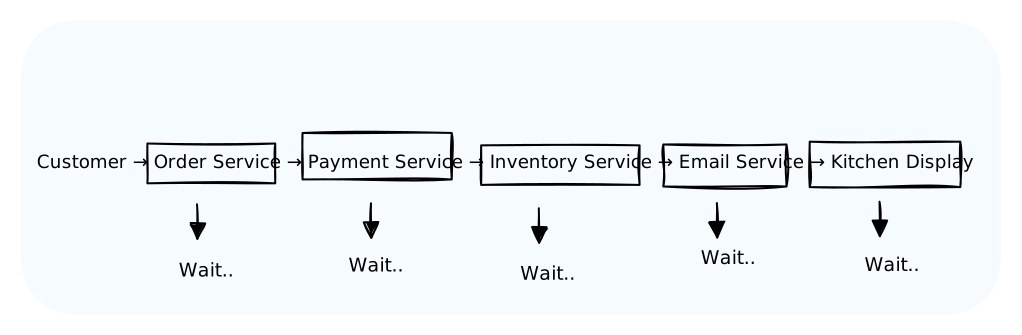
Total time: Sum of all service response times.
If Email Service is slow: Everything waits.
If Email Service is down: The entire order fails.
This is like a relay race where every runner must hand off perfectly. One stumble and the whole team loses.
The Pizza Shop Analogy
Imagine you are ordering a pizza by phone. Here is how the synchronous looks like:
- You call and say I want a pepperoni pizza
- The cashier says Hold on and walks to the kitchen
- The cashier waits while the chef makes the pizza
- The cashier waits while the delivery driver delivers it
- After you receive the pizza, the cashier says "Okay, your pizza has been delivered. That'll be 50 bucks."
You've been on hold for 45 minutes. Sounds ridiculous, right?
But this doesn't happen in real world. It looks something like this:
- You call and say "I want a pepperoni pizza"
- Cashier: "Got it! Order #47. It'll be there in 30 minutes." (hangs up)
- Cashier writes the order on a ticket and puts it in the queue
- Kitchen picks up the ticket when ready
- Driver picks up pizza when it's done
The cashier is free to take more orders. The kitchen works at its own pace. The driver doesn't need to know who ordered what. That ticket is a message queue.
Message Queues:
How It Works
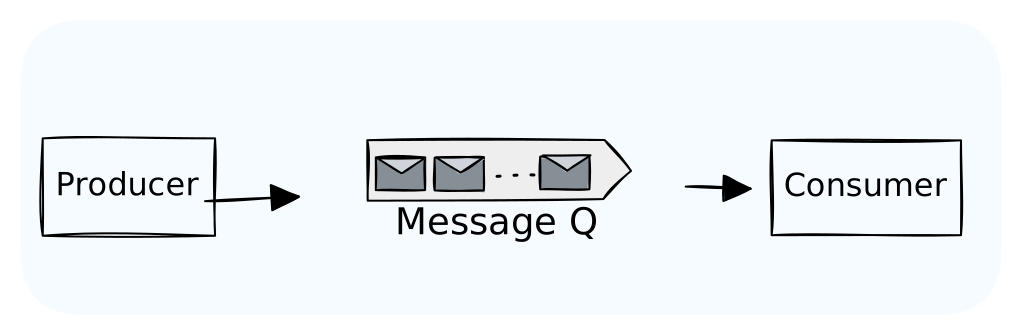
- Producer sends a message to the queue
- Queue stores the message until someone retrieves it
- Consumer pulls messages and processes them
The producer and consumer don't need to be running at the same time. They don't even need to know about each other.
Message Queue Properties
Persistence: Messages survive queue restarts. If the server reboots, your messages aren't lost.
Acknowledgment: Consumers confirm when they've processed a message. If a consumer crashes mid-processing, the message goes back to the queue.
Ordering: Messages are typically processed in order (FIFO), though this varies by implementation.
At-least-once delivery: The queue guarantees the message will be delivered at least once. Your consumer might see duplicates.
Event Streaming:
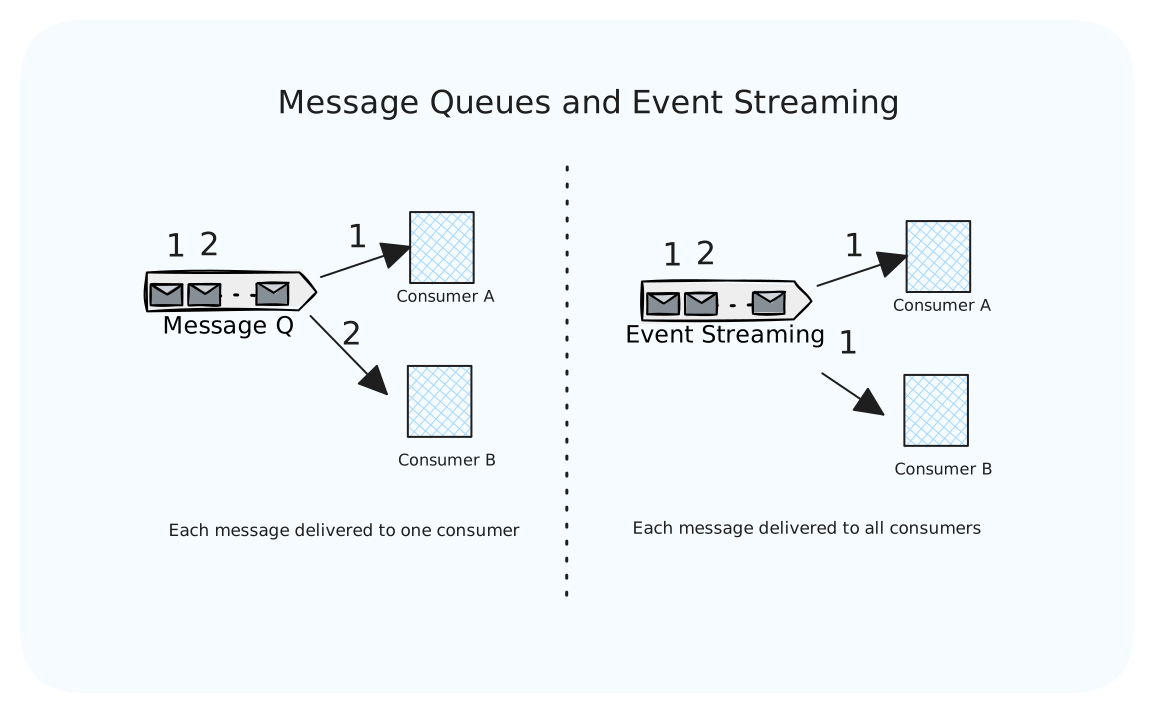
Event streaming is different from message queues. Think of it like a newspaper vs mail.
Message Queue (Mail):
- Addressed to a specific recipient
- Once received, it's gone
- Recipient must be known upfront
Event Stream (Newspaper):
- Published for anyone interested
- Stays available for a period
- New subscribers can read past issues
How It Works
Key differences:
- Multiple consumers can read the same event
- Events are retained for a configurable time (hours, days, weeks)
- Consumers track their position in the stream
- New consumers can start from the beginning or any point
Coffee Shop Example: Events
When an order is placed, we publish an OrderCreated event:
json{ "eventType": "OrderCreated", "timestamp": "2024-03-15T10:30:00Z", "data": { "orderId": "order-123", "customerId": "cust-456", "items": [{"name": "Latte", "price": 4.50}], "total": 4.50 } }
Multiple services subscribe to this event:
- Payment Service: Charges the customer
- Inventory Service: Decrements stock
- Analytics Service: Updates dashboards
- Loyalty Service: Awards points
- Kitchen Display: Shows the order
Each service processes the event independently. If we add a new Marketing Service next month, it can subscribe and even replay past events to catch up.
Queues vs Streams: When to Use Each
| Aspect | Message Queue | Event Stream |
|---|---|---|
| Delivery | To one consumer | To many consumers |
| Retention | Until consumed | For a time period |
| Replay | No | Yes |
| Use case | Task distribution | Event broadcast |
| Example | "Process this payment" | "An order was placed" |
Use Message Queues When:
- Work distribution: You have tasks that need to be done once by one worker
- Load leveling: Buffer requests during traffic spikes
- Guaranteed processing: Each message must be handled exactly once
Example: Email sending, image processing, report generation
Use Event Streams When:
- Multiple consumers: Different services need the same data
- Event sourcing: You want a complete history of what happened
- Real-time analytics: Dashboard updates, monitoring
- Replay capability: New services need to process historical events
Example: User activity tracking, audit logs, real-time feeds
Popular Tools
RabbitMQ: The Reliable Workhorse
Traditional message queue. Great for task distribution.
python# Producer channel.basic_publish( exchange='', routing_key='order_queue', body='{"order_id": 123}' ) # Consumer def callback(ch, method, properties, body): process_order(body) ch.basic_ack(delivery_tag=method.delivery_tag) channel.basic_consume(queue='order_queue', on_message_callback=callback)
Strengths: Flexible routing, multiple protocols, mature ecosystem.
Use for: Task queues, RPC, complex routing logic
Amazon SQS: The Managed Option
Fully managed queue service. No infrastructure to manage.
pythonimport boto3 sqs = boto3.client('sqs') # Send message sqs.send_message( QueueUrl='https://sqs.../my-queue', MessageBody='{"order_id": 123}' ) # Receive messages response = sqs.receive_message(QueueUrl='https://sqs.../my-queue') for message in response.get('Messages', []): process(message['Body']) sqs.delete_message( QueueUrl='https://sqs.../my-queue', ReceiptHandle=message['ReceiptHandle'] )
Strengths: Zero ops, scales automatically, cheap.
Use for: AWS-native applications, simple queue needs.
Apache Kafka: The Event Streaming Giant
Distributed event streaming platform. Built for scale.
pythonfrom kafka import KafkaProducer, KafkaConsumer # Producer producer = KafkaProducer(bootstrap_servers='localhost:9092') producer.send('orders', b'{"order_id": 123}') # Consumer consumer = KafkaConsumer('orders', bootstrap_servers='localhost:9092') for message in consumer: process(message.value)
Strengths: Massive throughput, replay capability, exactly-once semantics.
Use for: Event streaming, real-time analytics, high-volume data pipelines.
Quick Comparison
| Tool | Type | Managed Option | Throughput | Complexity |
|---|---|---|---|---|
| RabbitMQ | Queue | CloudAMQP | Moderate | Medium |
| Amazon SQS | Queue | Native AWS | High | Low |
| Apache Kafka | Stream | Confluent, MSK | Very High | High |
| Redis Streams | Stream | Redis Cloud | High | Medium |
Patterns for Reliable Processing
Pattern 1: Idempotent Consumers
With at-least-once delivery, consumers might see the same message twice. Make operations idempotent (safe to repeat).
Bad:
pythondef process_order(order): charge_customer(order.total) # Charges twice if message replayed!
Good:
pythondef process_order(order): if already_processed(order.id): return # Skip duplicate charge_customer(order.total) mark_processed(order.id)
Pattern 2: Dead Letter Queues
What happens when a message fails processing repeatedly? Don't lose it. Move it to a dead letter queue for investigation.
Pattern 3: Outbox Pattern
Ensure database writes and message publishing are atomic.
Problem: You update the database, then publish a message. If the app crashes between them, the message is lost.
Solution: Write the message to an outbox table in the same transaction. A separate process reads the outbox and publishes.
sqlBEGIN TRANSACTION; INSERT INTO orders (id, total) VALUES (123, 45.00); INSERT INTO outbox (event_type, payload) VALUES ('OrderCreated', '{"id": 123}'); COMMIT;
A background worker polls the outbox and publishes to the queue.
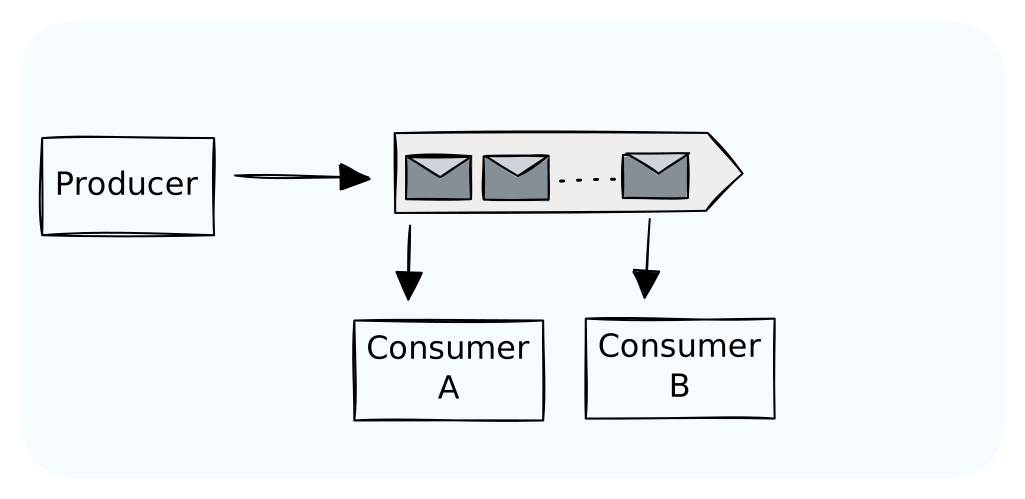
Pattern 4: Consumer Groups
Multiple instances of a consumer sharing the work.
Each message goes to ONE worker in the group. Scale by adding more workers.
Common Pitfalls
Pitfall 1: Unbounded Queues
If producers are faster than consumers, then the queue grows forever. Eventually, you will run out of memory or disk.
Fix:
- Monitor queue depth
- Set max queue size (reject or drop old messages)
- Scale consumers automatically based on queue depth
Pitfall 2: Poison Messages
A malformed message that can crash consumers which results in consumer restarts, consumes the same message, crashes again and again.
Fix:
- Limit retry attempts
- Use dead letter queues
- Validate messages before processing
Pitfall 3: Ordering Assumptions
Most queues don't guarantee strict ordering, especially with multiple consumers.
Fix:
- If order matters, use a single consumer or partitioned queues
- Include sequence numbers in messages
- Design consumers to handle out-of-order messages
Pitfall 4: Fire and Forget
Publishing a message and assuming it will be processed. What if the queue is down? What if the consumer crashes?
Fix:
- Use persistent/durable queues
- Implement acknowledgments
- Monitor processing metrics
- Alert on growing queues or high failure rates
Key Takeaways
Message queues decouple producers and consumers:
- Producers don't wait for consumers
- Traffic spikes are buffered
- Failed consumers don't crash producers
Event streams broadcast events to multiple subscribers:
- Multiple services can react to the same event
- Events are retained for replay
- New services can process historical data
Choose queues for task distribution (do this work once).
Choose streams for event broadcasting (everyone needs to know).
Make consumers idempotent. Messages may be delivered more than once.
Use dead letter queues. Don't lose failed messages.
Monitor everything. Queue depth, processing time, failure rates.
What's Next
We've covered how services communicate asynchronously. But what about the interface between services and the outside world? How do you design APIs that are easy to use, maintain, and scale? That's API Design Best Practices, coming up next.