CDN and Edge Computing
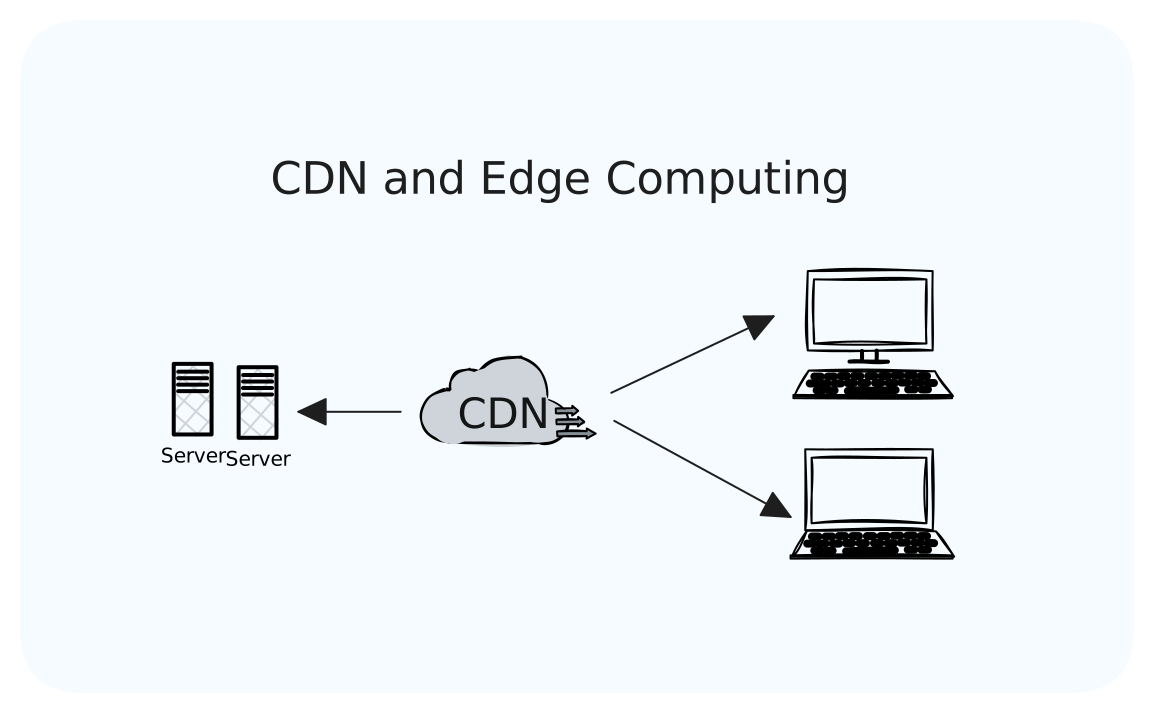
Our coffee shop app is now global. We have customers in New York, London, Tokyo, and Sydney. Our servers are in Virginia. Here's the problem we are facing now: when a customer in Sydney loads our menu with beautiful high-resolution images, that request travels 15,000 kilometers to Virginia and back.
Light in fiber optic cables travels at about 200,000 km/s. That's fast, but not instant. A round trip from Sydney to Virginia takes at least 150 milliseconds just with the speed of light. Add network hops, processing time, and suddenly the menu takes 2 seconds to load.
Physics is the one thing you can't optimize with better code. But you CAN move your content closer to users. That's what CDNs do.
What You Will Learn
- Why distance matters and what you can't optimize away
- How CDNs work and when to use them
- Caching strategies for static and dynamic content
- Edge computing: running code closer to users
- Cache invalidation (the hard part)
- Choosing between CDN providers
- Real-world architecture patterns
How CDNs Work
A CDN (Content Delivery Network) is a network of servers distributed globally. When a user requests content, they're served from the nearest server.
The Architecture
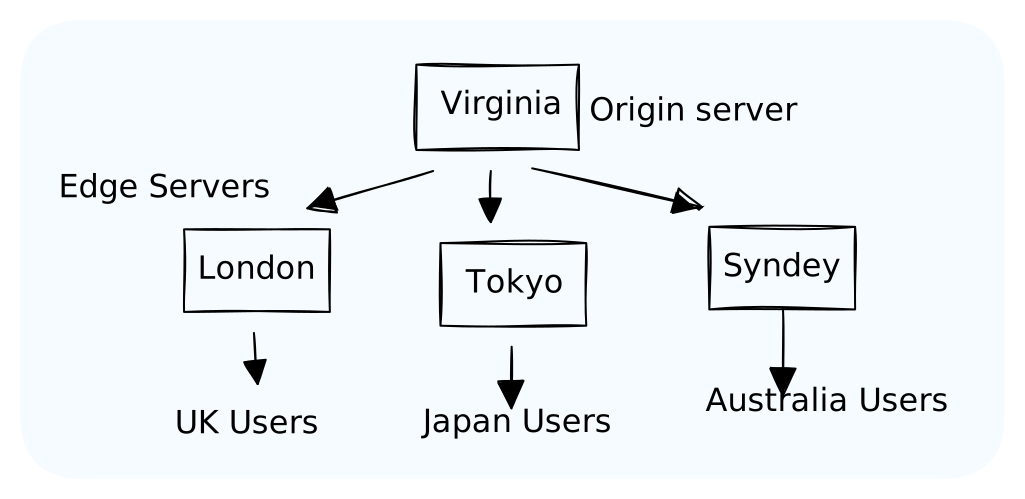
Origin Server: Your actual server with the original content.
Edge Servers (PoPs): "Points of Presence" distributed globally. They cache content and serve users.
The Request Flow
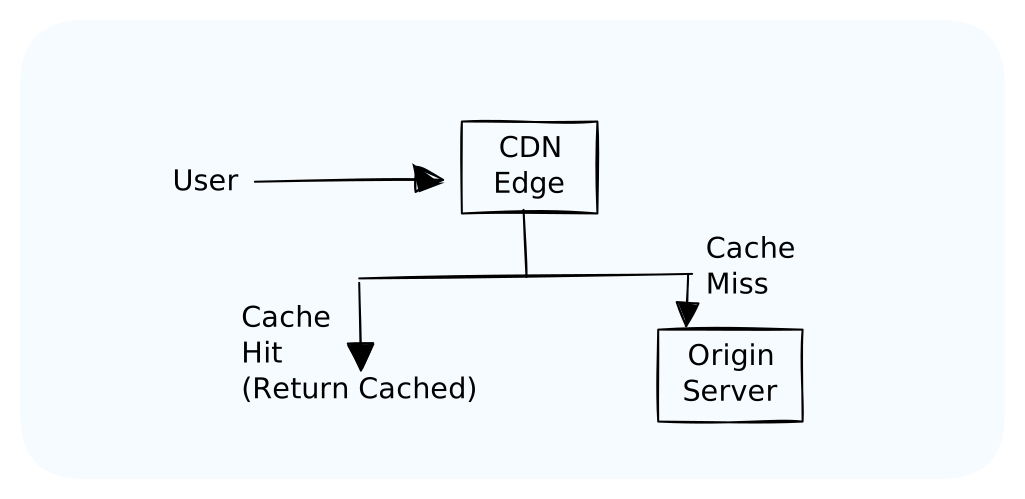
First request (cache miss):
plaintext1. User in Tokyo requests logo.png 2. Request goes to nearest edge server (Tokyo) 3. Tokyo edge doesn't have it (cache miss) 4. Tokyo edge fetches from origin (Virginia) 5. Tokyo edge caches logo.png 6. Tokyo edge returns logo.png to user Total time: ~400ms (had to go to origin)
Subsequent requests (cache hit):
plaintext1. Another user in Tokyo requests logo.png 2. Request goes to Tokyo edge 3. Tokyo edge has it cached (cache hit) 4. Tokyo edge returns logo.png immediately Total time: ~20ms (served from nearby edge)
What to Put on a CDN
Perfect for CDN: Static Assets
Content that doesn't change per user:
- Images: Logos, product photos, user avatars
- CSS/JavaScript: Stylesheets, application bundles
- Fonts: Web fonts
- Videos: Streaming content, video files
- Downloads: PDFs, installers, documents
These are cache forever content. Once cached, serve for days or weeks.
Good for CDN: Semi-Dynamic Content
Content that changes occasionally:
- HTML pages: If the same for all users (blogs, marketing pages)
- API responses: If cacheable (product catalog, public data)
- Search results: Common queries
Cache with shorter TTLs (minutes to hours).
Not for CDN: Dynamic Content
Content that varies per user or request:
- Real-time data: Stock prices, live scores
- Authenticated API calls: User-specific responses
- Checkout/payment: Must go to origin
This goes directly to your origin server.
Caching Strategies
Cache-Control Headers
Tell the CDN (and browsers) how to cache:
plaintext# Cache for 1 year (immutable assets with hashed filenames) Cache-Control: public, max-age=31536000, immutable # Cache for 1 hour, revalidate after Cache-Control: public, max-age=3600, must-revalidate # Don't cache at all Cache-Control: no-store # Cache but always check if it changed Cache-Control: no-cache
Strategy by Content Type
| Content Type | Cache-Control | TTL | Example |
|---|---|---|---|
| Hashed assets (main.a1b2c3.js) | immutable | 1 year | JS bundles, CSS |
| Images | public | 1 week | Product photos |
| HTML pages | public, must-revalidate | 5 minutes | Blog posts |
| API responses | public | 1-60 minutes | Product catalog |
| User-specific | private or no-store | None | User dashboard |
Versioning Static Assets
The cache busting problem: You deploy new CSS, but users have the old version cached.
Solution: Include a hash in the filename.
html<!-- Old way (cache problems) --> <link href="/styles.css" rel="stylesheet"> <!-- New way (hash changes when content changes) --> <link href="/styles.a1b2c3d4.css" rel="stylesheet">
Now you can cache styles.a1b2c3d4.css forever. When you change the CSS, the filename changes to styles.e5f6g7h8.css, and browsers fetch the new file.
Cache Invalidation
There are only two hard things in Computer Science: cache invalidation and naming things. — Phil Karlton
The Problem
You've cached your product catalog at all edge servers. The price changes. Now 300 edge servers have stale data. How do you update them all?
Strategy 1: Time-Based Expiration (TTL)
Set a max-age. After that time, the cache fetches fresh content.
httpCache-Control: public, max-age=300
Pros: Simple. Self-healing.
Cons: Content is stale until TTL expires. Short TTL = more origin traffic.
Strategy 2: Purge/Invalidate
Explicitly tell the CDN to clear specific content.
bash# Cloudflare API example curl -X POST "https://api.cloudflare.com/client/v4/zones/{zone_id}/purge_cache" \ -H "Authorization: Bearer {token}" \ -d '{"files":["https://example.com/product/123"]}'
Pros: Immediate invalidation.
Cons: API calls, complexity, not instant globally (propagation delay).
Strategy 3: Cache Tags
Tag cached content. Invalidate by tag.
plaintextProduct 123 page tagged: ["product:123", "category:electronics", "all-products"] When product 123 price changes: Invalidate tag "product:123" → All pages with that tag are purged
Pros: Granular control without knowing every URL.
Cons: Not all CDNs support this.
Strategy 4: Stale-While-Revalidate
Serve stale content while fetching fresh content in the background.
httpCache-Control: public, max-age=300, stale-while-revalidate=86400
"Cache for 5 minutes. After that, serve stale but fetch fresh in background. Never serve content older than 1 day."
Pros: Users always get fast responses. Content eventually updates.
Cons: Users might see slightly stale data.
Edge Computing: Code at the Edge
CDNs started as dumb caches. Now they can run code.
The Evolution
plaintextTraditional CDN: User → Edge (cache) → Origin (logic) Edge Computing: User → Edge (cache + logic) → Origin (when needed)
Instead of just caching static files, the edge can:
- Modify responses
- Make decisions
- Call APIs
- Run your code
Use Cases
A/B Testing:
javascript// Runs at edge, no round trip to origin export default { async fetch(request) { const bucket = Math.random() < 0.5 ? 'A' : 'B'; const response = await fetch(request); response.headers.set('X-Experiment', bucket); return response; } }
Geolocation-Based Content:
javascriptexport default { async fetch(request, env, ctx) { const country = request.cf.country; if (country === 'DE') { return Response.redirect('https://example.de'); } return fetch(request); } }
Authentication at Edge:
javascriptexport default { async fetch(request) { const token = request.headers.get('Authorization'); if (!isValidToken(token)) { return new Response('Unauthorized', { status: 401 }); } return fetch(request); } }
Image Optimization:
javascriptexport default { async fetch(request) { const url = new URL(request.url); const width = url.searchParams.get('w') || '800'; // Resize image at edge before serving return fetch(request, { cf: { image: { width: parseInt(width) } } }); } }
Edge Platforms
| Platform | Provider | Runtime |
|---|---|---|
| Cloudflare Workers | Cloudflare | V8 Isolates |
| Lambda@Edge | AWS | Node.js |
| Vercel Edge Functions | Vercel | V8 |
| Fastly Compute@Edge | Fastly | WebAssembly |
| Deno Deploy | Deno | V8 |
Edge Limitations
Edge functions have constraints:
- CPU time: Limited (usually 10-50ms)
- Memory: Limited (128MB typical)
- No persistent storage: Stateless
- Limited APIs: No filesystem, limited network
They're for quick transformations, not heavy computation.
CDN Architecture Patterns
Pattern 1: Static Site with CDN
Perfect for blogs, marketing sites, documentation.
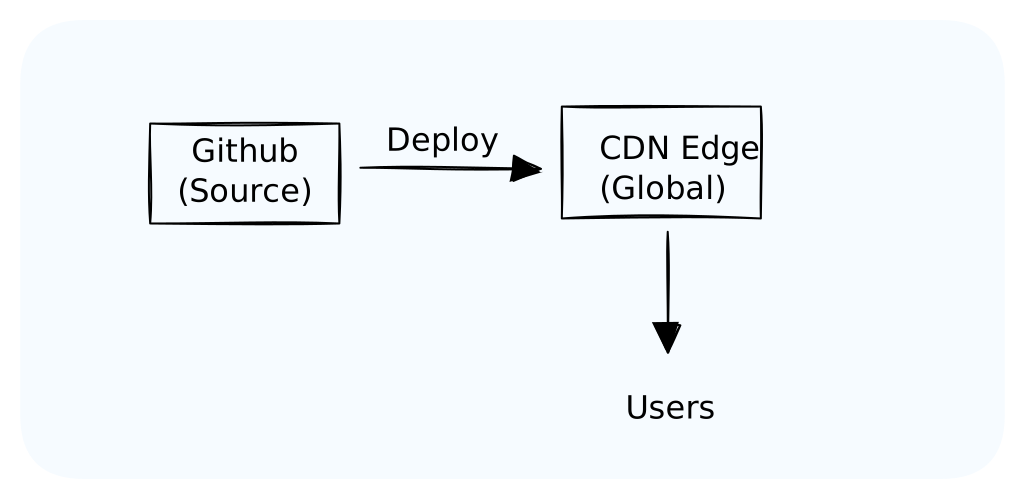
No origin server. The CDN IS the server. Sites like Gatsby, Next.js static export, Hugo.
Pattern 2: CDN in Front of Origin
Standard pattern. CDN caches what it can, forwards the rest.
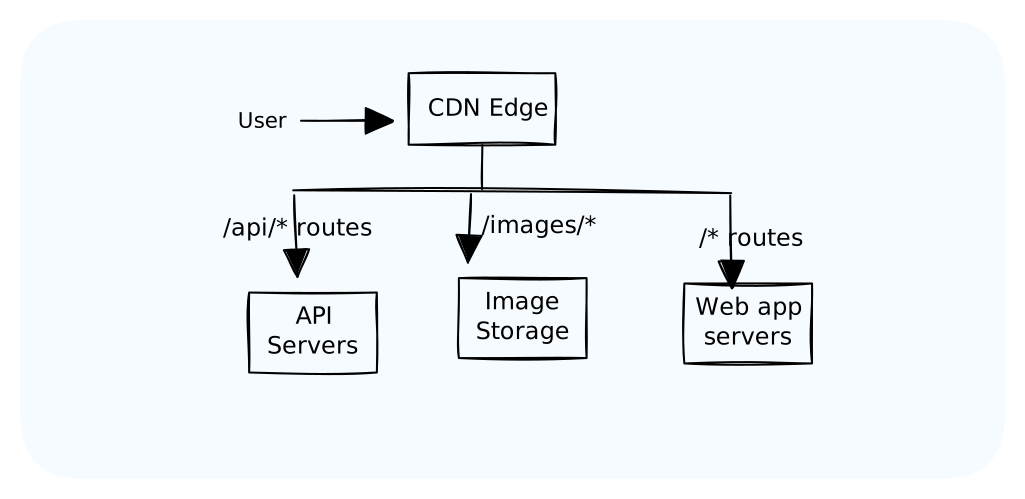
Pattern 3: Multi-Origin with Edge Routing
Edge decides which origin to use based on path, geography, or logic.
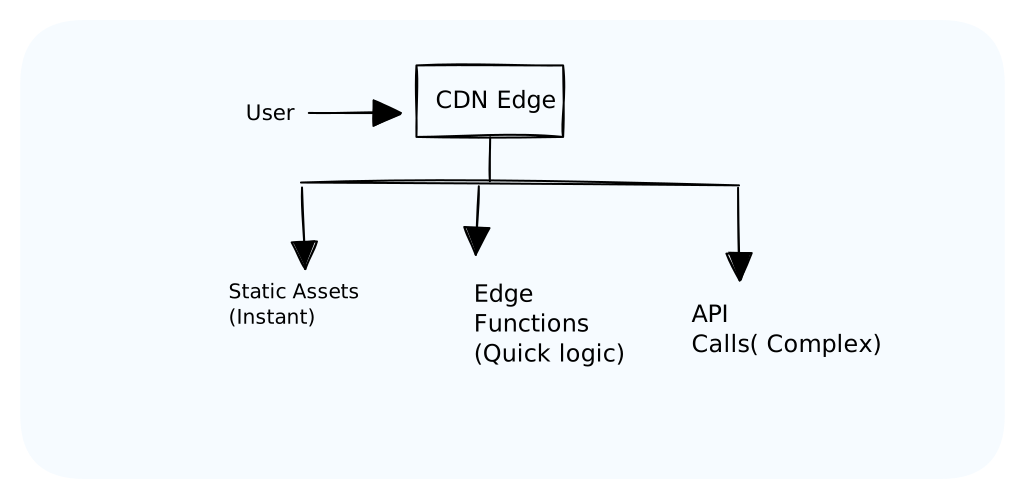
Pattern 4: Edge + Serverless
Edge handles what it can. Complex logic goes to serverless functions.
Choosing a CDN Provider
Key Factors
| Factor | Consider |
|---|---|
| Coverage | PoPs near your users? |
| Performance | Latency benchmarks |
| Features | Edge compute, image optimization, video |
| Pricing | Bandwidth costs, request costs |
| Integration | Works with your stack? |
| Support | Enterprise support available? |
Provider Comparison
| Provider | Strengths | Best For |
|---|---|---|
| Cloudflare | Edge compute, DDoS protection, free tier | General purpose, security-focused |
| AWS CloudFront | AWS integration, Lambda@Edge | AWS-native apps |
| Fastly | Real-time purging, edge compute | Dynamic content, media |
| Akamai | Largest network, enterprise features | Large enterprises |
| Vercel/Netlify | Developer experience, automatic deploys | JAMstack, Next.js |
Cost Considerations
CDN pricing is usually:
- Bandwidth: $/GB transferred
- Requests: $/10,000 requests
- Edge compute: $/million invocations + CPU time
Cost optimization tips:
- Compress content (gzip/brotli) to reduce bandwidth
- Use appropriate cache TTLs (fewer origin fetches)
- Optimize images (smaller files = less bandwidth)
- Consider reserved capacity for predictable traffic
Key Takeaways
CDNs reduce latency by serving content from servers near users. You can't beat the speed of light, but you can reduce the distance.
Cache what you can:
- Static assets (images, JS, CSS) → Cache for days/weeks
- Semi-dynamic (product pages) → Cache for minutes/hours
- Personalized content → Don't cache at CDN
Cache invalidation is hard. Use versioned filenames for immutable assets. Use TTLs and purge APIs for dynamic content.
Edge computing lets you run code at the edge. Great for quick transformations, routing, and authentication. Not for heavy computation.
Choose CDN based on:
- Geographic coverage for your users
- Features you need (edge compute, image optimization)
- Integration with your stack
- Cost for your traffic patterns
What's Next
You know how to deliver content globally. But what happens when things go wrong? Servers crash, networks fail, dependencies timeout.
Next up: Handling Failures — building systems that gracefully handle the inevitable. Timeouts, retries, circuit breakers, and graceful degradation.