Handling Failures
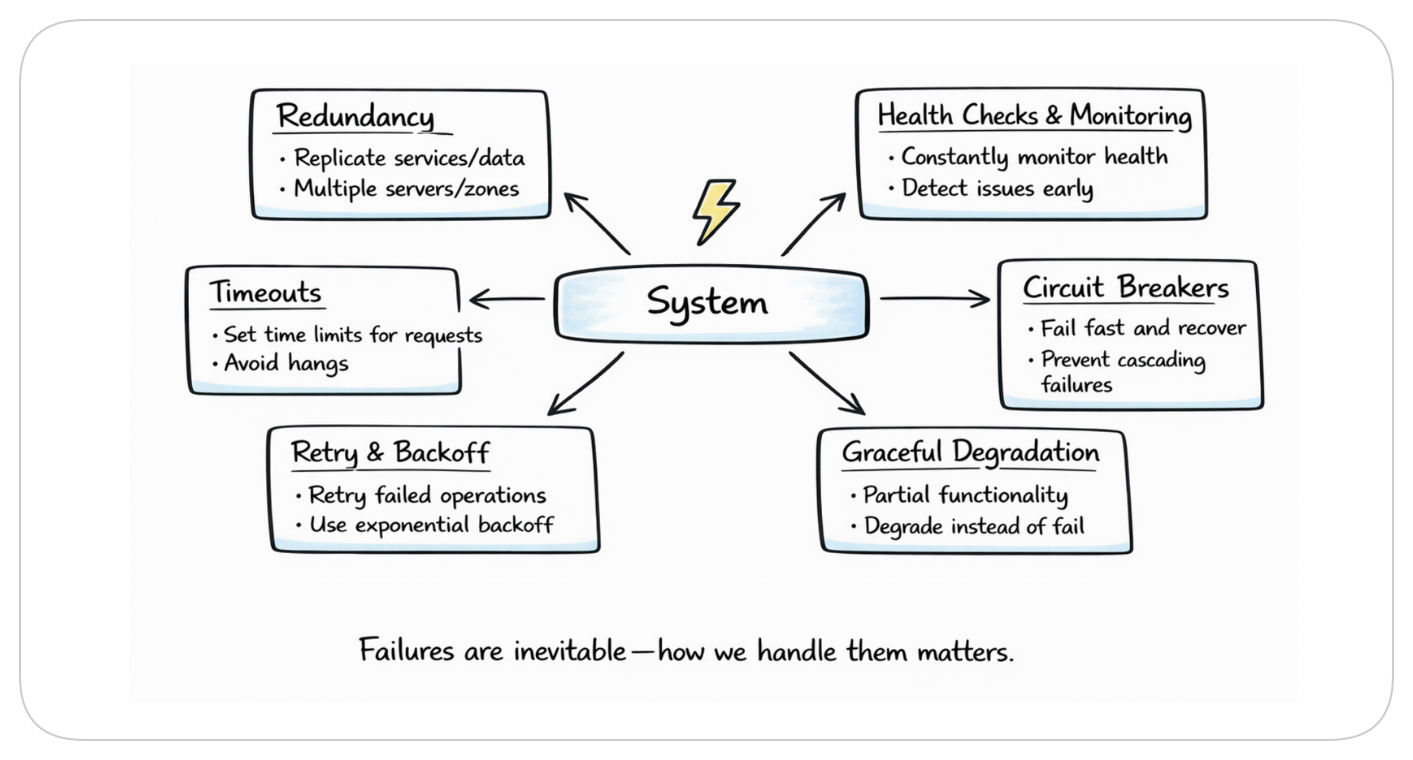
Your phone dies at 2% battery. It will be annoying, but you saw it coming.
Now imagine your phone dying randomly at 73%. No warning. Just black screen. That's what poorly designed systems feel like to users.
Everything you design will fail eventually. Servers will crash. There will be Network hiccups. Databases will timeout. The difference between a good system and a great system isn't whether failures happen. It's whether users notice when they do.
What You Will Learn
- Why failures are inevitable and how to plan for them
- Timeouts: the first line of defense
- Retries: when and how to try again
- Circuit breakers: knowing when to stop trying
- Graceful degradation: doing less instead of nothing
- Bulkheads: containing the blast radius
- How Netflix, Amazon, and others stay up when things break
The Restaurant Kitchen Analogy
Think about a busy restaurant kitchen.
If the grill breaks, you will cook on the stovetop. Slower, but food still comes out.
The dishwasher stops functioning? You will wash by hand. Slower, but plates are clean.
One cook calls in sick? Others cover their station. Slower, but orders still go out.
The kitchen doesn't shut down because one thing fails. It adapts. It degrades gracefully.
Your system should work the same way. Assume that your system will fail. Plan for it.
Timeouts: Don't Wait Forever
Here's a scenario. Your app calls a payment service. The payment service is having a bad day. It's not returning errors. It's just slow. Really slow.
Without a timeout, your app waits and waits. Users stare at a spinner. Your server is stuck holding that connection. More requests come in. They wait too. Soon you're out of resources, and your whole app is down.
All because you were too polite to hang up.
Set Timeouts on Everything
python# Bad: No timeout. Could wait forever. response = requests.get("https://payment-service/charge") # Good: Give up after 3 seconds response = requests.get("https://payment-service/charge", timeout=3)
How Long Should Timeouts Be?
Think about your user sitting there waiting for a response. Below are some reasonable timeouts for different operations.
| Operation | Reasonable timeout |
|---|---|
| Database query | 1-5 seconds |
| Internal service call | 1-3 seconds |
| External API call | 5-10 seconds |
| File upload | 30-60 seconds |
If the payment service doesn't respond in 3 seconds, it's probably not going to. Better to fail fast and let the user try again than leave them hanging for 30 seconds.
The Cascade Problem
Service A calls Service B calls Service C.
If C takes 10 seconds to timeout, B waits 10 seconds, A waits 10+ seconds.
Your user? Waiting 10+ seconds for an error.
Set timeouts at each layer. Make downstream timeouts shorter than upstream ones.
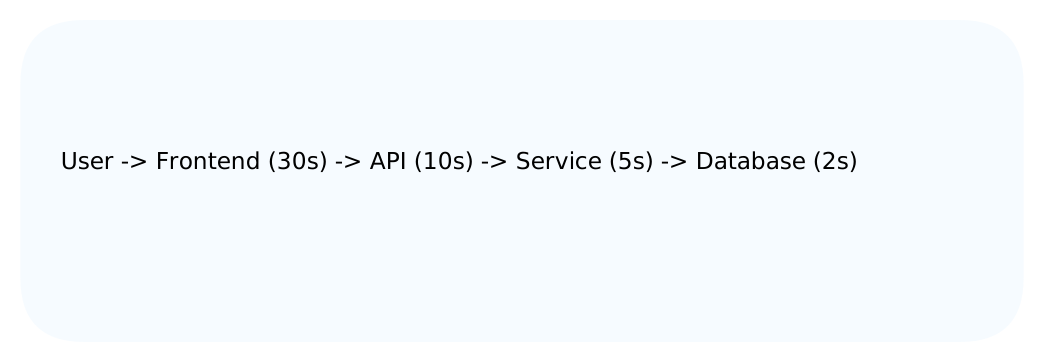
If the database is slow, it fails in 2 seconds. The service fails in 5. The API in 10. The user sees an error in ~10 seconds, not infinity.
Retries: Try Again, But Smartly
Sometimes failures are temporary maybe the network glitched for a split second, or the server was briefly overloaded. In cases like these, trying again might actually work.
The catch? Retrying the wrong way is worse than not retrying at all.
The Thundering Herd
Your database hiccups for 1 second. 1,000 requests fail. All 1,000 retry immediately. The database, already struggling, gets hammered with 1,000 simultaneous requests.
It fails again. All 1,000 retry again. And again. You've turned a 1-second glitch into a 10-minute outage.
Exponential Backoff
Don't retry immediately. Wait, then try again. If it fails, wait longer.
pythondef retry_with_backoff(operation, max_retries=3): for attempt in range(max_retries): try: return operation() except Exception as e: if attempt == max_retries - 1: raise e # Wait longer each time: 1s, 2s, 4s... wait_time = (2 ** attempt) time.sleep(wait_time)
First retry: wait 1 second. Second retry: wait 2 seconds. Third retry: wait 4 seconds.
This spreads out the load. Instead of 1,000 requests hitting at once, they trickle in over time.
Add Jitter
Even with backoff, if everyone waits exactly 1 second, they'll all retry at the same time.
Add randomness (jitter):
pythonwait_time = (2 ** attempt) + random.uniform(0, 1)
Now requests retry at 1.3s, 1.7s, 1.1s. Spread out, not synchronized.
Don't Retry Everything
Some errors aren't worth retrying:
| Error | Retry? | Reason |
|---|---|---|
| Connection timeout | Yes | might be temporary |
| 500 Internal Server Error | Maybe | could be transient |
| 503 Service Unavailable | Yes | server is overloaded |
| 400 Bad Request | No | your request is wrong |
| 401 Unauthorized | No | your credentials are wrong |
| 404 Not Found | No | the thing doesn't exist |
Retrying a 400 error is pointless. Your request was invalid. Sending it again won't help.
Circuit Breakers: Know When to Stop
Imagine calling a friend who never picks up. You call, wait, voicemail. Call again, wait, voicemail. Eventually you stop calling.
That's a circuit breaker.
How It Works
The circuit breaker tracks failures. When too many happen, it opens it stops sending requests entirely.
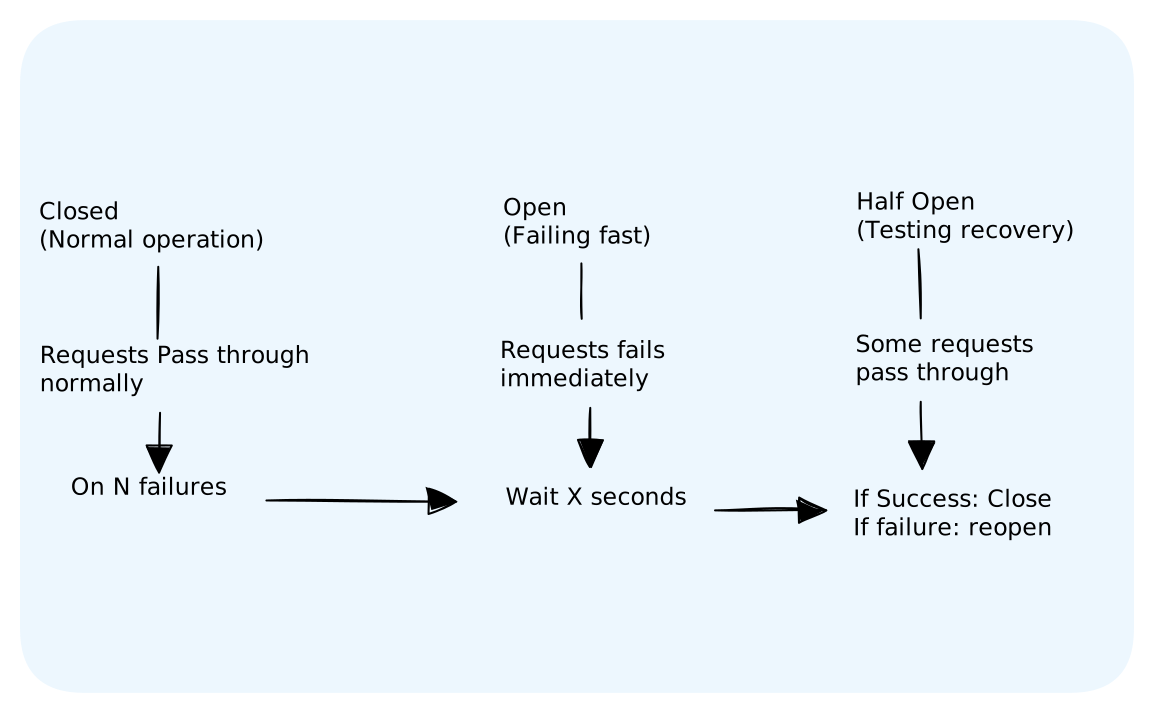
Closed: Everything's fine. Requests go through. Track failures.
Open: Too many failures. Stop trying. Fail immediately. Wait for cooldown.
Half-Open: Cooldown over. Let a few requests through to test. If they succeed, close the circuit. If they fail, open it again.
Example
pythonclass CircuitBreaker: def __init__(self, failure_threshold=5, reset_timeout=30): self.failure_count = 0 self.failure_threshold = failure_threshold self.reset_timeout = reset_timeout self.state = "CLOSED" self.last_failure_time = None def call(self, operation): if self.state == "OPEN": if time.time() - self.last_failure_time > self.reset_timeout: self.state = "HALF_OPEN" else: raise Exception("Circuit breaker is open") try: result = operation() if self.state == "HALF_OPEN": self.state = "CLOSED" self.failure_count = 0 return result except Exception as e: self.failure_count += 1 self.last_failure_time = time.time() if self.failure_count >= self.failure_threshold: self.state = "OPEN" raise e
Why This Matters
Without a circuit breaker, you keep hammering a dead service. Your threads are blocked waiting for timeouts. Your users wait too.
With a circuit breaker, you fail instantly. Your app stays responsive. The struggling service gets breathing room to recover.
Netflix's Hystrix library popularized this pattern. Now it's standard in most microservice frameworks.
Graceful Degradation: Do Less, Not Nothing
Here's the key insight: users would rather get something than nothing.
Examples
Netflix: Recommendations service is down? Show popular titles instead. Not personalized, but not a blank screen.
Amazon: Review service is slow? Show the product page without reviews. Users can still buy.
Twitter: Timeline service struggling? Show cached tweets from 5 minutes ago. Slightly stale, but functional.
Uber: Surge pricing service down? Charge normal rates. You lose money, but rides happen.
Implementation
pythondef get_product_page(product_id): product = get_product(product_id) # Must work # Non-critical features: catch and continue try: reviews = get_reviews(product_id) except Exception: reviews = [] # Empty is better than broken try: recommendations = get_recommendations(product_id) except Exception: recommendations = get_popular_products() # Fallback try: inventory = get_real_time_inventory(product_id) except Exception: inventory = {"status": "check_in_checkout"} # Deferred check return render_page(product, reviews, recommendations, inventory)
The product page works even if reviews, recommendations, or inventory checks fail. Users see something useful instead of an error page.
Identify Critical vs Non-Critical
Ask yourself: if this feature fails, should the whole page fail?
| Feature | Critical? | Fallback |
|---|---|---|
| Product details/Price | Yes | None then show error |
| Reviews | No | Show Reviews loading... |
| Recommendations | No | Show popular items |
| Inventory count | Maybe | Check availability at checkout |
Be ruthless. Most features aren't critical.
Bulkheads: Contain the Damage
On a ship, bulkheads are walls between compartments. If one compartment floods, the others stay dry. The ship doesn't sink.
Same idea in software.
The Problem
All your requests share one connection pool to the database.
Feature A has a bug that leaks connections. It uses all 100. Now Features B and C can't connect. One bad feature takes down everything.
The Solution
Give each feature its own pool:
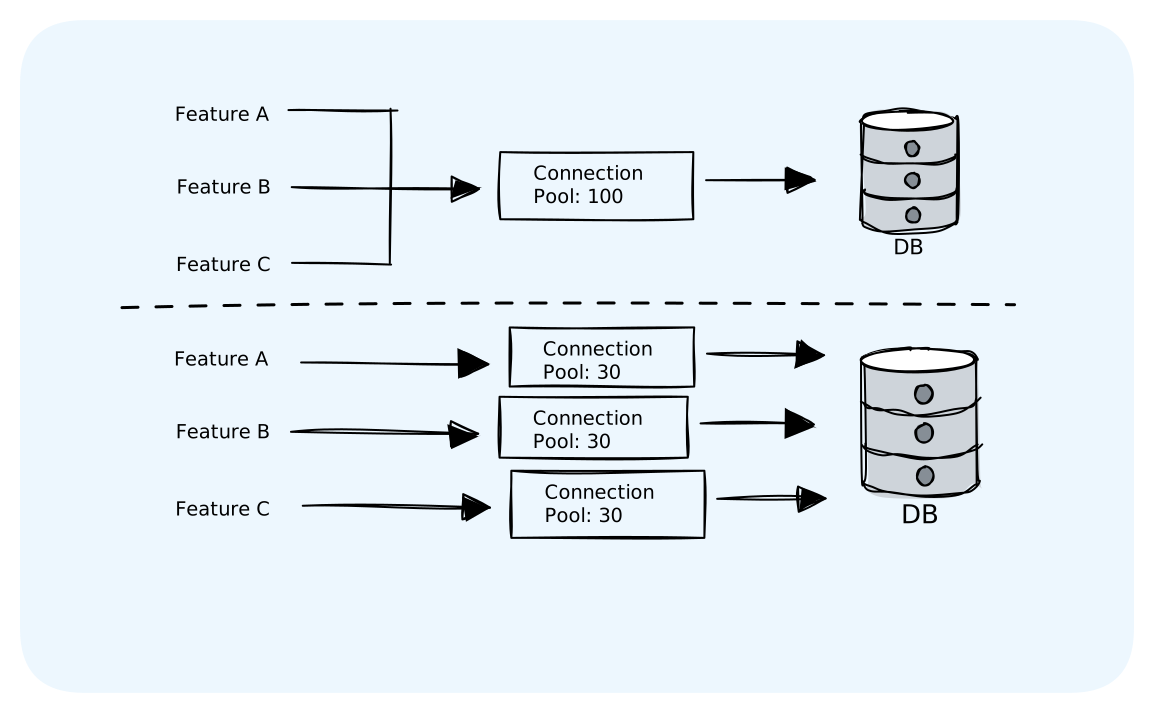
Feature A can only leak its 30 connections. Features B and C keep working.
Thread Pool Isolation
Same concept with threads:
python# Bad: All operations share threads executor = ThreadPoolExecutor(max_workers=100) # Good: Separate pools for different operations payment_executor = ThreadPoolExecutor(max_workers=30) notification_executor = ThreadPoolExecutor(max_workers=20) analytics_executor = ThreadPoolExecutor(max_workers=50)
If analytics goes crazy, it can only exhaust its 50 threads. Payments keep processing.
Failover: When All Else Fails
Sometimes a server just dies. You need another one to take over.
Active-Passive
One server handles traffic. Another sits idle, ready to take over.
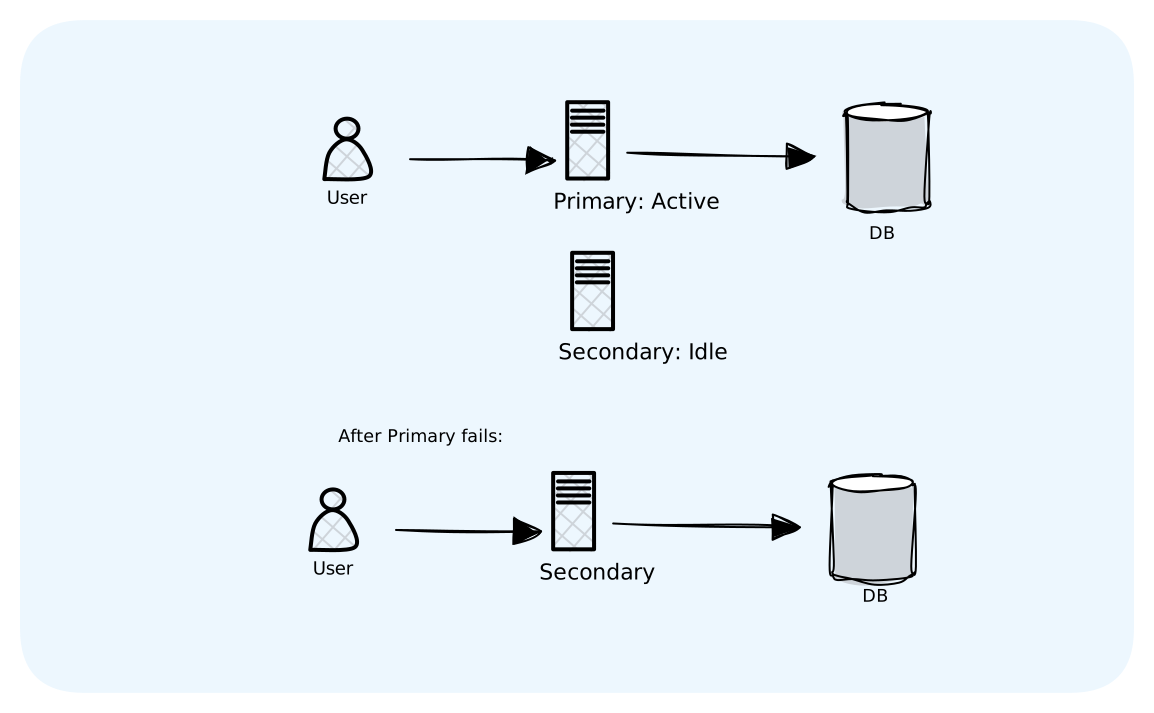
Simple. But wasteful — you're paying for a server that does nothing most of the time.
Active-Active
Both servers handle traffic. If one dies, the other handles everything.
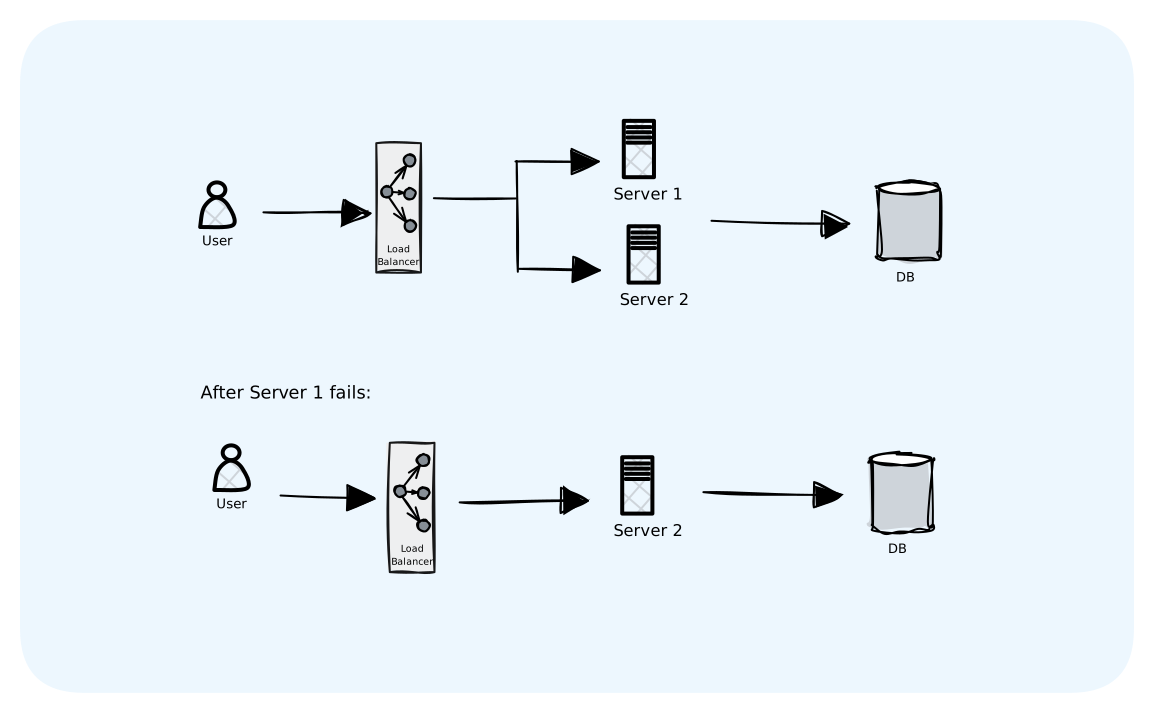
Better resource usage. But more complex — both servers need access to the same data.
Database Failover
Your database is a single point of failure. To fix this:
Primary-Replica: Primary handles writes. Replicas handle reads. If primary dies, promote a replica.
Most managed databases (AWS RDS, Cloud SQL) do this automatically.
Real-World Example: How Netflix Stays Up
Netflix serves 200+ million users. Things fail constantly. Here's how they stay up:
1. Chaos Monkey: They intentionally kill servers in production to make sure the system handles it.
2. Circuit Breakers (Hystrix): Every service call is wrapped in a circuit breaker. If recommendations fail, show popular titles.
3. Bulkheads: Each service has isolated thread pools. One bad service can't take down others.
4. Graceful Degradation: The app has fallbacks for everything. Homepage without personalization. Video without subtitles. Playback without 4K.
5. Regional Failover: If an entire AWS region goes down, traffic shifts to another region within minutes.
They don't prevent failures. They expect them and build systems that survive them.
The Checklist
Before you ship, verify:
Timeouts:
- Every external call has a timeout
- Timeouts are shorter downstream than upstream
- Users see errors in reasonable time, not minutes
Retries:
- Retries use exponential backoff
- Retries include jitter
- Only retriable errors are retried
- Max retry count is limited
Circuit Breakers:
- Critical dependencies have circuit breakers
- Fallbacks exist for when circuits open
Degradation:
- Critical vs non-critical features are identified
- Non-critical features have fallbacks
- The core user journey works even when things fail
Failover:
- Single points of failure are eliminated
- Database has replicas
- Failover is tested regularly
The Bottom Line
Failures are inevitable. Your job is to make them invisible.
Timeouts prevent waiting forever.
Retries with backoff handle temporary glitches without making things worse.
Circuit breakers know when to stop trying.
Graceful degradation means doing less instead of nothing.
Bulkheads contain damage to one area.
Failover ensures no single point of failure.
The best systems aren't the ones that never fail. They're the ones where users don't notice when they do.
What's Next
You've built systems that handle failures. But how do you know something failed in the first place? How do you see inside your running system?
That's Monitoring and Observability — the eyes and ears of your infrastructure.