Monitoring and Observability
Many Engineers have woken up at 2 AM more times than they would like to admit. Phone buzzes with pagerduty notifications, you check your slack and someone already posted that some users are complaining that checkouts are broken. You check multiple channels and see more reports. Okay, this is probably real.
What happens next depends entirely on your observability setup. Without it, you're SSHing into servers, grepping through log files and guessing. With it, you pull up Grafana, see the error spike started at 1:47 AM (right after that deploy you forgot about), and roll back to last stable build. Ten minutes, back to sleep.
I've seen both scenarios play out. The difference between a 10 minute incident and a 2 hour one usually comes down to whether you can actually see what's happening inside your systems.
What You Will Learn
- Difference between monitoring and observability (and why they’re not the same)
- The four pillars of observability:
- Metrics
- Logs
- Traces
- Profiling
- What you should actually measure in a real system
- How to set up alerts without overwhelming your team
- How to investigate issues when things go wrong
- Overview of the tooling most teams use in production
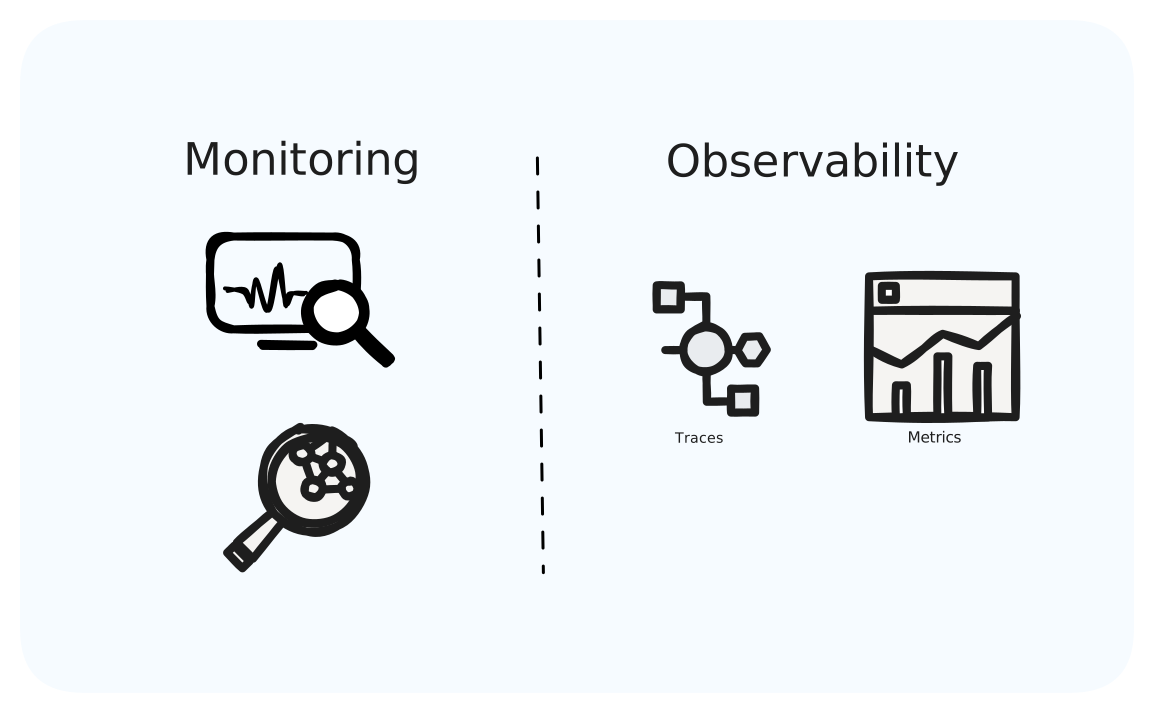
Monitoring vs Observability
People use these interchangeably but they are not the same.
Monitoring is about the failure modes you anticipated. You decide what healthy means like CPU stays under 80%, latency under 500ms, errors under 1% and get paged when those thresholds break. It answers a simple question: is the thing working or not?
Observability is what you need when monitoring says something's broken but doesn't tell you what. Your error rate spiked. Great, thanks. But is it one endpoint or all of them? One user or everyone? One region or global? If you can't slice the data to answer those questions, you don't have observability, you just have useless dashboards.
The difference matters at 2 AM. Monitoring wakes you up. Observability is what gets you back to bed.
The Four Pillars
1. Metrics: Numbers Over Time
Metrics are just numbers collected at regular intervals. CPU usage every 15 seconds. Request count every minute. Error rate, latency percentiles, queue depth are all time-series data.
You'll end up tracking infrastructure stuff (CPU, memory, disk, network, container restarts), application stuff (request rate, error rate, p50/p95/p99 latency, cache hit rates, connection pool usage) and business stuff (checkouts per minute, signups, payment failures).
The trade-off with metrics is aggregation. You lose the details of individual requests, but you can store months of data and query it fast. That's how you answer what was our p99 latency on Tuesday afternoons over the last quarter? A question that would be painful to answer with logs alone.
plaintext# Prometheus-style metrics http_requests_total{method="GET", status="200"} 145232 http_requests_total{method="POST", status="500"} 12 http_request_duration_seconds{quantile="0.99"} 0.23
2. Logs: Events That Happened
Logs give you the details that metrics throw away. When a specific request fails, the log tells you which user, which order, what error code and how long it took.
json{ "timestamp": "2024-03-15T10:23:45.123Z", "level": "ERROR", "service": "payment-service", "trace_id": "abc123xyz", "user_id": "user_123", "order_id": "order_456", "message": "Payment processing failed", "error_code": "card_declined", "stripe_request_id": "req_xyz789", "latency_ms": 234 }
Structured logging (JSON with consistent fields) is what makes logs actually useful. You can query how many errors for user_123 or find all card_declined with latency > 200ms. Unstructured logs like ERROR: Something went wrong variety are basically useless. You can't filter them, can't aggregate them, can't correlate them with anything.
3. Traces: The Journey of a Request
Once you have microservices, a single checkout might touch auth, inventory, payments, notifications and maybe ten services in total. When it's slow, which one's the problem?
Traces show you:
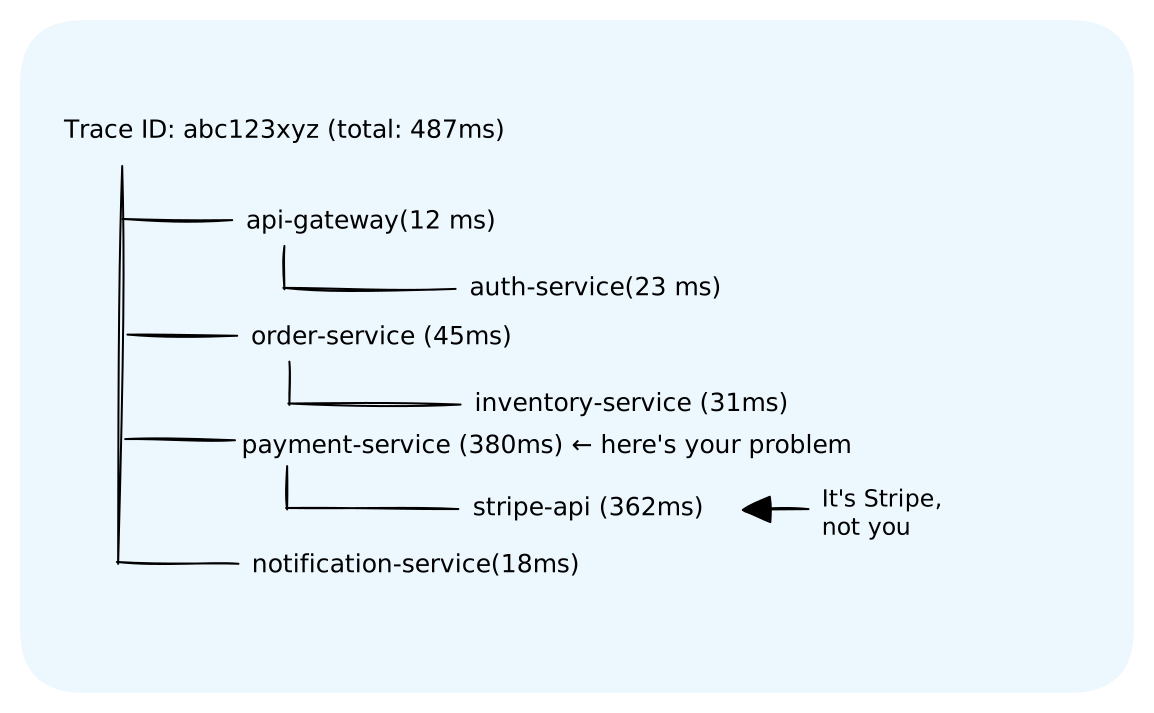
Without this, you'd be guessing. With it, you immediately know Stripe is slow, your code is fine, and the fix is either adding a timeout or waiting for Stripe to sort themselves out.
The trace_id should show up in your logs too. That's how you connect the pillars. See an error in metrics, find the trace, pull the logs for that trace_id.
4. Profiling: What's Happening Inside Your Code
This is the fourth pillar that's gaining traction. Continuous profiling shows you CPU usage, memory allocation, and lock contention at the function level not just this service is slow but this specific function is burning 40% of CPU.
Tools like Datadog's continuous profiler attach to your running services and sample what functions are executing. When your p99 latency spikes, profiling can tell you exactly which code path is responsible.
We won't go deep on profiling in this lesson as metrics, logs, and traces cover 90% of debugging scenarios. But it's worth knowing profiling exists for those performance mysteries where traces show where things are slow but not why.
What to Measure
The Four Golden Signals
Google's SRE book nailed this. These are the four things that actually matter:
Latency. Not averages but percentiles. If 99 requests take 50ms and 1 takes 10 seconds, your average looks fine at 150ms. But that one slow request? That's someone's terrible experience. Track p50, p95, p99. The p99 catches your power users, the ones hitting edge cases and complex queries. When p99 degrades, your best customers notice first.
Traffic. Requests per second, broken down however makes sense (by endpoint, by customer tier, whatever). This gives context to everything else. Latency up during a traffic spike is different from latency up at normal load. And a sudden traffic drop can be just as alarming. Is your load balancer dead? DNS broken?
Errors. Track the percentage failing, but broken down by type. 1% errors but it tells you nothing but Payment service returning 503s at 2%, timeouts at 0.5%. Now you can investigate.
Saturation. How close you are to running out of something. CPU, memory, connections, disk. This is the leading indicator. By the time latency spikes or errors climb, saturation was probably creeping up for a while. When your connection pool hits 90%, you're one traffic bump from exhaustion.
RED and USE
There are two mental models that help you not miss things.
RED is for services: Rate, Errors, Duration. Apply it at every service boundary.
USE is for resources: Utilization, Saturation, Errors. Apply it to infrastructure like CPU, memory, disk, connection pools.
Most teams end up with RED on the application layer, USE on the infrastructure layer, and the Four Golden Signals as the executive summary.
Setting Up Alerts
Alerting is where most teams screw up. Alert on too little and you miss outages. Alert on too much and your on-call engineers burn out, start ignoring pages, and miss the real outages anyway.
The Usual Mistake
New teams alert on everything. CPU above 70%? Alert. Memory above 80%? Alert. Any error at all? Alert. You end up with hundreds of alerts per week, most of them noise. Engineers learn to click acknowledge without looking. Then a real incident happens and it gets buried.
Alert on Symptoms
Alert when users are affected, not when internal metrics look concerning.
Database CPU at 90%? Maybe that's fine if it's running a batch job, users don't notice. Or maybe it's struggling at 70% because queries are backed up. The CPU number doesn't tell you. What tells you is whether response times are degraded. Alert on the p99 latency breaching 500ms, not the CPU percentage.
Alert Fatigue Will Kill You
If your on-call gets more than a handful of real alerts per shift, something's broken. Every alert should pass one test: would you wake someone up at 3 AM for this? No? Then it shouldn't page.
Some rules that help: if an alert fires and you take no action, fix it or delete it. If the same alert fires daily and nobody investigates, it's noise. Review your alerts monthly and be aggressive about pruning. Track how many alerts actually correlate with incidents. If most don't, you're alerting on the wrong things.
Severity Levels
Critical means page someone at 3 AM. Warning means look at it during business hours. Info means check it when you're bored.
Be ruthless about what counts as critical. If everything's critical, nothing is.
Building Dashboards
Dashboards need to do two things: tell you if everything's okay right now, and help you investigate when it's not.
What Every Service Dashboard Needs
Traffic (requests per second, maybe broken down by endpoint). Errors (rate and breakdown by type). Latency (p50, p95, p99 on the same graph). Saturation (CPU, memory, connection pools). Dependencies (how are the things you call doing?).
When someone gets paged, they should pull up the dashboard and understand the situation in 30 seconds or less.
Dashboard Mistakes I See Constantly
Too many panels. Forty graphs on one screen means you can see nothing. Keep it to 8-12. Make drill-down dashboards for the deep dives.
No context. 2,500 requests per second - is that good? Bad? Normal? Show a week-over-week comparison or a baseline band.
Averages. Average latency graphs hide everything interesting. Use percentiles.
Stale time windows. The default 1-hour view is useless when you're investigating something from yesterday. Make the time range obvious and easy to change.
Investigating Problems
You've been paged. Something's broken. Clock's ticking.
First Two Minutes: Triage
Is this real? Check your error dashboard. One user complaining could be their problem. 5% error spike is definitely your problem.
How bad is it? One endpoint or all of them? One region or global? Everyone or just enterprise customers? This tells you how hard to panic.
What changed recently? Open your deployment history. Seriously, do this first. Something like 80% of incidents happen after a change like deploy, config update, feature flag flip or database migration.
Next Ten Minutes: Dig In
If something deployed in the last hour, that's your prime suspect. Check if the timing matches the error spike. Look at the diff. Consider rolling back just to see if it fixes the problem.
If you have tracing, grab a trace ID from an error log and walk through it. Where does it fail? Compare to a successful request. The difference usually points at the problem.
Check your dependencies. Is Postgres healthy? Redis? That third-party API you call? Upstream problems cause downstream symptoms.
Look at saturation. Connection pool exhaustion, memory pressure, CPU throttling — these look like application bugs but they're resource problems.
The Usual Suspects
Bad deploys. Traffic spikes. Upstream dependencies having a bad day. Resource exhaustion. Expired certificates (this one's embarrassing but common). DNS issues. Slow database queries. Memory leaks that only show up under load.
Finding the Cause
Overlay your graphs like error rate, latency, traffic, CPU, deployment markers, all on the same time axis. When you see errors spike right after a deployment marker, you have a hypothesis. Test it: does rolling back fix it?
Tools of the Trade
The ecosystem's pretty consolidated at this point.
Metrics: Prometheus + Grafana
This is the open-source standard. Prometheus scrapes your services every 15 seconds, stores the data in its time-series database, and gives you PromQL for queries. Grafana sits on top for dashboards and alerting.
yaml# prometheus.yml scrape_configs: - job_name: 'api-service' static_configs: - targets: ['api-service:8080'] scrape_interval: 15s
Works great up to a few hundred services. After that you start looking at Thanos or Cortex for federation across clusters.
Logs: ELK
ELK (Elasticsearch, Logstash, Kibana) is powerful but running Elasticsearch is a part-time job. Most teams either use managed Elasticsearch (OpenSearch, Elastic Cloud), pay for a logging SaaS (Datadog, Splunk), or use their cloud provider's logging (CloudWatch, Google Cloud Logging).
Just make sure you're logging structured JSON. Everything else flows from that.
Traces: OpenTelemetry
OpenTelemetry won. It's the standard instrumentation library now, replacing all the vendor-specific SDKs. Instrument once, export to whatever backend you want.
pythonfrom opentelemetry import trace tracer = trace.get_tracer(__name__) def process_order(order_id): with tracer.start_as_current_span("process_order") as span: span.set_attribute("order.id", order_id) validate_order(order_id) charge_payment(order_id)
All-in-One: Datadog et al.
Datadog, New Relic, Dynatrace bundle metrics, logs, traces, APM together. Expensive (Datadog bills at scale can hit $50k+/month) but you don't have to run anything yourself. Most teams start with open source and migrate when the operational overhead of self-hosting starts to hurt.
What Real Companies Do
Netflix built their own everything because off-the-shelf tooling couldn't handle billions of time series. Atlas for metrics, Mantis for real-time processing, Edgar for traces. Their engineering blog goes deep on all of it. You probably don't need to do what Netflix does.
Uber built Jaeger because they had hundreds of services and no way to debug requests that touched a dozen of them. They also built M3 when Prometheus couldn't keep up. Then they open-sourced both, which is why you have Jaeger today.
Google wrote the original Dapper paper that Jaeger and Zipkin are based on. Their SRE book defined a lot of the vocabulary we use like SLIs, SLOs, error budgets. Worth reading.
Stripe has written good stuff about observability at a more normal scale. Their blog posts on structured logging and incident response are practical.
Most companies don't need custom tooling. Prometheus and Grafana, structured logging to whatever backend you want, OpenTelemetry for traces. Scale your tooling when you actually hit scaling problems, not when you imagine you might.
The Bottom Line
Observability isn't about collecting data. It's about being able to answer questions when things break.
Metrics tell you the system is sick. Logs tell you what happened to specific requests. Traces show you where things went wrong across services. You need all three, and they need to connect the trace_id in your logs should match your traces, so you can go from errors are up to here's the exact failing request to here's where it failed.
On alerting: if you're ignoring alerts or clicking acknowledge without investigating, you have a signal-to-noise problem. Fix it before it burns out your team and masks a real incident.
On incidents: start with what changed. Deployments cause most of them. When in doubt, roll back first and figure out what went wrong after things are stable.
Set this stuff up before you need it. Trying to add tracing during an outage is too late.
What's Next
You can see what's happening in your systems now, and you know how to handle failures. But what about people actively trying to break things? Attackers trying to steal data, take down services, exploit your APIs?
Next up is Security Basics.